Rating 4.7 out of 5 stars with 860 reviews
4.7- Ease of use (265)
- Compatibility (131)
- Price (62)
- VGA (58)
- Performance (38)
- Cable Length (3)
Customer Images
The vast majority of our reviews come from verified purchases. Reviews from customers may include My Best Buy members, employees, and Tech Insider Network members (as tagged). Select reviewers may receive discounted products, promotional considerations or entries into drawings for honest, helpful reviews.
- Rated 5 out of 5 stars
This One Really Works!
If you talk to computer technicians, they will often tell you that USB to VGA adapters do not work. They will say that they place too much stress on your graphics card, etc. But I'm very happy to say that the Insignia adapter really works beautifully. From the minute I plugged it in to my old laptop, my big flat screen monitor lit up and it's been perfect ever since. I couldn't be happier.
Posted by ROLVAAG
- Rated 5 out of 5 stars
Covid19
It’s been an expensive covid 19 for the electronics in my house hold this little Device saved me from going out and buying a hole new lap top.. if only the cracked iPad screen was as easy of a fix!
Posted by dbc1971
- Rated 5 out of 5 stars
Aditional Montor Needed
I have expanded my computer up to 4 monitors. Takes a little tweaking to configure all four, and it works.
Posted by ITDennis
- Rated 3 out of 5 stars
Insignia USB to VGA Adapter
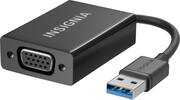
Compatible with Windows and Mac OS X:Allows you to connect your computer to VGA-compatible displays and monitors. Works with Windows 10, 8.1, 8, 7 and Mac OSX 10.6+ operation systems. Supports Full HD resolution up to 2048 x 1152:Extend or mirror your display. High-speed USB 3.0 interface:Works with both USB 3.0 and legacy USB ports for effortless connectivity. Easy to install:Adds a VGA port to your computer. Drivers are available online for simple setup and connectivity.
Posted by Ryan
- Rated 4 out of 5 stars
It was exactly what I needed!
I was hooking up a second monitor to my home computer. There was an HDMI port on the back of the computer, so I thought it would be easy. Hah! After failure and subsequent research, I discovered that this was only an HDMI port in. Why would you do that, HP? Anyway, got this adapter, hooked it up to a USB port on the computer, ran a VGA cable to the second monitor, installed the appropriate driver, and it worked great. Not exactly plug-and-play, but close enough.
Posted by SASL