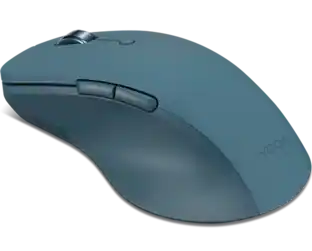
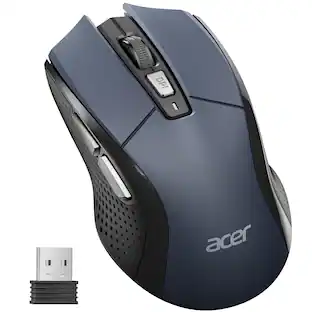
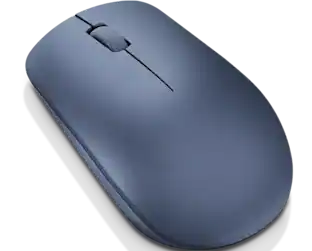
Kensington - MY430 Mouse - Optical - Wireless - Bluetooth - 2.40 GHz - Rechargeable - USB - 2400 dpi - 6 Button(s) - 5 - Wireless - Black
Reviews coming soon
About this product
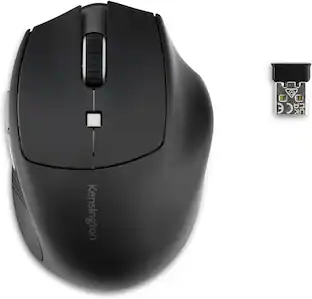
Kensington MY430 Mouse - Optical - Wireless - Bluetooth - 2.40 GHz - Rechargeable - USB - 2400 dpi - 6 Button(s) - 5 Programmable Button(s)
Features Multiple Connectivity Options
Connect up to three active devices-two via Bluetooth® Low Energy (LE) and one using the included 2.4GHz USB receiver. Includes built-in dongle storage. Windows, macOS, and Chrome OS compatible.
Sustainability Focused
Composed of 65% post-consumer recycled content (PCR), the plastic material used in this mouse is aimed at reducing our environmental impact.
Long-Lasting Rechargeable Battery
Provides up to 4 months of battery life on a single charge and includes USB-C® charging cable.
6 Buttons and Silent Left/Right Buttons
Left, right, forward, back, scroll/middle-click, and DPI buttons enhance navigation and productivity. Silent left/right buttons support a quiet work environment.
Customize with Free KensingtonWorks(tm) Software
Personalize MY430's 5-programmable buttons with free KensingtonWorks(tm) software to deliver enhanced productivity and convenience.
- Connection TypeWireless
Reviews
This product doesn't have any reviews yet.
Compare similar products

Kensington MY430 Mouse - Optical - Wireless - Bluetooth - 2.40 GHz - Rechargeable - USB - 2400 dpi - 6 Button(s) - 5 Programmable Button(s)
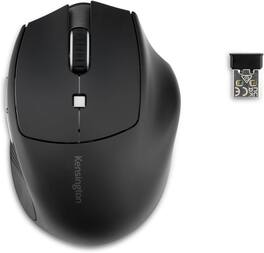
The Kensington Pro Fit Ergo MY435 EQ Rechargeable Wireless Mouse is a right-handed ergonomic pointing device shaped for small to average-size hands, aimed at office staff and hybrid workers who spend full days moving through documents, spreadsheets and video calls. The contoured shell arrives in a black finish and its outer case is molded from 40 percent post-consumer recycled plastic, part of the Kensington EQ line that emphasizes lower-impact materials while keeping the sculpted profile that supports the palm and holds the wrist relaxed. Quiet-click left and right buttons are the standout detail, muting the sharp snap of a conventional switch so shared offices, libraries and open-plan benches stay calm during heavy clicking sessions. Up to 6 buttons can be reassigned through the free Kensington Konnect software, letting a person map copy, paste, browser navigation, media control or application-specific macros straight to the mouse. Connectivity covers 2.4GHz wireless through the bundled USB-A nano receiver plus two independent Bluetooth 5.0 channels, so a laptop, a desktop and a tablet can stay paired at the same time and swap with a single press. A 500mAh internal battery recharges over the included USB-C cable and supports up to 6 months of operation on a full charge, keeping the mouse ready during travel and between hot-desking shifts. LED indicators confirm the active channel and the cursor speed setting at a glance, textured side panels improve grip, and the complete package is backed by a 3-year limited warranty.
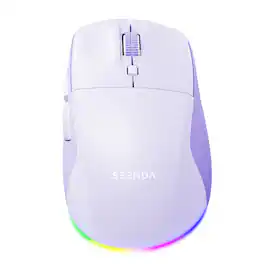
2.4G USB & Bluetooth, Silent, 3-Level DPI, Right-Hand Ergonomic Mouse for Laptop, iPad, MacBook, Desktop Work & Casual Gaming
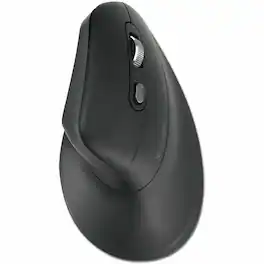
Kensington Pro Fit Ergo MY630 EQ Rechargeable Mouse - Full-size Mouse - Optical - Wireless - Bluetooth/Radio Frequency - 2.40 GHz - Rechargeable - 2400 dpi - Scroll Wheel - 5 Programmable Button(s) - Large Hand/Palm Size - Right-handed - 4 Month Battery Run Time
Specs
Be the first to ask a question.
We’ll try to get your question answered within 24 hours by a Best Buy customer or brand representative.
Customers often buy these together
Computer Keyboards

![esc ~ ! 1 tab caps lock shift ctrl F2 Fl # 2 3 Q W A S Z start opt L F3 $ 4 E D X alt cmd3 ) FS F4 A % 5 6 R T F G V C logi 44 HI & F9 FID FB F7 F6 * ) - - & 0 8 9 7 O P U I Y K L H J > < N M 1 B PM + = { [ : I ; ? I alt cmd D 2 4 300 3 1 F12 . * page I insert home up clear backspace 8 9 + 7 page A pg up end down home } I delete ] / 6 4 5 4 enter 2 3 enter 1 dn Pg end shift = 0 del ins etrl fn opt](https://pisces.bbystatic.com/image2/BestBuy_US/images/products/6539/6539505_sd.jpg;maxHeight=232;maxWidth=233?format=webp)
![Esc F1 F2 F3 F4 F5 F6 F7 F8 F9 F10 F11 F12 Print Screen Scroll Lock Pause Break 1 2 3 4 5 6 7 8 9 0 - + = Backspace Insert Home H Page Up A Num Look 1 I Tab Q W E R T Y U I o P { [ } ] I I Delete End IN Page Down 7 Home 8 9 Pg Up Caps A Lock A S D F G H J K L ; : DE g Enter 4 5 6 Shift Z X C V N M < > ? I Shift 1 End 2 3 Pp Dn Enter Ctrl Alt Alt Ctrl 0 Ins Del](https://pisces.bbystatic.com/image2/BestBuy_US/images/products/a588d446-5678-40ae-86b8-1f15e0026e66.jpg;maxHeight=232;maxWidth=233?format=webp)





![The text on the image reads:
888 DD DI DD 4 DSC i F2 F3 4 FS T6 ET 1. 1N IN F.. 11 1.. 114 1n F1 F12 118 in9 - a ee 1 8F 2 3 $ 4 % 5 A 6 & 7 . 8 I 9 I 0 ee I + = delete fn home page up clear - / + tab Q W E R T Y U I 0 P { [ ] ] | I delete end page down 7 8 9 ee caps lock A S D F G H J K L : I - return 4 5 6 + shift Z X C V N M < F > ? / shift a 1 2 3 control option 2 command 3 command option control Y - 0 enter
After grouping and correcting the text, it reads:
888 DD DI DD 4 DSC i F2 F3 4 FS T6 ET 1. 1N IN F.. 11 1.. 114 1n F1 F12 118 in9 - a ee 1 8F 2 3 $ 4 % 5 A 6 & 7 . 8 I 9 I 0 ee I + = delete fn home page up clear - / + tab Q W E R T Y U I 0 P { [ ] ] | I delete end page down 7 8 9 ee caps lock A S D F G H J K L : I - return 4 5 6 + shift Z X C V N M < F > ? / shift a 1 2 3 control option 2 command 3 command option control Y - 0 enter](https://pisces.bbystatic.com/image2/BestBuy_US/images/products/f4059d3a-0c2a-46ef-bcfd-4e11b9b26d5d.jpg;maxHeight=232;maxWidth=233?format=webp)





More to consider
 $33.99The price was $39.99
 Top Deal$89.99The price was $99.99


Explore tech essentials Sponsored
 $59.99The price was $99.99


Keep exploring
 $79.95The price was $119.95