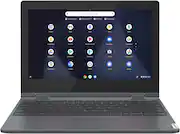
Fast, flexible, and fun, the Lenovo™ IdeaPad™ Flex 3 Chromebook 11" brings everyone’s favorite Chromebook features, housed in a slim 2-in-1 chassis, running on the lightning-fast Chrome OS that boots up in seconds, updates automatically, and is protected by built-in virus protection. Smaller than a piece of A4 paper, the IdeaPad Flex 3 Chromebook 11" features an Intel processor with up to 10 hours battery life. IdeaPad Flex 3 Chromebook 11" is your best companion from day to night.
Q: What is the ChromeOS Auto Update Ending date?
A: I bought this device and checked the AUE date in settings and it is actually June 2027. Five years out is excellent but it is NOT 2028.
A: This Lenovo Flex 3 11 Chromebook, model number 82BB000AUS, ships with a 64GB eMMC 5.1 solid state hard drive, soldered on the systemboard and is not upgradeable. The average size of digital images shot in 12MP resolution works out to about 5.2MB. Using that figure, 64GB of storage space will be able to hold about 12,600 JPEG images. So depending on how many photos you have, you can estimate how much of the available hard drive space on this Lenovo Flex 3 11 Chromebook you will need to use. You should always leave approximately 20 Percent of the available hard drive space open. Some other things to consider: This Lenovo Flex 3 11 Chromebook also has a MicroSD Card Slot that can be used with a MicroSD Card to expand your total storage space. The MicroSD Card is sold separately, if you choose to use one. Finally, this Lenovo Flex 3 11 Chromebook uses the Chrome Operating System and is compatible with these formats of media/Image files: Media: .3gp, .avi, .mov, .mp4, .m4v, .m4a, .mp3, .mkv, .ogv, .ogm, .ogg, .oga, .webm, .wav. Images: .bmp, .gif, .jpg, .jpeg, .png, .webp.
A: No. This Lenovo Flex 3 11 Chromebook, model number 82BB000AUS, ships with these ports: 2x USB 3.2 Gen 1, 2x USB-C 3.2 Gen 1 (support data transfer, Power Delivery, and DisplayPort 1.1a) with video out, 1x Card reader, 1x Headphone / microphone combo jack (3.5mm) and supports up to 3 independent displays (native display and 2 external monitors via USB-C). USB-C supports up to 4096x2160@60Hz. You can connect an HDMI monitor to this Flex 3 11 Chromebook by using a USB-c to HDMI adapter, like this one: https://www.bestbuy.com/site/insignia-usb-c-to-hdmi-adapter-black/6473497.p?skuId=6473497
Q: How bright does the screen get? Is it IPS or TN?
A: This Lenovo Flex 3 11 Chromebook, model number 82BB000AUS, ships with a 11.6 inch (screen size measured diagonally) IPS - HD (1366x768) 10-point Multi-touch screen, with a brightness level of 250 nits, and has a Glossy Finish.
Q: What printer is this computer compatible with?
A: I hava a HP all in one Printer it works great
A: Yes you can has multiple slots
Q: Is Google chat compatible with this ?
A: Yes, and pretty much any google service you can think of from google sheets to google chat.
Q: Does this chromebook work with a stylus?
A: My daughter found one that says it will work on her’s and it wasn’t expensive but she is still using a regular pen with the stylus tip on it. If she tries the stylus like the iPad had i will respond again with the new info.