Rating 4.7 out of 5 stars with 816 reviews
4.7- Screen Size (317)
- Overall Performance (145)
- Price (58)
- Ease of use (42)
- Refresh Rate (40)
- Speakers (16)
- Stand (13)
- HDMI (7)
Customer Images
The vast majority of our reviews come from verified purchases. Reviews from customers may include My Best Buy members, employees, and Tech Insider Network members (as tagged). Select reviewers may receive discounted products, promotional considerations or entries into drawings for honest, helpful reviews.
- Rated 5 out of 5 stars
Incredible 100Hz Smoothness at Unbeatable Price!
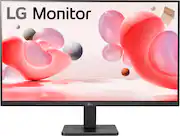
I added the LG 27" IPS FHD Monitor to my workspace, and it has been a fantastic value. For the price, it offers a sleek, modern look and reliable performance for both productivity and everyday use. I Liked: 1) 100Hz Refresh Rate: The jump from a standard 60Hz to 100Hz is surprisingly noticeable. Scrolling through documents and navigating the desktop feels significantly smoother and more responsive. 2) Vibrant IPS Panel: The colors are punchy and accurate. Since it’s an IPS display, the viewing angles are great—the image stays clear even if I’m not sitting perfectly centered at my desk. 3) 3-Side Borderless Design: The thin bezels on three sides give it a premium feel and make it perfect for a dual-monitor setup. It really helps maximize the screen real estate without taking up too much desk space. 4) Eye Care Features: As someone who spends hours reading and writing, I find the Reader Mode and Flicker Safe technology very helpful in reducing eye strain during long sessions. But, No Built-in Speakers: This model does not have internal speakers, so you will need a headset or external speakers for audio. Overall, this is a top-tier budget monitor. If you need a large, color-accurate, and smooth-performing display for your home office or general browsing, this LG model is a winner!
Posted by JSK0512
- Rated 5 out of 5 stars
Excellent Everyday Monitor with Smooth 100 Hz Perf
I’m very happy with this LG 27” monitor. The picture quality is bright, crisp, and consistent from any angle thanks to the IPS panel. The 3-side borderless design gives it a modern, clean look and makes it perfect for a dual-monitor setup. The 100 Hz refresh rate and AMD FreeSync make everything feel extra smooth — whether I’m browsing, working with spreadsheets, or doing some light gaming. Setup was quick and easy right out of the box, and the colors looked great without any major adjustments. The build quality feels solid, and LG’s on-screen control software makes it simple to adjust settings. For the price, it’s a fantastic value — big screen, smooth motion, and excellent clarity. Highly recommended for anyone looking for a reliable everyday or home office monitor!
Posted by SungK
- Rated 5 out of 5 stars
Great valued Monitor
I use this everyday from web searching to playing games on having multiple hdmis makes it easy to switch from console to PC with a button press. Have it mounted with other monitors works perfectly. Hertz are good no issue
Posted by MacBook
- Rated 4 out of 5 stars
Good basic monitor
Good monitor for office, or some light gaming(Minecraft, Stray, Peak). I got this on sale and it does exactly what it says. The only cons are that the monitor itself doesn’t have a speaker, and the screen has a slight forward tilt. But these aren’t really an issue for me since I have speakers, and I’m planning on getting a monitor riser soon.
Posted by Megan516
- Rated 5 out of 5 stars
LG- 27" Monitor - IPS 3-side Borderless, FHD 100Hz
The size and clarity of this monitor is perfect for what I need, it's a replacement for the ViewSonic monitor that died on me. The price was also excellent, I got it on sale!
Posted by Cook