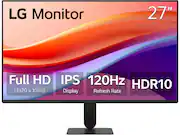
LG 27U411A-B 27-inch Full HD (1920 x 1080) IPS Computer Monitor, 120Hz, HDR10, Reader Mode, Flicker Safe, HDMI, Slim Stand Base, Black
Q: Is it possible to mount this monitor on a screen mount arm?
A: The LG 27U411A-B 27" Full HD IPS Monitor, 120Hz, HDR10, Reader Mode, Flicker Safe, HDMI - Black Model # 27U411AB, is a VESA - compliant display with a 100 x 100 mm VESA Mount Pattern, which can be used to mount the monitor on any VESA-compliant wall mount or VESA-compliant monitor arm that supports that pattern...^Ivan.
Q: Can you adjust viewing angle?
A: I dont see any way to adjust, and feel like if I try harder, the mount will break.....Please advise. Thanks, Ed
Q: I need to connect 2 monitors to my lab top. What is needed
A: Hi there. Thank you for sharing your experience with us. We understand that the 27U411A-B didn't meet your expectations regarding the setup information for a dual-monitor configuration. We understand your inquiry and are happy to provide the information you need to get your workspace ready. We understand your inquiry regarding the necessary components for connecting two monitors to your laptop. To connect two 27U411A-B monitors, which feature HDMI and D-Sub inputs, we recommend checking the available ports on your laptop first. Since most laptops have limited video outputs, the most efficient way to connect two monitors is by using a docking station or a USB-C to Dual HDMI adapter. This allows your laptop to send a signal to both screens simultaneously for an extended display. If your laptop has an HDMI port and a USB-C port that supports video output (DisplayPort Alt Mode), you can connect one monitor directly via HDMI and the second one using a USB-C to HDMI adapter. We want to ensure you have a seamless experience with our 120Hz IPS displays. https://www.bestbuy.com/product/lg-27u411a-b-27-full-hd-ips-monitor-120hz-hdr10-reader-mode-flicker-safe-hdmi-black/JJ8VPZKJ2V If you have any further questions about its features, please contact us on [email protected], and our team will be more than happy to assist you. —Renzo

LG 27U411A-B 27-inch Full HD (1920 x 1080) IPS Computer Monitor, 120Hz, HDR10, Reader Mode, Flicker Safe, HDMI, Slim Stand Base, Black

The AOC 22B30HM2 is a 22” three-side frameless slim monitor that can fully support your daily workflow, mixing quality and comfort for a minimal but complete home office. Enjoy great quality image with FHD resolution and wide angles of its VA panel. It also includes a good array of connectivity options to easily support your productivity.

The 27" Full HD (1920 x 1080) IPS monitor delivers sharp, vibrant visuals from virtually any viewing angle—ideal for working ...and even playing from home. Whether you're tackling emails, browsing the web, or managing projects, this monitor helps you stay clear, focused, and productive. The display's ultra-slim bezels and 3-side virtually borderless design bring a clean, modern look to any home office setup. The sleek stand adds a floating feel that’s perfect for dual monitor workstations or minimal desk spaces. A 120Hz refresh rate ensures smoother scrolling and frame transitions, while 1ms Motion Blur Reduction (MBR) keeps fast-moving visuals crisp—great for multitasking or after-hours gaming. With HDR10 support and up to 99% sRGB color gamut coverage, this LG monitor delivers vivid, accurate color across everything from video calls to creative projects. Whether you're outfitting a new home office or upgrading your current work-from-home setup, the LG 27U41YA-B monitor offers the clarity, speed, and style you need to stay productive and inspired.

Samsung’s 27" S3 Monitor enables smooth performance, heightened productivity, and greater comfort. The IPS Panel delivers a stunning color experience across the entire display with less color washing, offering clarity from any viewpoint so tones stay consistent and accurate. The 100Hz refresh rate reduces lag and motion blur while playing games, watching videos, or working. Game Picture Mode with optimizable game settings enables instant adjustment of color and image contrast. Eye Saver Mode protects vision, reduces blue light and screen flicker, and extends comfort even during long sessions. The ergonomic super-slim design is a stylish addition to any environment, while ultra-thin border bezels make the most of screen space. Multiple connectivity enables devices to be plugged straight into the monitor for increased flexibility.
| Pros for LG - 27U411A-B 27" Full HD IPS Monitor, 120Hz, HDR10, Reader Mode, Flicker Safe, HDMI - Black | |||
|---|---|---|---|
| There were no pros for this product— | Size, Image Quality, Setup Ease | Size, Overall Performance, Refresh Rate, Resolution, Design | Display Quality |
| Cons for LG - 27U411A-B 27" Full HD IPS Monitor, 120Hz, HDR10, Reader Mode, Flicker Safe, HDMI - Black | |||
| There were no cons for this product— | Speakers | Adjustability, Brightness | There were no cons for this product— |
Rating 5 out of 5 stars with 1 review
The vast majority of our reviews come from verified purchases. Reviews from customers may include My Best Buy members, employees, and Tech Insider Network members (as tagged). Select reviewers may receive discounted products, promotional considerations or entries into drawings for honest, helpful reviews.