Deals Worth GiftingShop now

Skip to content
Main Content

Logitech - MX Ink Mixed-Reality (MR) Stylus with Charging Dock Combo for Meta Quest 2, Meta Quest 3, Meta Quest 3S - Graphite

Model: 914-000087
SKU: 6606903
$169.99
or
Finance OptionsView your offers
Availability
Fulfillment Options
Available for pickup today at a nearby store
Order now for pickup on Tue, Dec 9 at
Act fast - Only 3 left at nearby store!
Sold by Best Buy

More Buying Options

Specifications
  • Display Type
    Not Applicable
    Resolution (Per Eye)
    1832 x 1920
    Refresh Rate
    120Hz
    Lens Design
    Fresnel
    Internal Memory
    0 gigabytes
    Movement Tracking
    Hand
  • Key Specs
    • Display Type: Not Applicable
    • Resolution (Per Eye): 1832 x 1920 (Refers to the highest number of pixels that a screen can process and display per eye. Higher resolution signals produce more detailed images.)
    • Refresh Rate: 120Hz (The number of frames per second the device can produce natively without enhancement. Higher rates help produce smooth, seamless pictures.)
    • Lens Design: Fresnel
    • Internal Memory: 0 gigabytes (Data storage capacity for built-in memory circuits.)
    • Movement Tracking: Hand
    • Sensors: None (Detects stimuli such as heat, light, sound, motion, or pressure and responds accordingly by operating a control or initiating a function of the device.)
    • Wireless: true
    • Wireless Connectivity: None (The manner in which a device sends data to another device over a short distance without the use of wires or cables.)
    • Product Width: 0.72 inches (The out of box width of the item. Width is measured as the horizontal distance from one side of the item to the other as it would be primarily used or placed.)
  • General
    • Brand: Logitech
    • Model Number: 914-000087
    • Product Name: MX Ink Mixed-Reality (MR) Stylus with Charging Dock Combo for Meta Quest 2, Meta Quest 3, Meta Quest 3S
    • Color: Graphite
  • Display
    • Display Type: Not Applicable
    • Resolution (Per Eye): 1832 x 1920 (Refers to the highest number of pixels that a screen can process and display per eye. Higher resolution signals produce more detailed images.)
    • Refresh Rate: 120Hz (The number of frames per second the device can produce natively without enhancement. Higher rates help produce smooth, seamless pictures.)
    • Interpupillary Distance Adjustment: false (Adjusts the distance between the device's eyepieces to match the distance between the user's two pupils. This allows for optimal focus and viewing.)
    • Lens Design: Fresnel
  • Features
    • Internal Memory: 0 gigabytes (Data storage capacity for built-in memory circuits.)
    • Controller(s): false
    • Interactive Buttons: true (Interact with virtual buttons to control or interact with various elements of virtual reality gameplay. // Use buttons on the device to control or interact with various elements of virtual reality gameplay.)
    • Movement Tracking: Hand
    • Sensors: None (Detects stimuli such as heat, light, sound, motion, or pressure and responds accordingly by operating a control or initiating a function of the device.)
    • Product Use: Mixed Reality (MR)
  • Compatibility
    • Compatible Platform(s): Meta Quest 3s, Meta Quest 3, Meta Quest 2
  • Connectivity
    • Interfaces with: Gaming console
    • Wireless: true
    • Wireless Connectivity: None (The manner in which a device sends data to another device over a short distance without the use of wires or cables.)
  • Dimensions
    • Product Height: 6.46 inches (The out of box height of the item. Height is measured as the vertical distance from the bottom of the item to the top as it would be primarily used or placed.)
    • Product Width: 0.72 inches (The out of box width of the item. Width is measured as the horizontal distance from one side of the item to the other as it would be primarily used or placed.)
    • Product Depth: 0.72 inches (The out of box depth of the item. Depth is measured as the distance from the front of the item to the back as it would be primarily used or placed.)
    • Product Weight: 1.02 ounces (The out of box weight of the item.)
  • Warranty
    • Warranty - Parts: 1 year
    • Warranty - Labor: None
  • Other
    • UPC: 097855200068

MX Ink is a crafted control device with perfected pressure sensitivity and organic form - a tool you do not need to learn. Dive into your creations, in 3D and 2D, with frictionless ease. Pair and control leveraging Meta Horizon app and Meta Settings. Simple and elegant charging with the MX Inkwell Charging Dock. MX Ink was designed to be intuitive and give a masterfully fine-tuned and immersive experience.

  • MX Ink Mixed Reality (MR) Stylus Combo for Meta Quest: Experience high-precision creations and operations in Mixed Reality (MR) with the familiar feel of a pen; say goodbye to learning curves, save time, and stay seamlessly in your workflow
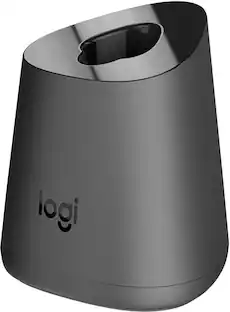
  • Pair and recharge: Easily recharge the wireless MX Ink stylus by simply placing it in the included MX Inkwell Charging Dock or with a USB-C cable (not included)
  • Designed for Meta Quest: MX Ink MR Stylus is designed and built to effortlessly connect with your Meta Quest and work alongside your Meta Touch Controllers; transition smoothly from 2D to 3D, then back again without disrupting your workflow
  • High-precision control with a familiar feel: Enjoy high-precision creativity and control with a pressure-sensitive tip (1 fine tip/ 1 wide tip included) and main button of this stylus; sketch, grab, move, and manipulate fluidly in mixed reality (MR)
  • Pair and control leveraging Meta Horizon app and Meta Settings: Deep integration in Meta Settings lets you tailor your control, pressure curves, activation forces; select right or left-handed control, and configure button mapping
  • Intuitive and fluid: High-accuracy 6DoF with balanced button feel, pressure, tactility, and haptics achieves seamless spatial tracking; a must for MR applications
  • Long battery life: Last up to 7 hours in a typical workflow; battery life varies significantly based on headset and applications; parameters based on Meta Quest 3 usage estimates*
  • MX Ink Mixed Reality (MR) Stylus Combo for Meta Quest: Experience high-precision creations and operations in Mixed Reality (MR) with the familiar feel of a pen; say goodbye to learning curves, save time, and stay seamlessly in your workflow
  • Pair and recharge: Easily recharge the wireless MX Ink stylus by simply placing it in the included MX Inkwell Charging Dock or with a USB-C cable (not included)
  • Designed for Meta Quest: MX Ink MR Stylus is designed and built to effortlessly connect with your Meta Quest and work alongside your Meta Touch Controllers; transition smoothly from 2D to 3D, then back again without disrupting your workflow
  • High-precision control with a familiar feel: Enjoy high-precision creativity and control with a pressure-sensitive tip (1 fine tip/ 1 wide tip included) and main button of this stylus; sketch, grab, move, and manipulate fluidly in mixed reality (MR)
  • Pair and control leveraging Meta Horizon app and Meta Settings: Deep integration in Meta Settings lets you tailor your control, pressure curves, activation forces; select right or left-handed control, and configure button mapping
  • Intuitive and fluid: High-accuracy 6DoF with balanced button feel, pressure, tactility, and haptics achieves seamless spatial tracking; a must for MR applications
  • Long battery life: Last up to 7 hours in a typical workflow; battery life varies significantly based on headset and applications; parameters based on Meta Quest 3 usage estimates*
Whats Included
  • MX Ink Mixed-Reality (MR) Stylus with Charging Dock Combo for Meta Quest 2, Meta Quest 3, Meta Quest 3S
  • MX Ink Mixed-Reality (MR) Stylus with Charging Dock Combo for Meta Quest 2, Meta Quest 3, Meta Quest 3S
Disclaimers
  • *Battery life may vary based on user and computing conditions.
  • *Battery life may vary based on user and computing conditions.

Q: Can the MX Ink stylus be used for both 2D and 3D creations?

A: The MX Ink stylus allows you to dive into your creations in both 2D and 3D.

Q: How does the MX Ink stylus work with the Meta Quest headsets?

A: The MX Ink stylus pairs with Meta Quest headsets and is controlled through the Meta Horizon app and Meta Settings.

Q: What is the warranty period for the MX Ink stylus?

A: The MX Ink Mixed-Reality Stylus comes with a one-year warranty for parts.

Sponsored

Compare similar products

Logitech - MX Ink Mixed-Reality (MR) Stylus with Charging Dock Combo for Meta Quest 2, Meta Quest 3, Meta Quest 3S - Graphite
4.5(33)

MX Ink is a crafted control device with perfected pressure sensitivity and organic form - a tool you do not need to learn. Dive into your creations, in 3D and 2D, with frictionless ease. Pair and control leveraging Meta Horizon app and Meta Settings. Simple and elegant charging with the MX Inkwell Charging Dock. MX Ink was designed to be intuitive and give a masterfully fine-tuned and immersive experience.

Logitech - MX Ink Mixed-Reality (MR) Stylus Wireless Pen Controller for Meta Quest 2, Meta Quest 3, Meta Quest 3S - Graphite
5.0(2)

MX Ink is a crafted control device with perfected pressure sensitivity and organic form. This is a tool you do not need to learn. Dive into your creations, in 3D and 2D, with frictionless ease. Pair and control leveraging Meta Horizon app and Meta Settings. MX Ink was designed to be intuitive and give a masterfully fine-tuned and immersive experience.

Insignia™ - Charge Station for Meta Quest 3 and 3S - White
4.4(38)

Designed for the Meta Quest 3 and Meta Quest 3S headset and touch plus controllers, this Insignia Charging Dock for Meta Quest 3 & 3S not only neatly stores your gear, but also quickly and easily recharges the Touch Plus controllers and Meta Quest 3 & 3S headset. The Meta Quest 3 & 3S Charging Dock includes two high-power rechargeable battery packs, an AC adapter, and a USB-C quick connector. Save money on batteries, get organized, and play in your virtual worlds longer

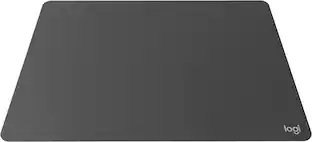
Logitech - MX Mat for MX Ink Mixed Reality (MR) Stylus for Meta Quest 2, Meta Quest 3, Meta Quest 3S - Graphite

Logitech MX Mat lets you transform any desk or tabletop into the perfect workspace for MX Ink every time.

Pros for Logitech - MX Ink Mixed-Reality (MR) Stylus with Charging Dock Combo for Meta Quest 2, Meta Quest 3, Meta Quest 3S - Graphite
Ease of Use, Battery Life, Pressure Sensitivity, Tracking Performance, WeightThere were no pros for this productEase of Use, Overall Performance, Charging SpeedThere were no pros for this product
Cons for Logitech - MX Ink Mixed-Reality (MR) Stylus with Charging Dock Combo for Meta Quest 2, Meta Quest 3, Meta Quest 3S - Graphite
ConnectivityThere were no cons for this productThere were no cons for this productThere were no cons for this product

Specs

Reviews

Customers are saying

Customers are enthusiastic about the MX Ink stylus's long battery life, which can last up to seven hours, and its pressure-sensitive tip that enables artistic input. They also appreciate the precision it offers, especially when selecting items and drawing fine lines. The convenience of USB-C charging, either directly on the stylus or through the charging dock, is another positive aspect mentioned by users.

This summary was generated by AI based on customer reviews.

Customer Images

The vast majority of our reviews come from verified purchases. Reviews from customers may include My Best Buy members, employees, and Tech Insider Network members (as tagged). Select reviewers may receive discounted products, promotional considerations or entries into drawings for honest, helpful reviews.

  • Rated 4 out of 5 stars

    Review of Logitech MX Inc Mixed-Reality stylus

    As an artist exploring the creative possibilities offered by the Meta Quest line, I recently tried the Logitech MX Inc Mixed-Reality (MR) Stylus with Charging Dock Combo. This stylus aims to enhance accuracy for painting, drawing, and sculpting apps, and while it excels in some areas, it also presents a few significant drawbacks. Comfort and Design One of the first things I noticed was the thickness of the stylus, which makes it incredibly comfortable to hold. Transitioning from the bulkier headset controllers to a stylus that fits comfortably between my fingers was a pleasant surprise. The ergonomic design allows for extended creative sessions without discomfort. Precision and Performance The level of accuracy delivered by the stylus is impressive. The gimbal processor provides a seamless experience that almost tricks your mind into thinking you're using a traditional brush or pen. The strokes feel natural and responsive, closely mimicking the sensation of drawing on paper. This level of precision is particularly beneficial for artists looking to create intricate designs or detailed sculptures in virtual reality. Connectivity Issues However, the stylus does have some flaws. As a third-party device intended for use with the Meta Quest, it requires a separate smartphone app to connect to the headset. This reliance on a third device feels counterintuitive, especially when compared to how easily Xbox controllers can connect to the headset. The need to use a phone to establish this connection can be a hassle, significantly slowing down the user experience. It would be much more efficient if users could switch between the stylus and other input devices seamlessly without having to disconnect and reconnect multiple times. Pros and Cons On the plus side, the stylus offers a very comfortable interface for creative tasks, making it an excellent tool for drawing, painting, and sculpting. However, the inability to quickly switch back to gaming or other applications without going through the cumbersome connection process detracts from the overall enjoyment. I often found myself wanting to hop between creative work and gaming but had to remove the headset and fiddle with my phone to reconnect, which disrupted the flow of my session. Comparative Experience In terms of comparison, the only similar device I can think of is the Apple Pencil for tablets. The MX Inc Stylus provides similar touch sensitivity, allowing for variations in pressure and angle, which is essential for an immersive creative experience. Target Audience This stylus is clearly designed for those who are serious about the creative aspects of virtual reality. I find it less suited for casual users who may not require such specialized input. However, for artists and creatives, this tool shows great potential and could become a regular part of their toolkit in the future. Conclusion In conclusion, I rate the Logitech MX Inc Mixed-Reality Stylus an 8 out of 10. The device itself works beautifully and delivers a fantastic creative experience. However, the cumbersome connectivity process and lack of streamlined functionality hinder its overall appeal. I would recommend this stylus to those who enjoy drawing, painting, and sculpting in VR, as it offers a level of immersion that enhances the creative process. Casual users, however, may find the connectivity issues frustrating and may prefer a more straightforward input method.

    Posted by Fernandezf13

  • Rated 4 out of 5 stars

    Almost as good as other MX products

    If you’re stuck with a Quest headset to do 3D design work, this stylus makes the process much more intuitive. I have been a fan of Logitech’s other MX series products, so I was excited to give this a try. While it doesn’t quite live up to my experience with the other MX products, it’s a precision input device that works well. I have used MX Keys and MX Master for a few years, and I’ve come to really appreciate the precision operation and quality feel of these products. MX Ink is constructed with a type of plastic that feels standard for a disposable pen, so it’s familiar and easy to hold. However, with the MX branding I would have expected it to have a more substantial feel, maybe with rubbery grips to make it easier and more pleasurable to hold. Similarly, for me, MX is synonymous with precision input ability for professionals to be able to control the precise location of objects and to facilitate fluid control with things like pressure sensitivity. While it seems that MX Ink does all this, it is limited by the Quest optics for position information and visual resolution. Quest is definitely not a professional-quality device, so it seems odd to pair a top-of-the-line brand stylus with a VR headset that is essentially a toy. The stylus itself has several buttons to provide various controls, and they are customizable (depending on the app you use) to perform various tasks. Some of the buttons are pressure-sensitive, including a pressure-sensitive tip, which makes artistic input possible. Having a pressure-sensitive tip is essential, but working in 3D it feels a little bit weird because a lot of the time you don’t have a physical surface to press against—so you’ll always need switch to an alternative method of input when you don’t have a physical surface to use. Even when you do, Quest does not seem to always understand when you’re working on a flat surface and that the input should then be limited to that plane. In other words, even when the tip is pressed against a flat surface, Quest still uses its optics to estimate the position of the stylus in 3D—so location information isn’t always exactly on that surface. Finally, the MX Ink comes with a dock they call the MX Inkwell. Cute name, but I’m not sure if it serves a useful purpose. They’ve handily included a USB-C port on the stylus itself for charging, so there’s no need to use the dock to charge (although you can). Granted the dock gives you a handy place to put the stylus, assuming you have room on your desk for it. However, that’s all it does. The kit comes with a couple alternative/replacement tips, but there’s no place to store them when they’re not on the stylus. Why doesn’t the dock have a place to store the extra tips? Overall, this is a good start at a professional-grade input device for 3D creative work. Now we need to wait for a headset that operates at the same level.

    Posted by Kenneth

  • Rated 5 out of 5 stars

    Great addition to the Meta Quest 3!

    The Logitech MX Mixed Reality Stylus is a great addition to the Meta Quest 3 system, offering a much more fluid way of interacting with your virtual environment. When setting it up, it took a moment to get used to the buttons, as they do work differently to the controller. It took me about 3 tries to get it paired to the Meta Quest 3, but when I did so the tracking and motion was very fluid indeed. I did notice that the physical size was replicated in VR as a smaller controller when used in mixed reality, making it look smaller than the actual controller/stylus was, but it does not affect the way that you use it at all. The motion is very accurate and reactive, very fluid and smooth at the same time. Moving menus, interacting with panels and buttons was done very intuitively and very easily as well. When paired with the Meta app you get connectivity notifications and updates etc, so I recommend doing that first. There was an update right out of the box that took about a minute or two to upload. The great thing about this is the accuracy that you get within 3D rendering software over and above the standard Meta Quest controller. That works fine, but when working on tighter detail and intricate elements, this stylus is a game changer. The pressure sensitive buttons make a nice addition to the environment, helping to create those more realistic visuals. Overall, this is more than a gimmick or a toy add on to the Meta Quest 3, it’s a tool, a controller, a stylus - a valid addition to your VR system if you are using it to create 3D objects or environments. There is no lag, it performed flawlessly for me, very happy with it!

    Posted by Cupra

No content
Sponsored

Similar products from outside of Best Buy

sponsored

Finance Options

My Best Buy® Credit Card
10% back in rewardson your first day of purchases when approved for the My Best Buy® Credit Card.
Buy Now, Pay Later
4 payments starting at $42.50