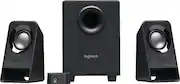
Rating 4.2 out of 5 stars with 94 reviews
4.2- Sound Quality (60)
- Bass (14)
- Value (9)
- Ease of use (7)
- Size (4)
- Volume (6)
Customer Images
The vast majority of our reviews come from verified purchases. Reviews from customers may include My Best Buy members, employees, and Tech Insider Network members (as tagged). Select reviewers may receive discounted products, promotional considerations or entries into drawings for honest, helpful reviews.
- Rated 5 out of 5 stars
Look good, sound great, and priced at a steal!
Have had this setup for a little bit now (almost a month). Extremely easy to hook up. Very sleek in appearance and can get very loud while keeping great quality sound. Exceptionally good for the price and I recommend these to anyone looking for an upgrade. Upgraded to these from a 12+ year old set of Logitech speakers (which still worked and sounded nice, they were just visually outdated), so I expect these speakers to last just as long. Logitech is a great brand! Extremely satisfied.
Posted by Vick
- Rated 1 out of 5 stars
Entry level speakers
The woofers are much weaker than the subwoofer.The subwoofer will deliver explosive sounds from action movies,but the woofers are so weak that it's hard to hear the dialogues clearly. It''s $2.50 cheaper from Walmart when I made the order. The subwoofer I received has a big dent in the bottom.
Posted by Reviewer
- Rated 5 out of 5 stars
Great Budget with bass
For the price point, these tick off a lot of boxes; bass, clear sound, compact size. The remote control is a nice addition if you are wanting a clean desk with discrete sound. Worth the increase over the s120/s150/z150/z200 etc. Only downside is the cable length which limits placement of the speakers.
Posted by McFail
- Rated 5 out of 5 stars
10/10
Better than expected! Picked these up for my desktop in my home office. Sound is great, vocals are clear, bass can be adjusted with nob on subwoofer. Perfect for a small/medium office. I have the speakers on either side of my monitor, and the sub below the desk with the bass turned all the way up and it is so much more immersive than my old speakers - I could tell the difference immediately. Well worth the $30.
Posted by Morty
- Rated 5 out of 5 stars
Good for the price
Great sound for the price. I use it mostly for youtube videos and video editing and it does what it is supposed to do. I like that the small speakers can fit under my screen (on their side) and the bass can go behind my screen, which saves space, looks clean and provides a good sound. Can't beat this price.
Posted by Videoeditor