Rating 3.8 out of 5 stars with 100 reviews
3.8- Sound Quality (49)
- Battery Life (20)
- Comfort (13)
- Touch Controls (8)
- Fit (26)
- Price (7)
- Bass (4)
- Design (4)
Customer Images
The vast majority of our reviews come from verified purchases. Reviews from customers may include My Best Buy members, employees, and Tech Insider Network members (as tagged). Select reviewers may receive discounted products, promotional considerations or entries into drawings for honest, helpful reviews.
- Rated 3 out of 5 stars
Great Sound, Too Big
I recently purchased the Microsoft Surface True Wireless In-Ear Earbuds, and I must say that I was disappointed with their size. The earbuds themselves are surprisingly large and bulky, which makes them uncomfortable to wear for extended periods. They protrude noticeably from my ears, and the fit is not as secure as I had hoped for. Additionally, the larger size makes them less discreet and can be a hindrance during physical activities or while wearing hats or glasses. While the sound quality is decent, the bulky design is a major drawback for me.
This review is from Microsoft - Surface True Wireless In-Ear Earbuds - Graphite
Posted by croco
- Rated 3 out of 5 stars
Great for some, but not for everyone
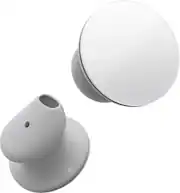
Disclaimer: I am affiliated with the Best Buy Tech Insider Network Program and I received the Surface Earbuds from Best Buy for the purpose of writing an honest, unbiased review. I was slow to the Bluetooth world, the early clip-ons for handsfree calling just didn’t do it for me. Poor sound quality. Difficulty in pairing. Specialized charging. All this changed for me with the introduction of the Apple Airpods and I have never looked back to wired headphones since late 2016. With Microsoft coming this late to the party (2020), I was interested in finding out if the Surface Earbuds were a flop like the Microsoft Zune MP3 Player put out to compete with the iPod, or if it was a success like the Microsoft Surface computer line. I have listed out detailed pros and cons below as well as a direct comparison to the Airpods to help you with the features, but I will start with some general comments. First of all, NOT a flop. Microsoft did NOT copy the features of other products but headed out in their own direction. That leaves you with choice which is always a good thing. None of the ‘cons’ were deal breakers for me. The Earbuds work well. Whether they are for you, is going to be a matter of personal preferences. Three things are likely to be polarizing: 1) The fit is ‘different.’ I had to read the instructions to figure out how to put them in so that they would not fall out (pointed down, insert, then twist 90 degrees). There are three choices of ear inserts to customize for your ear. But they are easy to dislodge. I didn’t like the fit for that reason. On the plus side, they were comfortable when they weren’t falling out. 2) The appearance is ‘different.’ Check out the picture. You are either going to think they are chic or ugly. To be honest, I don’t really care how they look. I buy my tech for how it works not how it looks. No one has pointed and laughed yet. But I know some care. 3) The overall sound is ‘moderate.’ The open ear design means no noise cancellation and people can hear you. In a quiet environment they sound good, but no base. There are some features everyone will love. Great battery life*. Easy gestures. Well integrated in MS Office (if that’s your thing). They come with a decent App (Android and IOS) that does allow for some customization, including an equalizer. I grew up with equalizers (analog) and miss them in the digital world. Love that in the App. * One interesting caveat on battery life. The right earbud drains significantly faster than the left one. Perhaps this is because the left Earbud is slaved to the right. For maximum battery life while listening after 6 hours I had to put the right Earbud in the case. So who are these made for? They seem to be best suited for an office environment where you want to optimize for comfort (open ear design) at the expense of a tight fit or even best sound. Clearly better for people in the Microsoft world versus the Apple world. People who want the longest charge outside of case possible (trans Atlantic flights?). People that live in Microsoft Office. Why three stars and not five? - Value. I thought for the feature set/performance they were a bit expensive. - Design. I had to down grade for me due to fit (might be better for you). Also thought the case was blah. And don’t like the lack of wireless charging (at this price). I WOULD recommend to a friend they consider them as long as they know the caveats. Here are some specifics. Pros: - Battery life. Battery life. Battery life. 8 hours play time out of case (for the left ear). 24 total with charging. - Equalizer control in Surface App. Really good. - Bluetooth. No obvious lag. Good range. - Good touch gestures with large surface for controlling in ear. Very easy. - Good microphones for phone calls or voice dictation in Office. Sound seems optimized for voice. - Integrates well with MS Office. Cons: - No Wireless charging. USB C only. - Only pairs with one device at a time outside of Surface environment (no switching between phone and computer seamlessly) -No ear sensors for pause when you take them out. They will play on for 10 minutes before turning off when you remove them - Volume seems low. - No noise cancellation, active or passive. Open ear design. Your Mileage May Vary: - Sound. Open ear design results in weak base, and to my ears they sounded a bit tinny out of the box, but I could compensate with the equalizer. Decent sound, doesn’t stand out one way or the other. - Fit. For me very comfortable for long periods of times (better than most). But came out easily. So not going jogging with them. - Appearance. Like wearing white quarters on your ears. Matter of taste. - Case. Coffin shaped. Hard edges. For me, not the best feel in the pocket as compared to other cases. Slightly hard for me to get buds out of case. - Privacy concerns. They collect a lot of information in the Surface App about your listening habits/devices. Not sure why Microsoft needs this. May not concern you. - For the feature set at $200 I would not call these competitively priced, i.e. not the best value. Versus Apple Airpods: Let’s face it Microsoft is late to the party and the comparison to Airpods is inevitable. I’ve been using Airpods since 2016 so the following is 100% opinion on what I prefer. Your mileage will vary (see above). Straight out of the box, to me the Airpod Pros have a slight edge in sound. Very slight. But the App equalizer gives you more option, so I might give the nod to the Earbuds. And the Surface Earbuds are slightly more comfortable over long times. I definitely like the longer in-ear battery life in the Surface Earbuds. And the touch gestures are easier in the Surface Earbuds. But they lack voice control which I enjoy with the Airpods. I prefer the rounded and thinner Airpods case in my pocket. It’s pretty much a toss-up on phone call quality. They do work well with MS Office. The Bluetooth pairing is not as seemless as the Airpods, but is stable once paired. So in the end, the Airpods remain my go to for out and about and I am likely to just leave my Earbuds paired to my computer at work. The right tool for the right job I like to say.
Posted by Kcir
- Rated 3 out of 5 stars
Premium Earbuds, but not for small ears
I am a member of Best Buy’s Technical Insider Network, TIN for short. Reviewers in this invitation-only program are provided products for the purpose of writing honest, unbiased reviews. I am one of the many office workers who find myself working from home during these unprecedented times. I use video conferencing software, like many of you, to stay in touch with my colleagues. Normally, I use either my Plantronics wireless headset or one of my gaming wired headsets. They are both heavy, bulky, and simulate Princess Leia hair buns on screen. I was excited when TIN asked me to review the Microsoft Surface Earbuds. I own other wireless earbuds from different manufactures, but none were made for an office setting. Hence, the microphones in these earbuds are not very good. However, the Surface Earbuds were made for the office! Let’s start with Pros and Cons. Pros: - Clear vocals from all audio sources - Quality microphones - Simple touch controls - Charging Case charges earbuds between uses. - Easy Bluetooth setup. - Multiple sized tips to fit multiple ear sizes. - Secure fit in ear. Will not fall out during use. - USB-B to USB-C charging cable. The case has the USB-C connector. - Surface Earbud app allows EQ and other useful capabilities. - Easy access to digital assistant for Cortana and Siri. Note: I do not own any Android devices. Cons: - Uncomfortable after an hour of use. - Can be difficult to auto reconnect between multiple devices. - MS Office integration mysteriously missing First, I want to focus on the positive. Sound quality on the Microsoft Surface Earbuds are great. Audio through my laptop and iPhone were crystal clear. I asked for direct feedback from those on my conference calls. Their comments were very positive. One person I spoke with spends his free time in a broadcast studio doing podcasts. He said that it was about time I put a diffuser on my microphone. He was referring to my Plantronics headset. He had no idea I had changed over to the Surface Earbuds. A friend of mine, who I called on my iPhone, stated that my voice sounds deeper than normal. Otherwise I was clear. The Surface Earbuds microphone is centered in the earpiece and positioned to rest against the inside of your ear. This has the extra benefit of cutting down on wind noise and the transmission of ambient office noise. I normally listen to music between phone calls and meetings. My go to headset is Sennheiser headphones. I have zero expectations that the Surface Earbuds can keep up with the Sennheiser’s. The benefit of using the earbuds is that I do not need to switch out headsets if someone calls my cell, office phone, or Skype. I have to say that I was surprised at how good the Surface Earbuds sounded. I played a number of selections ranging from Vivaldi’s double concertos, Lindsay Sterling’s “Artemis”, Sturgill Simpson’s “Sound & Fury”, and Meghan Trainor’s “Title”. I was expecting the music to be constrained and bottled up. Instead, it was surprising clear and concise. Granted, the bass will not rock your world like dedicated headphones will. Good enough for an office setting. However, since the earbuds do not cover your ear canal, any outside sounds will equally compete with what you are listening too. I heard road noise from cars passing by, chirping birds, and my family’s conversations while I was trying to listen to music. Then again, I know that I can walk down the street or through an office setting able to fully interact with my environment without having to remove the earbuds. You will have to decide for yourself if the trade off has any benefits to you. Let’s revisit bass. The default EQ for these earbuds is flat EQ. You can adjust the EQ to your liking through the Surface Audio app available for download for Windows 10, iOS, and Android. The EQ has multiple presents including Classical, POP, and Rock. You can also manual adjust the EQ to best suite your desired experience. For example, the first track on the album “Artemis,” starts with a high-pitched electric violin that slowly merges with a deeper rhythm track. The default “Flat” EQ is anemic for this piece. I solved the problem by adjust the EQ in the Surface App from “Flat” to “Pop”. The adjustment helped the earbuds deliver a much deeper and richer experience. The ear bud touch controls work for both Windows and iOS. (I do not own an Android device.) A lite touch swiping up or down on the right earbud increases and lowers volume. Forward and back swipes on the left earbud allows you to switch music tracks. Double tap on the right earbud invokes the digital assistant for the device you are connected too. Microsoft reports that there is touch integration with Office 365. Unfortunately, Microsoft Surface controls for my version of Office, Office 365 Family, was not available. There is one Office feature that does not require a Surface product to successfully operate, dictation. Dictation mode in MS Word can be done with any microphone. Testing with the Surface Earbuds was quick and accurate as long as I ignored punctuation. I have zero experience verbally inserting punctuation into my speech. There are multiple reasons why someone would want to take the time to train themselves to use this feature. Someone who is disabled or lack touch typing capabilities may be two such use cases. If you fall into this category, then you can find the verbal punctuation commands for MS Word and PowerPoint on Microsoft’s product support page. Just do a Bing search in your favorite browser. There is one issue with these earbuds that really impacted my experience. I found them very uncomfortable to wear. They became painful to my ear after an hour of normal listening. Less time if I engaged in any activity that caused movement within my ear such as talking, chewing, yawning, or adjusting my jaw for any reason. The earbuds come with three different size silicon tips: large, medium, and small. I chose the small tips because I have small ears. Unfortunately, due the size of my ear, the earbuds put a significant amount of pressure on the surrounding cartilage. The earbuds became less comfortable the longer I wore them. I did play around with the positioning of the earbuds in my ear. All I managed to do was find positions that allowed me to wear them for an extra 30 minutes before I had to take them out. In conclusion, the Surface Earbuds offer a premium experience. They will not fall out of your ears if used as directed. Sounds are clear and concise. The microphones do an excellent job of picking up your voice. And the touch controls worked without any issues. The Surface Audio app serves to add that little bit of extra value that really make these stand out from other earbuds on the market. I do appreciate the fact that I do not have to jam these earbuds into my ear canal like other earbuds. I do find value in being able to hear what is happening around me in an office or public situation. Finally, if you have small ears then you will have to judge for yourself if the Surface Earbuds will meet your needs. This one issue disappoints me the most because I really wanted these to work. However, my experience dictates that I can only use these for short periods of time. I would recommend these earbuds to a friend. But only friends with ears larger than mine. Thank you for reading this review. I hope you found it helpful.
Posted by ITJim
- Rated 4 out of 5 stars
A very solid entry by Microsoft
I’ve wanted to upgrade for a while now as my 3 year old failing headphones weren’t working right. So I wanted to try something new and I decided to go with these Microsoft surface earbuds. I have to say that I didn’t think I would like the design looking at the stock photos online but in person and in my ear, they are actually very nice and they look cool. I’m sure they were design to make the touch controls work better. The touch controls work very well. Easy and intuitive. But sometimes I do accidentally trigger Siri while playing music.i listen to a lot of music so that’s a minor inconvenience. But I’ll adjust I’m sure part of it Is human error as well. The case is what you would expect Nowadays. sleek and functional. I Do like the size. Not too small, not too big. Sound quality out the box needs adjusting. The highs are too sharp for me, the bass needs a little kick. But the mid range/vocals are great. Very clear and rich. These earbuds do come with an app to tweak the EQ to your liking and after I made the adjustments. These sound great. Very balanced and clear.a nice added feature as my old earbuds didn’t have an EQ! Bluetooth range seems fine but I live in a 1k sq foot apt. And I keep my promise home on me every where I go. The battery life is great as I didn’t have to charge for 3 days with scattered use. Type C connector charges fast. My only real gripe while minor to me might be a bigger deal to others, is the ear tips. They do not sit perfectly in my ear canal even after switching to the large tips. I have to kind of push them in. But once I do they don’t fall out. I’m a very active person. Not the end of the world for me. But something to note! I still recommend for sure. Overall a very good set of truly wireless earbuds. Please note:Reviewers in this invitation-only program are provided products for the purpose of writing honest, unbiased reviews. Thoughts and opinions are of my own. Good luck and happy shopping.
Posted by BestbuyGuy210
- Rated 5 out of 5 stars
Superior sound but looks kind of silly
I love them but man do they look weird on me! Great sounds and great for business calls. I use them daily
This review is from Microsoft - Surface True Wireless In-Ear Earbuds - Graphite
Posted by Devondo