Rating 4.5 out of 5 stars with 3761 reviews
4.5- Sound Quality (1972)
- Comfort (595)
- Battery Life (293)
- Bluetooth (231)
- Price (151)
- Connection (95)
- Fit (32)
Customer Images
The vast majority of our reviews come from verified purchases. Reviews from customers may include My Best Buy members, employees, and Tech Insider Network members (as tagged). Select reviewers may receive discounted products, promotional considerations or entries into drawings for honest, helpful reviews.
- Rated 5 out of 5 stars
Great headset at a great price
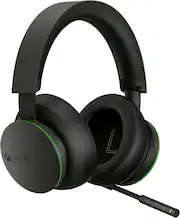
Microsoft really hit this one out of the ballpark, I just got these in today and right away they are my favorite headsets for gaming. I really like this for a few reasons: 1. Price: at $99 Microsoft I wouldn’t say is taking a loss, but any other headset manufacture would sell these for at least $150 if bot $200 2. Confortable: These fit perfectly on my head, I have trouble with other headsets (i have an average head) as they clamp down on my head so much that it gives me a headache only after a few minutes of gaming, these don’t have that problem. 3. Sound: crisp and clear, and with the help of the Xbox app (The same one where you can customize the Elite controllers) you’re able to tinker with the sound, at its highest these things are super loud, with great bass if you so choose if not you can tone that down as well. 4. Battery: since I just got this I don’t know how long the battery will last, but I’m sure it’ll at least be decent. I’ll update this later if necessary. 5. Build Quality: this is a no-frills headset, it only does one thing and one thing well and that is sound great for gaming.. The plastics feel premium and the (what im sure is fake leather) material it’s good enough, they are soft and fit well around my ears, they also mute everything around me and only lets me concentrate on the game. 6. Mic: The mic works good, and everybody can hear me, but it might take some getting used to for some people, it only folds up and wraps around the left ear cup to get them out of the way, A mute button ensures that people don’t listen when you don’t want them to, It doesn’t extend in or out or detach. The quality is such that I’m sure these things can be folded up and down thousands of times with no problems Very happy with these headsets, they are a great price, great build, and the best part is they are completely wireless, they pair to the Xbox exactly how you would Perry controller, you just hold down the button for a few seconds and that’s it. Make sure you mess with the sound settings on the app if you don’t find them sounding great right away.
Posted by Elegit
- Rated 5 out of 5 stars
Xbox wireless headset with Dolby Atmos for gaming!
Wow these headphones are dope. I didn’t want to spend more than a bill on a headset. I wanted a headset for my Xbox and pc. You’ll have to tweak the settings asap because it’s bass heavy out the box. YouTube the best settings. I decided to include the Dolby atmos from the Microsoft store to enhance the sound. DTS is also an option. I paired it to my Xbox and PC without any trouble. I’m not an expert on audiophile but these sound great with Dolby atmos. You can control the volume on the right side and balance the game/person chat on the left. The only negative is the mic is short. The headphones are comfortable but after 2 hours I need to take them off for a moment. Best part is the wireless, I can walk around without any wires issues.
Posted by Blaze
- Rated 5 out of 5 stars
A Must Have for Every Starfield Fan
The Microsoft Xbox Wireless Gaming Headset in the Starfield Edition is a sleek and stylish headset that delivers an immersive and high-quality audio experience for gamers. With its compatibility for Xbox Series X|S, Xbox One, and Windows 10|11, it offers versatility for different gaming platforms. First and foremost, let's talk about the sound quality. The Xbox Wireless Gaming Headset provides clear and balanced audio, allowing you to hear every detail in your games. The headset is equipped with custom-tuned 50mm drivers that deliver rich and immersive soundscapes, whether it's the booming explosions in an action-packed game or the subtle background music in an atmospheric adventure. The headset features spatial audio technology, which further enhances the gaming experience. With this technology, you'll have a better sense of direction and spatial awareness, making it easier to locate enemies or immerse yourself in the virtual world. Additionally, the headset supports Windows Sonic, Dolby Atmos, and DTS Headphone:X for an even more immersive audio experience. Comfort is a crucial aspect of any gaming headset, and the Xbox Wireless Gaming Headset excels in this area. It features a lightweight design with soft and breathable ear cushions that provide long-lasting comfort, even during extended gaming sessions. The adjustable headband ensures a secure fit for different head sizes, and the ear cups can be rotated to fit comfortably around your ears. Another standout feature is the wireless connectivity. With Xbox Wireless technology, you can connect the headset directly to your Xbox console without the need for a separate dongle. The connectivity is reliable and has minimal lag, ensuring a seamless gaming experience. The headset also offers Bluetooth connectivity, so you can use it with your mobile devices or PCs for gaming or listening to music. The battery life of the Xbox Wireless Gaming Headset is impressive, offering up to 15 hours of continuous use on a single charge. Additionally, a quick charge feature allows you to get around 4 hours of use with just a 30-minute charge, ensuring that you won't be interrupted during your gaming sessions. One minor drawback of the headset is the lack of some premium features like active noise cancellation. While the headset offers good noise isolation, it doesn't completely block out all external sounds. However, this doesn't significantly affect the overall gaming experience. In conclusion, the Microsoft Xbox Wireless Gaming Headset in the Starfield Edition is a remarkable headset that provides excellent sound quality, comfort, and wireless connectivity. Whether you're gaming on an Xbox console or a PC, this headset delivers immersive audio for a truly engaging gaming experience. With its stylish design and impressive battery life, it's a great option for gamers who want a quality headset that combines style and performance.
This review is from Microsoft - XBOX Wireless Gaming Headset for XBOX Series X|S, XBOX One, and Windows 10|11 - Starfield Edition
- Rated 5 out of 5 stars
Get these NOW!!!
If you have a Xbox, this headset is a must have! I hooked these up to my Xbox One S as soon as I got home, and I was blown away! I'm still listening to them right out the box at a %50 charge, and that was 4 hrs ago! They are loud as heck, and I didn't need to tweek them. All I did was raise the bass boost up to 4 and I was impressed! They have no distortion what so ever, like the Turtle Beach 600 Gen 2. I took those back a month ago, and got these instead! No regrets at all, best decision I've made this year!
Posted by Beans
- Rated 5 out of 5 stars
A must-have for any Starfield fan!
Pro: For the price, I would call this a steal. I have had many other headsets in the past but this one does not only offer good sound quality but also is comfortable on the ears and has a satisfying weight. The skin is great and works well with my setup. Battery seems to last a long while too. Added bonus with the power on/mute/unmute sound bites as well. Con: I wish there was a way to mute the mic without having to reach up to my head. Does make it feel like I'm really piloting a spaceship though.
This review is from Microsoft - XBOX Wireless Gaming Headset for XBOX Series X|S, XBOX One, and Windows 10|11 - Starfield Edition
Posted by Firebeard