Rating 4.7 out of 5 stars with 603 reviews
4.7- Curved screen (65)
- Gaming (43)
- Picture quality (43)
- Price (41)
- Refresh rate (36)
- No speakers (8)
- Broken (3)
- Durability (2)
- No instructions (2)
- No sound (2)
Customer Images
The vast majority of our reviews come from verified purchases. Reviews from customers may include My Best Buy members, employees, and Tech Insider Network members (as tagged). Select reviewers may receive discounted products, promotional considerations or entries into drawings for honest, helpful reviews.
- Rated 5 out of 5 stars
LOVE IT!!
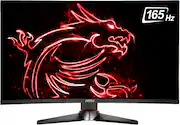
The monitor itself is great in size and the curve is just right. It looks amazing and the refresh rate is excellent. The settings are easy to adjust and easy to get to not like other monitors. Great for gaming, working on projects for your job, streaming and watching movies, videos and more! I definitely recommend this amazing monitor if you’re looking for a high quality monitor.
Posted by Bean
- Rated 5 out of 5 stars
Great monitor!!
I bought this monitor because my 12 year old cracked my old Samsung curved 27 inch as he was changing the hdmi so he can play his Xbox. I was very annoyed to spend 300 during these times. After using the monitor I learned to love it. Awesome monitor. Great refresh rate of 165. Super vivid colors. Wouldn't trade it now for anything!
Posted by Masterb
- Rated 5 out of 5 stars
Great monitor, I shouldn't have purchased a curved
The first thing I should have known, was not to buy a curved monitor. I remember back in the day when everyone used CRT monitors, and when you upgraded to a flat panel just looking at the monitor looked strange, like it was anti-curved even though it was straight. Now I'm seeing the opposite, and I probably always will since everything else in my house is square, like my TV and monitor at work. All the websites I go to, all the pictures I view, everything is just not geometrically square anymore. Just my issue, so I'm not knocking a star. I should knock a star for the "Mystic Light" that doesn't change. I've downloaded the Mystic Light 3 software only to find out, doh, it doesn't support monitors. So I downloaded Monitor Mystic Light from MSI's website of the product page. Nothing changes anything in the software. I press the "Restore Default" button and the software crashes. The Off setting doesn't do anything, along with all the other effects. Pressing Static->Select All crashes the software too, and selecting 1 of the 9 boxes that look like it's supposed to turn on individual LEDs crashes too. Don't know what "Light of logo" does because it doesn't work. Basically don't buy this for the lights on the back that you don't see, you can't change them, they're always in rainbow mode. My wall is 2' away and that light definitely isn't bright enough to shine on the wall. Other than that, the monitor works perfectly. I play Doom 2016 with all settings MAX on my Core i7 4th gen with Nvidia GTX 1060 6GB with FreeSync enabled. I enabled the game's onscreen FPS and I average around 140-160 in Vulcan mode using the Displayport. The cool thing about this monitor is that I could probably use the HDMI and get 165Hz too since it has a v2.0b port, which the standard is capable up to 240Hz, and my GTX 1060 6GB has 2.0b also. Don't listen to anyone who says 1080p on a 27" is too low resolution. I opened Photoshop and put 1 pixel on the screen and can barely see it, it's too small. So 27" gaming @1080p is perfect, especially for many video cards out now. Setting Windows 10 display to 165Hz has a noticeably smooth affect on moving windows. When it was initially at a default 60Hz I noticed ghosting and trailing. But wow, 165Hz in the desktop mode has such an eerie smoothness to movement. The included pictures (front and back) was after about an hour of playing Doom 2016. It appears the lighting source is at the bottom. There's no noticeable light bleed through the bottom either like you'd typically get with IPS. The contrast is very good and the angle of visibility is good too, not much color change at all angles, I was surprised by that. I've seen way worse on many laptops. The menu joystick works perfectly. Now I can navigate through the menu with my eyes closed. So all in all for me the geometry is the worst and then the lack of changing the LED colors on the back (if you're supposed to). But the brightness, contrast, vibrant colors and refresh rate makes me love this monitor. And this is with default settings, I haven't tried any calibration yet.
Posted by MrTom
- Rated 4 out of 5 stars
Visualize this!
The monitor is beautiful, The curve is great and it’s a great monitor for the price! However the picture quality is a bit…Underwhelming. I’ve played around with the settings A LOT and I’m great with tech no it’s not a personal thing, I guess I expected a bit more sharpness to it. However my switch looks flawless on the monitor..My laptop however I have an HP omen built in 2020 so it’s definetly not old with GeForce RTX built in, So once again it’s not the graphics department. If you’re into super bright colors and strong contrast try it out and if unhappy then return. I’m happier for my switch then my actual laptop but all in all no defects. 4 out of 5!
Posted by Rgalindo084
- Rated 5 out of 5 stars
Awesome monitors!
Oh boy what can I say MSI never disappoints. Picture is great currently I’m using them for work since I’m at home I use double screens. I can’t wait to test them for online gaming once I build my PC. Thanks again Best Buy!
Posted by DJELIVATE