Rating 3.2 out of 5 stars with 55 reviews
3.2- Noise Level (4)
- Navigation (9)
- Battery Life (5)
- Performance (4)
- App (3)
- Side Brush (3)
Customer Images
The vast majority of our reviews come from verified purchases. Reviews from customers may include My Best Buy members, employees, and Tech Insider Network members (as tagged). Select reviewers may receive discounted products, promotional considerations or entries into drawings for honest, helpful reviews.
- Rated 1 out of 5 stars
incomplete product. does not work.
I bought this from best buy within a few months of being released, and boy did I learn my lesson never to buy a new design within the first year. The app would not support multiple maps for different floors. When the battery died while the vacuum got stuck overnight under a couch, it would not turn on. I reached out to help each time, and it looks like they finally released a firmware update to make that bit better. Since the first five months, it has been a dud sitting in the hallway. I reached out to support, and after going back and forth for months, they wouldn't help; I gave up. So I have a product under warranty that can't be fixed. I regret not buying third-party support. After finding online forums reporting similar issues for other neato products, I learned to stay from these. My electric car runs with zero maintenance costs, and this thing requires cleaning of sensors every time you go to the bathroom. Feel free to ask me for pictures and videos of it just going round and round.
Posted by neveragainaneato
- Rated 1 out of 5 stars
Junk!!!
The worst robot vacuum I have ever had. I have had this for over a month and it still has not completed a full cleaning of my house. Customer service informed me that it will only work on 2g network so I changed it. Still didn’t fix it then moved to another room as requested. Tried to clean and after a little while it went between the bathroom and living room for five minutes not cleaning then stopped and told me it couldn’t find the base. Once returned as requested it cancelled the cleaning run. It has done this multiple times and every time you return to base it cancels the job. Waste of money!!! I had a Neato connected and a roomba before this which had no problems cleaning my whole house from the beginning this one cannot and has not done it yet. I’m outside of the 15 day return policy for Best Buy and Neato will not exchange. Below are the instructions from customer service. So you might as well get rid of your pets and make sure you don’t live in your house as it doesn’t seem to be able to handle any kind of slight change. From Neato Customer service: If an item of furniture, pet, child, adult, or object has moved, been added or removed from that area since the Floor Plan was created, the robot will no longer be able to recognize the area and match it to the Floor Plan it has on record, hence it will not know which Floor Plan to use or if any Floor Plan should be used for that particular cleaning cycle, and will determine that no Floor Plan match has been found as a result. 1.Nothing has moved in the cleaning area surrounding the base since the original floor plan was made. 2.Nothing was added / removed since the original floor plan was made. 3.The charge base hasn’t moved since the original floor plan was made. 4. Make sure charge base is not setup under direct sunlight/under window/right beside door and have 3 feet clear space. Location of charge base: - The charge base must stand on a straight wall - it cannot stand in a corner or a meter to a corner or a door - it cannot stand in direct sunlight - it cannot be placed under another object - put the base in a room with no change made in the environment / unchanging environment, so that further difficulties can be avoided (for example not close to a table with chairs which move) - it should have at least three meter to the right and left side - The robot should be able to scan the charge base from several points out of the room while cleaning
Posted by Frustrated
- Rated 3 out of 5 stars
Needs some updates
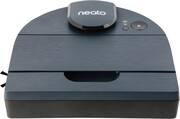
The Neato D8 is the second mapping robot vacuum I've owned and is my first introduction to the Neato brand. I've only really heard of the iBrand of vacuums, so I was excited to try the D8 out. Set-Up: Very easy start up. Download the MyNeato app and it'll walk you through the steps to set up the vacuum. Really simple and easy to get it connected to WiFi. First Run and Map: After the initial set-up, it wanted to do the first run to get a map of my home. I pressed the "Play" button to start mapping and it started. After about 30 minutes, I get an alert saying the sensor was having issues. Turns out it jammed itself under my couch. My previous robot vacuum never had this issue. I had to power cycle the D8 and set it on the charging base. When I checked the app, my map was incomplete and the orientation was incorrect. I decided to put a No-Go Zone where my couch is on the incomplete map and scheduled it to run again the next day. When I woke up, I had an alert saying there was a sensor error. The Neato had wedged itself again under the couch. After a week of the same problem, I decided to get some furniture risers for my couch. I deleted the D8 from the app, did the set-up process once more and did the initial run again. It was finally able to map my area and give my a very accurate map. Cleaning and Scheduling: There are two options for cleaning: Eco and Turbo. Eco allows the battery to run longer and make the vacuum quieter, while Turbo can get fairly loud, but does a great job on carpets and rugs. One thing I really like is the scheduling. Mondays, Wednesdays, and Fridays I have the Neato clean in the mornings using Eco mode, and then Tuesdays and Thursdays it cleans with Turbo. This was something my previous vacuum lacked. Appearance and Maintenance: The D8 is a nice vacuum. Very sleek and modern made with nice materials. The charging base is small and the power cord can be wrapped behind it for nice cable management. When it comes to emptying the bin, it is one of the easiest things to do. Since the bin is on top of the vacuum, you don't need to press a button and slide it out of a compartment. You can just lift it out and empty. And the D8 bin is a nice size. If I run it everyday, I may need to empty it out once or twice during the week. Issues: I have run into quite a few issues with the Neato. The entire initial set-up and not being able to get it to clean for a week was a major problem. I would think that the robot is able to sense if it gets into a tight area and back up or avoid it. But so far the D8 just goes in and gets itself stuck. The top of the Neato where the Lidar sensor is already has scuff marks from when it jammed itself the first week. Also the map and app could use more features. I'd like to be able to create specific rooms and schedule the vacuum to clean in those areas on certain days. Another thing is maybe for the initial mapping, I think it should just move around the house without actually cleaning and wasting battery. That way for people with bigger homes it could map quicker. Final Thoughts: The Neato D8 is a really nice machine with some problems. But what I really look forward to is the future firmware updates that will make it better. At the state it's in right now, it's usable but has to be babysat. With that said, the Neato D8 has been a great addition to my home and I'm excited to continue using it.
Posted by KMont1234
- Rated 4 out of 5 stars
This thing works!
I previously had the Neato D4 robot a few years ago. The unit worked well but it had an issue staying connected to my Wi-Fi network and had to be re-setup pretty much every day. It drove me nuts so I sold it. So when I got the opportunity to try the D8, the first thing I did was call Neato to ask them is their software had been changed since the D4. I didn't want to spend the money on this machine if I was going to have the same issue, ($700 for a vacuum is not exactly cheap). Their customer service person told me that the software had indeed been improved and that I shouldn't have any connection issues this time. So I decided to give the D8 a try. The first thing you need to do is get the app. Make sure you get the "MyNeato" app and not the regular Neato app as they are different. The Neato app only works with models up to D7. Of course I originally got the regular Neato app and couldn't figure out how to set up my robot. A quick call to Neato customer service got me sorted out. Once I had the correct app it was pretty easy to set up the robot. I got that done and had it do it's first cleaning. We have LVP flooring in our kitchen and dining areas and those are the only places I wanted the robot to go. Because I had, had the D4 and knew that if you have places you don't want the robot to go, you are going to have to physically block them off for the first cleaning as you cannot set up the No-go areas until AFTER the robot has done it's initial cleaning and mapped out your floorplan. So I just put some boxes and books on the floor to make some barriers. The robot did its thing and then went back to base and docked itself when it was done. I viewed the floorplan and set up my No-go areas. The robot has 2 cleaning modes, Eco and Turbo. Eco is quieter and helps the battery last longer. Turbo mode makes considerably more noise and doesn't pick up that much more dirt in my experience. So I'm fine with the Eco mode. The second time I tried using the robot, it didn't seem to follow the No-go areas I had set up. We have a parrot and our cage has a tarp under it to keep bird poop off of the carpet. The robot went up on to this tarp and got stuck. The app told me that the rollers were blocked. So I picked up the robot and checked everything underneath and there was nothing blocking the rollers and they spun fine. I tried to get the robot restarted but the error wouldn't go away. I called tech support and they walked me through resetting the robot but then for some reason it couldn't download the floorplan. I thought to myself, "Here we go again with Neato and the connection issues." Nothing we tried got it going again so I ended up having to delete my floorplan and even had to delete my robot and set it up again. Even after all this it was still no joy with the floor plan. I called tech support again and we tested my Wi-Fi speed and I had over 100mbps where the robot was at so speed wasn't the issue. The tech asked me if I have mesh Wi-Fi extenders, which I do, (Eero). The tech suggested that I contact Eero and have them set up a static IP address for the robot. I had no idea how to do this but luckily Eero was able to do this for me over the phone. Couldn't have been easier. It's been about a week since I set up the static IP address and the robot has not had any problems staying connected. So it looks like Neato has indeed sorted out my previous connection issue. As far as cleaning, this thing does a really good job. The shape allows it to get pretty close into the corners. Of course it won't get all the way in there but I would say it gets to within an inch or so of our base boards. It also does a good job navigating over the floor mats we have in front of our stove and sink. I also really like being able to set up No-go lines with the app. However you can only make box shapes. For some reason you can't make diagonal lines which is a bit of a bummer for me as we have 1 spot in our living room where the transition from LVP to carpet is on a diagonal. So I have to let the robot go onto the carpet a little bit where the No-go boxes do not touch. The cons with this unit are its price, (like I said, this unit isn't exactly cheap) and the fact that it has no internal memory and thus needs to be connected to your Wi-Fi to be able to work. I wish the robot could store your floorplan and be able to work offline. If you have Wi-Fi extenders you may need to do the static IP address thing. But other than that, this machine is very good at it's job. It cleans remarkably well and in Eco mode is relatively quiet. It won't replace you needing to sweep your floors on a regular basis, (at least to get into the corners), but it will certainly make your sweeping chore easier.
Posted by darien87
- Rated 1 out of 5 stars
Good luck making it work
Out of 10 "runs" it completed 3. House is 110sqm. If objects are higher than the bumper it won't detect them and possibly hit the upper sensor or get stock. It has problems with the app where it does not recognize the map. There is no spot cleaning is all rooms or wait until it does the one you want. Programed cleaning does not respect no go zones. It is all done digital so if something goes wrong there is not a hard reset in the robot. My first unit became inoperable due to software issues I am getting a replacement. Also expect offshore customer service with very strong accent.
Posted by Milton