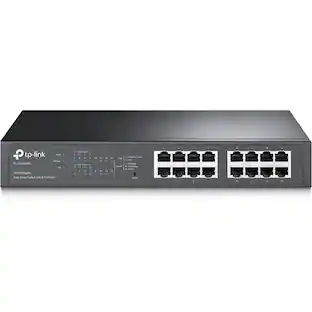
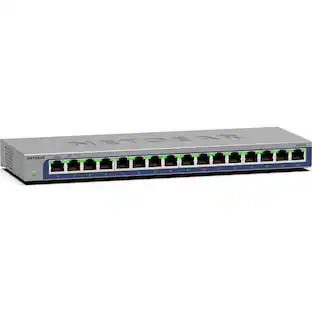
NETGEAR - 16-Port 10/100/1000 Mbps Gigabit Unmanaged Switch - Blue
Customers are saying
Customers love the flawless performance and exceptional ease of use provided by this network switch. Users frequently highlight the impressive gigabit speeds, the convenience of additional ports, and the compact size as standout features. While the device is generally praised for its reliability, some customers noted that the included instructions could be clearer. Overall, it is considered a highly effective and affordable solution for enhancing home or office connectivity.
Gigabit Ethernet
16 auto-sensing 10/100/1000 Mbps Gigabit Ethernet ports with non-blocking switching architecture for maximum throughput at wire speed.
Plug-and-Play
Simple set up with no software or configuration needed.
Internet Splitter
Connectivity to your router or modem for additional wired connections (laptop, gaming console, printer, etc).
Cost Effective
Most affordable connectivity to your network.
Easy-monitoring
Per port LEDs for port activity and speed.
Auto-MDI/MDIX
Eliminates the need for crossover cables.
- Number of LAN Ports16
Reviews
Rating 4.8 out of 5 stars with 1615 reviews
- Performance (438)
- Ease of use (417)
- Speed (187)
- Ports (144)
- Price (112)
- Heat (12)
- Power (6)
- Noise (4)
- Instructions (3)
Customer Images
The vast majority of our reviews come from verified purchases. Reviews from customers may include My Best Buy members, employees, and Tech Insider Network members (as tagged). Select reviewers may receive discounted products, promotional considerations or entries into drawings for honest, helpful reviews.
Compare similar products

Now you can put together a powerful, high-speed network on a small scale. NETGEAR's GS116 Copper Gigabit Ethernet Switch lets you build a system that can move even very large files across your network instantly - up to 2000Mbps on each port. The standards-based GS116 helps to protect customers' existing and future network infrastructure investments by painlessly integrating other 10, 100, 1000 devices as well as honoring layer 2 802.1p priority tags. Packed with ease-of-use features, this adaptable switch supports either PC or Macintosh operating systems. The compact size makes it ideal for home, small office, workgroups, departments and conference room environments. Its durable metal case has no fan for silent operation.

The NETGEAR Gigabit Unmanaged Switch series helps you cost effectively expand your network to Gigabit speeds and higher port counts. The GS116v3 Gigabit Ethernet switch comes with 16 Gigabit copper ports in a desktop metal case and is wall-mountable. The GS116 is energy efficient, built to last, and rigorously tested to provide the reliability you need. 802.1p traffic prioritization and jumbo frame support allow for seamless integration with more sophisticated networks.

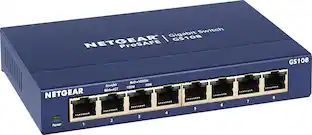
NETGEAR ProSAFE 8-port Gigabit desktop switch, designed for business with simple plug-and-play connectivity and no configuration needed. It comes with a sturdy metal case and the NETGEAR limited lifetime warranty. It supports Energy-Efficient Ethernet (IEEE802.3az) for optimized energy savings and DSCP-based QoS for traffic prioritization.

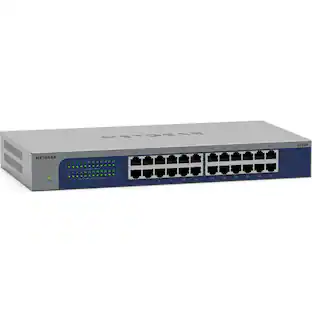
The NETGEAR GS524v3 is a high-performance switch designed to meet the demands of growing networks. With a 48 Gbps bandwidth and 24 gigabit ports, it supports high-speed data transmission and multiple device connections. This switch is engineered for efficiency, featuring auto-switching technology and Auto Power Down to conserve energy. It supports jumbo frames up to 9KB, enhancing network performance for large data packets.
| Pros for NETGEAR - 16-Port 10/100/1000 Mbps Gigabit Unmanaged Switch - Blue | |||
|---|---|---|---|
| Performance, Ease of use, Speed, Ports, Price | Overall Performance, Ease of Use | Ease of use, Performance, Speed, Ports, Price | Overall Performance, Setup |
| Cons for NETGEAR - 16-Port 10/100/1000 Mbps Gigabit Unmanaged Switch - Blue | |||
| Heat, Power, Noise, Instructions | There were no cons for this product— | Heat, Lag | There were no cons for this product— |
Specs
Customers often buy these together
Ethernet Cables

Network Adapters
Customers ultimately bought

Explore tech essentials Sponsored

Discover related products
 $12.99The price was $13.99













Keep exploring
 $337.50The price was $365.29