Rating 4.5 out of 5 stars with 959 reviews
4.5- Ease of use (274)
- Speed (121)
- Performance (108)
- Range (56)
- Signal Strength (54)
- Compatibility (24)
- Size (13)
- Design (4)
- Lag (4)
Customer Images
The vast majority of our reviews come from verified purchases. Reviews from customers may include My Best Buy members, employees, and Tech Insider Network members (as tagged). Select reviewers may receive discounted products, promotional considerations or entries into drawings for honest, helpful reviews.
- Rated 5 out of 5 stars
Installed it in PC in my palapa
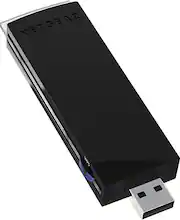
It works very well for streaming videos and music! Before, I had problems with my wifi reach. Now, Netgear N900 Dual band has done a good job on a PC that I use about 100 feet away from my wifi! I love this product and highly recommend it to everyone that has a PC that does not have wifi capability!!!!
Posted by Trevi
- Rated 5 out of 5 stars
Great wireless upload and download speeds
I switched from DSL to FIOS recently. My computer was hardwired to my DSL router, but due to cabling issues the FIOS router had to be installed in a different location, downstairs and at the other end of my house. The Verizon tech told me that I wouldn't be able to get the FIOS speeds I was paying for if I had to use wireless access (as opposed to being hardwired), and he suggested adding a new jack upstairs (which would have cost $$$). I decided to try this Netgear wi-fi USB adapter first. It was extremely easy to set up (just run CD, plug in and go) and it even comes with a cable and adapter that lets you extend the range of the device. The only problem you might run into is if the USB ports on your computer are really close together and if you already have other devices installed, it can be hard to squeeze this in next to them. I did some speed testing after I installed this and I got speeds that are really close to the levels I am paying for (and when I mean close, I mean I'm only a few Mbps off of both my max upload and download speeds). I'm really happy so far, and this has exceeded my expectations!
Posted by SBear
- Rated 4 out of 5 stars
Great adapter, horrible setup software
Let me begin by saying that this device is now working great - I use this to connect my main computer to the wireless network in the house for connectivity to my Wi-Fi printing network (yeah, too many printers). I have a main color laser printer connected up via ethernet to the home network for me to use, and 2 other printers (1 color inkjet and 1 b&w laser) for everyone else in the family to use. Now, I purchased this adapter because my old one was simply that - old. It worked, but was connecting at 72mbps. I purchased this one after reading about the various other models Netgear had available (and Best Buy had them all out and clearly showing on the shelf); I decided on this one over the others due to speed. The setup software CD included with the adapter was a joke. It asked me if I wanted to skip the CD and download the latest from the web - which I decided would be better - and then failed to do anything. I then attempted to install the software again without the update; the setup CD installed the driver files...and failed to find the adapter when I plugged it in. I completely uninstalled and re-installed again and same issue. I went to the website and - Lo and Behold! - you have to download their latest device driver for Windows 10. OK, setup CD is now worthless to me anyway, so I threw it out. I downloaded the Windows 10 driver from the web and followed all the prompts...and it failed to find my adapter when I plugged it in. Now, Netgear has a great reputation for having some great basic devices, so I was about 99% certain that the adapter was fine. But there is always that 1% that makes you wonder if you are just spinning your wheels. So how did I resolve this? I went into the Devices and Printers and noticed that I had some unknown device that was listed as something like Microsoft Router Device or something or other (it said something network-related, but nothing denoting Netgear or Wi-Fi adapter or anything remotely related to what it really was). I went into its device configuration, attempted to tell it to use a better driver...dug the stupid CD out of the trash, and when it scanned the CD for the driver, it found 2 - the initial one that was auto-installed as default that was NOT the Netgear driver, and the actual Netgear driver. I pointed it at the Netgear driver and my adapter was found and started working. Something that should have normally taken me 3 minutes from start to finish (counting removing the adapter from the packaging), instead took me almost 20 minutes. And while that may not seem like a lot of time to some, I was more than I wanted to spend setting up a device that should have been plug-and-play for Windows 10 (which I think it technically was trying to do but the software got in the way).
Posted by inogengames
- Rated 5 out of 5 stars
Awesome Wifi card
I bought this to plug into my PC due to not having a hard line available and it is like I am connected directly to my router! I have 3 walls between this card and my router and it has no problems connecting and streaming what so ever. I play games quite often and I have no Issues lagging while connected to a game.
Posted by Benjamin
- Rated 5 out of 5 stars
This devise was easy to setup
I purchased this devise to replace an existing USB WI-FI transmitter. It improved the overall speed and reliability of my ancient computer so that it's life can be extended for daily computer activity. It was simple to setup, has great range and provides excellent speed over my wireless network.
Posted by johcin