Outlet EventEnds Oct. 26. Limited quantities. No rainchecks.Shop now

Main Content
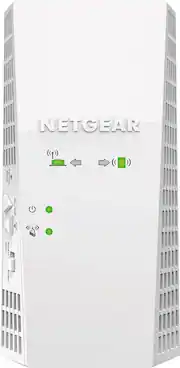
product image

NETGEAR - Nighthawk AC1900 Dual-Band Wi-Fi Range Extender - White

Model: EX6400-100NAS
SKU: 5580325
This item is no longer available in new condition. See similar items below
  • Key Specs
    • Wi-Fi Speed: 1900.0 gigabits per second (The maximum rate at which data is transferred between a network device and wireless router.)
    • Wireless Standard: AC, N (The wireless networking protocol used by the device. Each iteration of the protocol is based on the 802.11 standard developed by the Institute of Electrical and Electronics Engineers (IEEE) Standards Association. Denoted by letters following 802.11 (802.11a, 802.11ac, etc.), each version, published in alphabetical order, encompasses all previous versions.)
    • Wi-Fi Range: 10000 square feet (The device will provide a Wi-Fi connection to this approximate area.)
    • Form Factor: Plug-in (The size, arrangement, and physical configuration of the product.)
    • Band Technology: Dual (Refers to the number of frequency bands used to wirelessly transmit an internet signal. For example, dual-band devices may use one 2.4 and one 5 GHz band, while tri-band devices may use one 2.4 and two 5 GHz bands. Multiple bands also provide more flexibility for designating connected devices to specific band use.)
    • Frequency Band: 2.4 GHz, 5.0 GHz (Bands may be grouped into categories such as low- and high-band VHF (Very High Frequency), low- and high-band UHF (Ultra High Frequency), or certain frequency channels (measured in MHz or GHz). Generally, higher frequencies transmit information faster but have shorter range than lower frequencies.)
    • Antenna Type: Internal
    • Number of LAN Ports: 1 (Number of devices able to be connected to the Local Area Network (LAN). LAN ports allow wired connections to other networking devices (wireless access points, range extenders, etc.) in order to share the internet connection received through a WAN port.)
    • Number of PoE (Power over Ethernet) Ports: 1 (Allow connection of a single cable that provides both data connection and electrical power (Power over Ethernet).)
    • Wireless Networking Standard: Wi-Fi 5 (The wireless networking standard used by the device. Each iteration of the standard developed by the Wi-Fi Alliance corresponds to an existing IEEE 802.11 protocol; for example, standard 802.11ac (or AC) is termed Wi-Fi 5. Refers specifically to the standard the device is designed to use, but ultimately determines product interoperability and backward compatibility including previous versions.)
  • General
    • Brand: NETGEAR
    • Model Number: EX6400-100NAS
    • Product Name: Nighthawk AC1900 Dual-Band Wi-Fi Range Extender
    • Color: White
  • Network
    • Wi-Fi Range: 10000 square feet (The device will provide a Wi-Fi connection to this approximate area.)
    • Attached Antenna: true
    • Minimum Frequency: 2400.0 megahertz (The lowest signal frequency that the device is able to amplify or transmit. The higher the frequency, the more data that can be transmitted and the more easily the signal is attenuated (weakened over distance/passing through buildings).)
    • Maximum Frequency: 5.0 gigahertz (The highest signal frequency that the device is able to amplify or transmit. Generally, the higher the frequency, the more data that can be transmitted and the more likely the signal is attenuated (weakened over distance/passing through buildings).)
    • Maximum Coverage Area: 10000.0 square feet
    • Wireless Networking Standard: Wi-Fi 5 (The wireless networking standard used by the device. Each iteration of the standard developed by the Wi-Fi Alliance corresponds to an existing IEEE 802.11 protocol; for example, standard 802.11ac (or AC) is termed Wi-Fi 5. Refers specifically to the standard the device is designed to use, but ultimately determines product interoperability and backward compatibility including previous versions.)
  • Features
    • Overload Protection: true (Features intended to protect the product from damage and overheating caused by overload.)
  • Ports
    • Number Of USB Port(s): 0 (The total number of USB ports including all generations and versions.)
  • Compatibility
    • System Requirements: 2.4 and/or 5GHz 802.11 a/b/g/n/ac wireless router or gateway; Microsoft Internet Explorer 8.0, Firefox 20, Safari 5.1 or Google Chrome 25.0 or higher browser (The software that a product must have for it to be able to integrate with another product.)
  • Security
    • Security Features: WPA/WPA2-PSK (Wi-Fi Protected Access) and WEP
  • Dimensions
    • Product Height: 6.34 inches (The out of box height of the item. Height is measured as the vertical distance from the bottom of the item to the top as it would be primarily used or placed.)
    • Product Length: 1.75 inches (The out of box length of the item. Length is measured as the longest dimension of the item.)
    • Product Width: 3.2 inches (The out of box width of the item. Width is measured as the horizontal distance from one side of the item to the other as it would be primarily used or placed.)
    • Product Weight: 0.66 pounds (The out of box weight of the item.)
  • Warranty
    • Warranty - Parts: 1 year
    • Warranty - Labor: 90 Days
  • Other
    • UPC: 606449111897

Extend your existing Wi-Fi with Nighthawk AC1900 Wi-Fi Mesh Extender, and get the speeds that you pay for throughout your home. This Mesh Extender improves coverage and works with your home Wi-Fi to create a powerful Wi-Fi System. Includes Mesh features like Smart Roaming and One Wi-Fi Name. Easily connect all your smart home devices to one network, no new Wi-Fi names and passwords needed. Move from room-to-room while streaming video on your mobile device without any interruptions. Other powerful features like MU-MIMO and Smart Connect ensure every device is assigned the fastest available Wi-Fi connection. Easy setup with a touch of a button. Boost your Wi-Fi to the extreme with this Nighthawk Wall-plug Wi-Fi Mesh Extender. Works with your existing Wi-Fi router, gateway, or ISP provided gateway.NOTE: Firmware upgrade & factory reset required to unlock Mesh Wi-Fi features.See other products that work with this Wi-Fi networking product

  • Create your own Mesh Network: This Mesh Wi-Fi Extender improves coverage and works with your home Wi-Fi to create a powerful Wi-Fi System.
  • Smart Roaming: Freely move around your home without the fear of disconnecting. The Wi-Fi Mesh extender automatically hands off your connection between your router and extender.
  • One Wi-Fi Name: Creates a single network and extends coverage of your home's Wi-Fi with one Wi-Fi name and security password.
  • Works with your Existing Wi-Fi: Easily creates an extended mesh Wi-Fi system with your existing gateway, router, or ISP provided gateway.
  • Dual band Wi-Fi up to 1.9Gbps: Extends 2.4 and 5 GHz Wi-Fi signals from existing Wi-Fi routers for better range.
  • Smart Connect: Intelligently selects the optimal Wi-Fi band for every device.
  • Max Coverage: High power amplifiers and internal antenna array increase whole-home coverage.
  • MU-MIMO: Simultaneous streaming to multiple devices.
  • Create your own Mesh Network: This Mesh Wi-Fi Extender improves coverage and works with your home Wi-Fi to create a powerful Wi-Fi System.
  • Smart Roaming: Freely move around your home without the fear of disconnecting. The Wi-Fi Mesh extender automatically hands off your connection between your router and extender.
  • One Wi-Fi Name: Creates a single network and extends coverage of your home's Wi-Fi with one Wi-Fi name and security password.
  • Works with your Existing Wi-Fi: Easily creates an extended mesh Wi-Fi system with your existing gateway, router, or ISP provided gateway.
  • Dual band Wi-Fi up to 1.9Gbps: Extends 2.4 and 5 GHz Wi-Fi signals from existing Wi-Fi routers for better range.
  • Smart Connect: Intelligently selects the optimal Wi-Fi band for every device.
  • Max Coverage: High power amplifiers and internal antenna array increase whole-home coverage.
  • MU-MIMO: Simultaneous streaming to multiple devices.
Whats Included
  • AC1900 Mesh Wi-Fi Range Extender (EX6400)
  • Quick start guide
  • AC1900 Mesh Wi-Fi Range Extender (EX6400)
  • Quick start guide

Q: Is this device simple to install? Just plug in to electrical socket? Having problems with service in parts of a large home and bad towers in the area.

A: It is not complicated to install but it is not as simple as just plugging it into an electrical outlet. If the intent of your decision to purchase this product is to extend the range of your primary WiFi network - you will need to know how to connect to your primary WiFi. E.g. SSID (Name of your network) and password. If you know how to connect your phone and other devices to your WiFi, you have the ability to set this extender up. The instructions will direct you to plug it into an electrical outlet near your current WiFi (usually built into your modem) and direct you to connect either a laptop or phone to the default SSID for the range extender via a URL. From there, you will go through a simple setup process that will connect the extender to your primary WiFi. When you are done, you can unplug the extender and plug it into a outlet that is approximately half the distance from the location you need better coverage in and it should turn on and automatically connect to your primary WiFi if you configured it correctly. However, while relatively easy to set up and less expensive, I would advise that you consider a mesh extender vs. a range extender like this one. The main reason that I recommend the mesh extender, which is more expensive, is that you do not have to switch back and forth with different SSIDs. For example, if your primary SSID is "ALPHA", this range extender could be configured with an "ALPHA-2GEXT" and a "ALPHA-5GEXT" (or other similar name) but it cannot be the exact same SSID as your primary WiFi. If you travel back and forth in your house with a device like your phone or laptop, you will have to switch to use the WiFi with the best signal in your home. With a mesh extender, the SSID remains the same name and you don't have to switch back and forth with different SSIDs in your home. If you can afford it - go with the mesh extender (also just as easy to set up).

Q: WE had this for a week and it worked great. Today the connection to the router dropped and we have tried every area to reconnect and even tried with an ethernet and next to the router and it will not reconnect to the router...anyone else have this happen?

A: Try unplugging the extender and the modem for a minute and then plug them in and check that he lights on the extender are working. Power fluctuations can cause your problem.

Q: Does this use the same SSID (wifi network name) or does this create a new SSID (different than your home wifi name)? I read somewhere that some wifi extenders create a new SSID.

A: It creates a new SSID with the suffix "EXT" for extension. It is dual band so actually creates two new SSIDs - one for 2.5G and one for 5G.

Q: would this work with wifi 6 router?

A: Hi wwwwwwwwwww, Yes but will not output wifi 6