Rating 4.5 out of 5 stars with 8065 reviews
4.5- Ease of use (2518)
- Range (955)
- Performance (939)
- Speed (817)
- Setup (412)
- Compatibility (32)
Customer Images
The vast majority of our reviews come from verified purchases. Reviews from customers may include My Best Buy members, employees, and Tech Insider Network members (as tagged). Select reviewers may receive discounted products, promotional considerations or entries into drawings for honest, helpful reviews.
- Rated 5 out of 5 stars
Great little modem
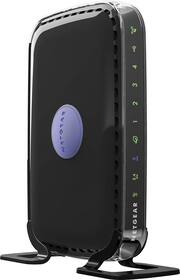
I bought this to replace the last generation of the same router which died after 6 years. Very compact, which I love, and it can be placed flat or you can have it stand up with included legs. Performance is great as well, good range and stable connection!
Posted by sushibar7
- Rated 5 out of 5 stars
Awesome router
It's easy to set up anywhere you want. It's always on and never had any problem with needing to turn it off or reset it even after two months of constant use. The dual band makes it more awesome since I can be on Xbox live and watching Netflix and streaming all at the same time without any interruption. Sure fast connection and great HD quality.
Posted by Richlyrich53204
- Rated 5 out of 5 stars
EXCELLENT ROUTER!!!
I have used wireless networking in my home for years and have had several routers. The NETGEAR RangeMax Dual-Band Wireless-N Router is by far the BEST ONE YET!!! We have 1 Desktop PC, 2 Laptops, 1 MFD and 4 tablets that connect through this router (sometimes all at once) and we have never experienced any issues of slow connections or download speeds! To top it all off was the price!!! The value far outweighs the cost!!! I absolutely LOVE this router!!!
Posted by TheMrsGrape
- Rated 5 out of 5 stars
Great router for a beginner
The style, speed and price are perfect for my needs.
Posted by Mismos
- Rated 4 out of 5 stars
pretty good for my first wireless router
If your looking for a easy WiFi set up this is the way to go
Posted by Junior