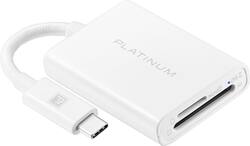
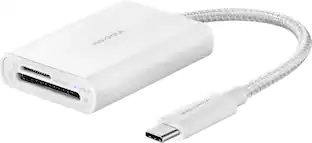
Platinum™ - USB-C to SD and microSD Card Reader - White
- General
- Brand: Platinum™
- Model Number: PT-AFACS
- Product Name: USB-C to SD and microSD Card Reader
- Color: White
- Other
- USB Cable Included: true
- LED Indicator(s): true
- Computer Connectivity: Mac, Windows, Apple iPadOS
- Number Of Memory Cards Supported: 2
- Number Of Slots: 2
- UPC: 600603296918
If you’re filming or taking photos, there is nothing worse than a full memory card in the middle of a shoot. Transfer and back up files with the Platinum PT-AFACS USB-C to SD and microSD Card Reader. With a USB-C and USB 3.1 Gen 2 interface, simply connect it to your computer or device and quickly transfer data with 5 Gbps. It’s compatible with iMac, iPad, Windows and USB-C devices to help keep your creativity flowing without having to pause and delete unwanted files. A blue LED blinks to let you know when the UHS-II SD memory card is in and that files are being read. A compact design and included braided 100 mm cable mean you can take it wherever you go without adding weight or clutter. Follow your creativity and never let a full memory card stop you again.
- USB-C and USB 3.1 Gen 2 interface: Easily connect and transfer data to your computer.
- Wide compatibility: Compatible with iMac, iPad, Windows and USB-C devices.
- 5 Gbps transfer rate: For high-speed data transfer between your devices.
- Multiuse: Read and write SD/micro SD at the same time.
- Blue LED indicator: Light blinks when memory card is in and while reading and writing data.
- Bus-powered USB: Eliminates the need for an external power adapter.
- Braided cord: Includes a 100 mm white braided cord that delivers quality and durability.
- Compact design: Easily goes everywhere you do.
Whats Included
- Platinum USB-C to SD and microSD Card Reader
Product Manuals
Q: Will this work with my Android Samsung s8 phone?
A: This card reader is compatible with most USB-C devices.
Q: Is this compatible with MacBook Air M2, which has Thunderbolt USB 4 ports?
A: Hello SistyU. This card reader is designed and compatible with iMac, iPad, Windows and USB-C devices. Mary II Platinum Customer Support
A: Hi Marvin, You can access all the files of your microSD by inserting the card into the slot and attaching the accessory to your Galaxy S22 device via USB-C. Platinum Products Lisa
Q: My Z Fold 3 won't bring it up on my files. Any help would be appreciated.
A: I don't really have an answer, other than to say that I also have a Galaxy Z Fold3 and it works perfectly on my phone. Go to Settings>Apps>My Files. Tap "Open" (at bottom of screen). Tap "USB Storage" Tap "DCIM". If you've already solved the issue, maybe this will help someone else.
Q: Will this read a CaC card?(military I.d)
A: This reads SD and Micro SD cards, so no it will not read that kind of card.
Q: will this read a sim card for phones?
A: No, this card reader does not work for SIM cards.
Q: Will it work with my HP pavilion?
A: Yes. That's what I'm using it with.
Q: Will this work with Samsung S10e phone
A: Hi Miky, This card reader is compatible with most USB-C devices, so if your Samsung S10 phone has USB-C type then this will work. If you have any questions or concerns, please use the link below to reach us and also you can contact this phone number 800-499-3964 for further assistance. Platinum Products Nikki https://www.bestbuy.com/site/best-buy-brands/platinum/pcmcat369700050000.c?id=pcmcat369700050000
People also viewed
 $14.99The price was $18.99
Today's top picks
- $14.99The price was $18.99
 $28.33The price was $42.20