Rating 4.7 out of 5 stars with 209 reviews
4.7- Overall Performance (51)
- Design (26)
- Ease of use (19)
- Connectivity (12)
- Weight (8)
- Battery Life (15)
- Stick Drift (3)
Customer Images
The vast majority of our reviews come from verified purchases. Reviews from customers may include My Best Buy members, employees, and Tech Insider Network members (as tagged). Select reviewers may receive discounted products, promotional considerations or entries into drawings for honest, helpful reviews.
- Rated 5 out of 5 stars
I would recommend!
[Employee of bestbuy] Purchased it for my son for his birthday! Connected easily with the switch. Easy to hold and makes playing games easier. The bright color makes it hard to misplace and it's his favorite character in fortnite! PEELY!
This review is from PowerA - Enhanced Wireless Controller for Nintendo Switch - Fortnite Peely
Posted by EvaMaria
- Rated 5 out of 5 stars
Functional, Cute, and reliable.
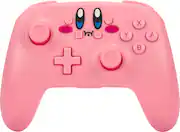
My 5 year old daughter wanted a controller to play Mario Odyssey and Kirby. She loves the pink color, the fun Kirby face and the layout/control scheme worked well. We were pleased with the thumb sticks, with the button layout, with the feedback, and triggers. We had no concerns with the charging time or battery duration. The controller is cheaper than Nintendo branded controller and lacked a few of the main features: Does not support HD rumble, IR, motion control, or Amiibo NFC. I did not want to buy another set of Joy Cons to get drift and I did not feel that another Pro Controller was worth the cost. So far (3 months), neither of the PowerA controllers has developed any thumb stick drift. For the money, this device was well worth it for our family. In fact, we bought the Kirby, and Link Versions for our kids.
Posted by JonWalters
- Rated 5 out of 5 stars
Kirby Switch Pro Controller!
Got this as a gift for my wife for Christmas and she loves it! Super cute design, high quality feel and plays great! Have other pro controllers and this is on par with the best of them.
Posted by JustinR
- Rated 5 out of 5 stars
Kirby controller
This control is super cute love Kirby . and it’s easy to connect to Nintendo switch to play on the tv.
Posted by DamarisMV
- Rated 5 out of 5 stars
Excellent control
I love the feel. Great quality and bright gaming colors.
This review is from PowerA - Enhanced Wireless Controller for Nintendo Switch - Pikachu Vibrant
Posted by JoseP