Rating 4.3 out of 5 stars with 52 reviews
4.3- Sound Quality (38)
- Bass (18)
- RGB (14)
- Connectivity (9)
- THX Spatial Audio (6)
- Size (4)
Customer Images
The vast majority of our reviews come from verified purchases. Reviews from customers may include My Best Buy members, employees, and Tech Insider Network members (as tagged). Select reviewers may receive discounted products, promotional considerations or entries into drawings for honest, helpful reviews.
- Rated 5 out of 5 stars
Absolutely love these speakers.
These are THE BEST sounding speakers I have ever owned. I replaced a Bose cinemate system with these on my PC. The sound is simply unreal. The highs and mids are crystal clear, and that little 5.5 inch sub absolutely SLAMS!!! The price was a hard pill to swallow at first, but after hearing them I couldn’t be more pleased with my purchase. My only caveat (which will be fixed in a software update later) is the spectrum cycling of the lighting when the speakers sleep. Off or your color profile would be better.
Posted by JonathanC
- Rated 5 out of 5 stars
good product
Sounds great the bass is really punchy and the wireless subwoofer is really convenient
Posted by NathanielK
- Rated 4 out of 5 stars
A Great Pair of Gaming Speakers!
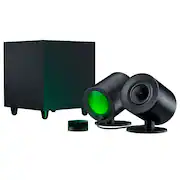
The Razer Nommo V2 Pro Gaming Speaker(4-piece) is a pricy gaming speaker. This is not your typical music studio speaker set which is even pricier but for a gaming setup (especially for PC), these are perfect. I have taken the time to review this 4-piece set and in short, Razer did a great job with these but improvements can certainly be made. This is my review of the Razer Nommo V2 Pro Gaming Speakers. *TLDR at the bottom ============ IN THE BOX/SETUP: In the box, you get a pair of the Razer Nommo V2 Pro speakers, a wireless subwoofer, a wireless control pod, a USB-A to USB-C cable, a power adapter for the speakers (some regional plugs are included too), a power cord for the subwoofer, and 2 AAA batteries. First, I want to acknowledge the attention to detail that was given to the packing of the materials. Everything was neatly packed and organized. The instructions were clear and easy to follow. Just make sure you have everything plugged in all the way because I didn’t initially and was dumbfounded about why the speakers weren’t turning on after following all the instructions correctly. Setup took about 20 minutes. I tested the speakers with my PC, PS5, and phone for Bluetooth functionality. ============ FEATURES (HARDWARE AND SOFTWARE): If you hate wires, you will love these. These speakers have the bare minimum when it comes to wires. Some of the wires are braided too so they are great quality and should have minimal tangling. The two desk speakers have customizable RGB if they are connected to a PC. Outside of a computer, the RGB is not customizable. The subwoofer is wireless as well as the control pod. The control pod is used to control the speakers. This is essentially the “remote” for these speakers. I would’ve preferred an actual remote with different built-in functions like audio inputs(USB, Bluetooth), audio presets, volume control, RGB shutoff button, etc. The control pod has some basic functions like play/pause, mute, and next but it is still very limited if you want to control the speakers from far away. In terms of software features, there are plenty included with these speakers. I will be speaking on behalf of the features available with Razer’s Synapse software on PC. There is currently no other software available that allows for customization. Within Synapse, one can switch between Stereo and THX Spatial Audio. Both modes sound amazing, but I have noticed a greater sound stage with THX Spatial Audio. The surround sound when playing music, games, or a movie is vast and sounds incredible. Pair this mode with some custom EQ settings and you have everything you need for great sound. Within EQ settings there are default audio presets for movies, games, etc., but the lows, mids, and highs can be customized to your liking too. There are a lot of RGB modes available and like with any Razer device, they will sync with your other RGB devices. ============ SOUND QUALITY: Whether you are gaming, listening to music, or watching a movie, these speakers will blow you away. (literally, so be careful not to turn it up all the way) The out-of-the-box sound is perfect, but I enjoy the work of fine-tuning the audio. I have previously mentioned that Razer’s Synapse software allows you to play around with the EQ settings. I highly recommend playing around with the EQ until you find that sweet spot for your ears. You won’t regret the time it takes. The subwoofer adds a deep bass to the sound stage and combined with THX Spatial Audio, the surround sound is seriously immersive. If these had a remote control, I could see these being perfect for an at-home mini movie theatre. In terms of PC gaming, these do an excellent job of providing the immersive sound that game developers want you to hear. Whether you are in an emotional cutscene or shooting down helicopters in Far Cry 6, everything will sound great. These speakers can be used with a PS5. All you need to do is plug the USB cable into the PS5 and the PS5 will automatically detect the speakers. Unfortunately, there is no way to manage EQ settings or RGB when using the speaker with a console. However, the vast sound stage still exists and sounds great with whatever game you are playing. Regarding Bluetooth functionality and sound, there is not too much to it. Click the single button on the control pod and the speakers will go into Bluetooth mode. Connect your phone and that is it. There is no way to control the RGB which by default goes into audio visualizer mode. EQ can be adjusted within your phone’s settings. Music and podcasts still sound great. ============ POTENTIAL IMPROVEMENTS: I have mostly covered the pros of these gaming speakers but there are certainly some improvements that can be made. I will list them down below. -The control pod is limited, a remote with multiple input options (USB, Bluetooth, etc.), multiple audio presets, different RGB options, volume, subwoofer level, etc. would’ve been nice to control the sound when connected to either a console or using Bluetooth -As a user of an ultrawide monitor, I struggled to find a good position for the two bulky desk speakers. It would’ve been if these were height-adjustable to accommodate someone with a large or many monitors or someone with limited desk space -Limited RGB customization when connected to other devices. Some form of a button to shut off RGB would’ve been neat in case the RGB needs to be turned off (e.g. movie night) -An analog or optical input would’ve been nice to have to plug these speakers into a TV. -Switching to PC from Bluetooth mode is not the most efficient, rather than clicking the control pod button, you instead need to unplug the USB-A cable and plug it into the PC to switch modes, a remote with a dedicated button would streamline this process -This is more of a request but RGB on the subwoofer would’ve been neat, the subwoofer is pretty bland ============ CONCLUSION/TLDR: Overall, Razer hit a home run with the Nommo V2 PC Gaming Speakers. The vibrant sound of the speakers and the thumping sound of the subwoofer allows for an immersive experience whether you are gaming, watching a movie, or listening to music. The customization for these speakers on PC is vast and neat to have as an option. I did have trouble finding space for the bulky speakers and would’ve liked them to be adjustable. The control pod while nice is extremely limited for controlling the speakers from afar. There were other minor drawbacks listed above but if they aren’t too bothersome, I wholeheartedly recommend you give these gaming speakers a shot!
Posted by BarackObama
- Rated 4 out of 5 stars
Nice sound with some quirks
Pros Strong bass Clean highs Good simulated center channel Lighting enhances gameplay Lighting syncs with other Razer products More setup options versus their soundbar option Easy wireless setup Realistic spatial audio Also offers Bluetooth connectivity Cons Only two input options No stereo jack Lighting effects don’t match with game Limited manual lighting controls Speakers enter sleep mode sometimes even when in use Speakers don’t automatically wake from sleep No Bluetooth adjustments Fixing randomly sleep mode means manually turning speakers on/off Controls are only on puck which can get lost, such as switching inputs Puck has limited control options Subwoofer randomly disconnects when off/asleep The Razer Nommo V2 Pro is the top tier in the lineup of gaming speakers for those who prefer individual speakers versus their soundbar option. Razer did a nice job packaging every nicely with everything protected and held in place with thick foam. In fact, they did such a good job the whole family missed the control puck when it was first unboxed. The first thing that stands out is just how big the speakers are. Unlike most gaming speakers these have some heft to them. For smaller desk setups it might be challenging to find space. Similarly, the subwoofer is large. There are no controls, input jacks, or output jacks on the speakers. The speakers are only controlled via the wireless puck or via Synapse. Setup 9/10 Basic setup is extremely easy. Just plug the speakers into power and the USB-A cord into the computer. The speakers are USB-C but the included cord is USB-C to USB-A. You can place the subwoofer anywhere since it is wireless. Similarly, the control puck just needs the batteries installed and you are up and running. All components are paired wirelessly from the factory. The first time you plug them in they turn on automatically and are ready to go. You can pair Bluetooth devices by switching modes using the control puck. While easy to do, the downside is without the small and easy to lose wireless puck, functionality of the speakers is limited. If you are prone to losing things on your desk, you may wish to tape the control puck down. Controls and Customizability 6/10 The puck can be used to turn the RGB lights on and off, but all other lighting controls are done via Synapse. In Bluetooth mode the only lighting option you have is on and off. Any EQ settings in Bluetooth mode would need to be done via the Bluetooth source if available on the playback device. In Synapse, you can customize the general lighting effects like breathing, spectrum cycling, etc., similar to other Razer products. With compatible games it automatically chooses the lighting effect unless overridden. There is no option to create custom lighting profiles per game when overridden. You can have the lighting effects match other Razer products that use Synapse. You have a 10 band EQ to adjust the sound and a THX Spatial audio off/on option. Spatial audio reduces bass slighting in favor of a larger soundstage and placement of sounds. One oddity worth mentioning is the power saving mode. Like all speakers the Nommo V2 Pro has an automatic power save mode. What is odd is it only applies to powering off. The instructions don’t make it clear but when they fall asleep for any reason you must manually turn them back on with puck. What is even more strange is in some games, such as Forza and Halo, the speakers would time out and fall asleep as if they were not in use. This is understandably frustrating if you are in the middle of a firefight. The only way around this is to completely turn off the auto power off function and manually turn the speakers on and off. It is uncertain if Razer can improve this via updates but as it stands, your best bet is to have them be fully manual. Lighting 4/10 Of course, with this being Razer you must talk about the lighting. The promotional materials make you think the effect is going to do something to immerse you more into the game, but it is more of the regular Razer lighting. While the effect is nice as a wall wash it doesn’t really add to the gameplay, at least currently. For example, there is a profile for Halo Infinite. When launching Halo the speakers changes to flashing white. Your first thought might be the speakers would change colors based on possible muzzle flash or what the background scenery is to create more immersion. In reality, no matter what was happening in the game, the speakers just flashed white somewhat like lighting. This just seems like a missed opportunity. Hopefully Razer is still polishing the way this works and eventually the effects will be more dynamic and based on gameplay. Sound Performance 8/10 Out of the box sound quality is decent. Bass is heavy and almost boomy but adds impacts to games. It can easily fill a medium sized room. By default the mids are slightly weak but still reasonable. Even with adjustment the bass feels a bit boomy but not offensively so. With adjustment the overall range is respectable but not outstanding. Games feel dynamic and music feels lively. With so much bass it’s so surprise that bass heavy music does with the Nommo V2 Pros. What is more of a surprise is acoustic is represented well. If you are away from the speakers then they sound better with Spatial audio off, but sitting in front of them the Spatial effects provide a sense of depth and soundstage. Spatial Audio is where having two discreet speakers helps. You can adjust each speaker to create your sweet spot for spatial effects to match your seating position. There is a distinct spot where the spatial effect is strongest and where it drops off sharply. Sitting in the sweet spot, in-games sounds have good placement. The simulated center channel is very good. The left and ride side are distinct with a modest amount of sound placement behind. Placement of sounds is stronger to the front and sides compared to the back, but the overall effect gives you a good idea where sounds are coming from without headphones or speakers all around you. The only downside is the speaker stands aren’t adjustable themselves. This means that if you sit higher or lower than normal you can’t just point the speakers up or down to move the sweet spot. You either need to move yourself up or down or prop up the speakers higher. It’s a minor inconvenience but it would have been nice if the speaker stands at least could adjust vertical tilt. Final Thoughts Overall, the Razer Nommo V2 Pro are very nice speakers that do a respectable job as both gaming and music speakers. Sound quality is not top tier but close after EQ adjustments. The main gripe is the power save function. If Razer could enhance the in-game functionality of the lighting to enhance gameplay, this package could be hard to beat even with the quirks. If you are in the market for gaming speakers with excellent spatial audio, decently well-rounded audio quality, and like the idea of RGB lighting effects then the Razer Nommo V2 Pro is worth considering.
Posted by CraigB
- Rated 5 out of 5 stars
Surround sound speakers
The razor surround sound system I purchased for my computer was so easy to hook up. The sound quality is like no other the along with the subwoofer
Posted by Pesci