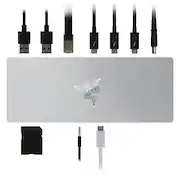
Rating 4 out of 5 stars with 52 reviews
4.0- RGB Lighting (16)
- Thunderbolt 4 (9)
- Build Quality (7)
- Power (6)
- Charging (4)
- HDMI (10)
- Price (7)
- Ports (3)
Customer Images
The vast majority of our reviews come from verified purchases. Reviews from customers may include My Best Buy members, employees, and Tech Insider Network members (as tagged). Select reviewers may receive discounted products, promotional considerations or entries into drawings for honest, helpful reviews.
- Rated 5 out of 5 stars
Awesome accessory, High speed
I have a razer laptop and it's greatly improved my functionality when I leave it set up as a desktop, I am easily able to hook it up to all of my devices so I only have to unplug one thing when I take my laptop off the desk. Plus you can't beat the light show as it syncs for all of my other razer devices and Govee Devices to make for a really cool look over by my desk. Pricey, but works nicely.
This review is from Razer - Thunderbolt 4 Certified Dock with Chroma RGB Lighting and 10 Ports for PC and Mac - Black
- Rated 3 out of 5 stars
Its a dock, just not the correct dock.
I received the dock and it functions. Please be advised though that the Mercury version of the dock does not have the Chroma RGB lighting as is mentioned in the product name. I have asked them to update the naming. This item borrows the reviews from the and information from the black one which actually does the rgb lighting (sku 6479075).
Posted by GHCJ
- Rated 5 out of 5 stars
Clean, attractive and fully featured
TLDR: (that’s Too Long, Didn’t Read) Docks are usually all business of just connecting a lot of wires to one box and then connecting that box to your computer with one wire, but this one is not only very capable, but also fun! I would have preferred having the cable to the computer on the back and a few more ports on the front for temporary connections, but this does the job it was designed to do, and does it with panache! There is more than enough power and ports to get everything connected with a single cable to your laptop or desktop. Pros: * Small footprint. * Full-size SD card slot on the front. * 3.5mm Headphone jack on the front. * Light bar is fun and the configuration options are endless. * High-power TB cable to the computer for laptop charging, too. Cons: * Huge power brick about the size of the dock (albeit one with a huge 135W capacity, too). * No labels on any of the ports. * Minimal ports on the front. Aesthetics: Very subtle design that matches other Razer products with a matte black finish and chamfered edges. The front has 3 holes with no labeling but it’s kinda obvious what they are for; an SD card slot, a 3.5mm headphone jack and a Thunderbolt cable. The Chroma lighting is totally unnecessary for a dock, but it’s eminently cool anyway. You can even sync the dock’s lighting up with the other Chroma-controlled parts of your rig so they all work in harmony. Usability: The entire bottom is a rubber pad so the dock not only won’t slide around on your desk if you tug a cable, but also so it won’t slide away from you as you insert or remove an SD card from the front. Inserting or removing the 3.5mm headphone cable might require two hands, but it’s probably not something you’ll do often. None of the ports have labels. While this adds to the minimalist aesthetic, it does make it a tad more confusing to figure out what each port is intended for; aside from the obvious based on the shape of the plug. I generally prefer my dock to have all of the “permanent” connections in the back and all of the “temporary” connections in the front to keep things neat. This dock has the single TB cable for the PC in the front along with the SD card slot and headphone jack. I would have liked that PC cable to be in the back and have a spare USB-A and USB-C port in the front for temporary connections, but it’s not a deal-breaker. The software is very gaming-centric. I wouldn’t call it the easiest to use, but it does have a TON of configuration options for the lights on the dock. You don’t need the software for any other aspect of the dock, though. Then again, if you don’t want the Chroma lighting, there are other dock options out there for less cost. Functionality: I won’t go down the spec list or enumerate every device you can connect. Let’s just say that if you can plug it in to this dock, it’ll most likely work. I find it incredibly useful for my laptop so I can have a few 4k monitors, a hardwired network, and a few other devices all connected to the dock for use when I’m at my desk. Then when I want to take my laptop with me elsewhere, it’s just one connection to unplug. If your laptop charges over USB-C/TB, that one cable can also keep it powered up, too. Value: I would not call this dock a value-priced option. It’s not priced crazy high, but it’s not the cheap option, either. Based on Razer’s other products, I’d feel comfortable with the quality and support you’ll get from this. Conclusion: You get what you pay for, and you get a LOT with this dock. Not only does it support a ton of high-power connections, but does it with style, too. BTW, as of the time of this review, there is no Mac version of the software, but there is a Mac-specific version of the dock in white with no lighting effects (or software).
This review is from Razer - Thunderbolt 4 Certified Dock with Chroma RGB Lighting and 10 Ports for PC and Mac - Black
Posted by gadgeTT
- Rated 5 out of 5 stars
Sloid thunderbolt 4 hub
This Razer thunderbolt 4 hub stands out among other hubs for the unique design and quality it provides. It is built of a solid piece of nice feel aluminum that is powered by a power adaptor. The underglow Razer Chroma lighting is gorgeous. It complements my other Razer products and can be customized via the Razer Synapse software on PC ONLY, not available on Mac OS; however, it still works without the ability to customize the hub via Synapse software. As far as the performance is concerned, I hooked up the hub into my Alienware PC via Thunderbolt 3 upstream port, which is the USB-C located in the front of the hub, and it worked flawlessly; the 4K display works like a breeze. I connected my other peripherals via the USB ports with no issues. Additionally, I use my MacBook Pro M1 for work, so this hub is absolutely a lifesaver since my MacBook Pro has only two thunderbolt ports; with the hub connected to my Macbook Pro, the 4k/120hz monitor worked smoothly via thunderbolt 4 while it keeps my Mac charged with fast charging up to 90 watts all time as thunderbolt 4 provides audio, video and power delivery. Great hub for computers with limited ports but lacks HDMI port as well as DisplayPort. I/O Ports 4 Thunderbolt™ 4 (USB-C) 3 USB-A 3.2 Gen 2 1 Gigabit Ethernet SD Card Reader, UHS-II 3.5 audio jack
This review is from Razer - Thunderbolt 4 Certified Dock with Chroma RGB Lighting and 10 Ports for PC and Mac - Black
Posted by Zaid
- Rated 5 out of 5 stars
Solid dock
This is one of the first Thunderbolt4 / USB4 docks. It’s solidly built inside and out, and it works with anything that supports Thunderbolt or USB-C. There can be limitations but those are on the computer it connects with. There is a different Verizon of this same dock, ‘Mercury’ color, or silver. It’s the same without the lights on the base. Consider this version when non-windows computers. At the house we use several computers. To some extent, the dock worked with every single one, with some limitations: - Chromebook with Thunderbolt 4 ports and Intel Iris Xe video: Everything works, connected two DisplayPort 1080p older monitors with DP to USB-C cables. The light bar cannot be controlled from ChromeOS so it light ups with a slowly rotating color effect. There might be a way of controlling the lights from the Linux subsystem on Chromebooks but didn’t try it. - macOS: An older MacBook with Intel graphics from 2017 worked perfectly, except for controlling the lights. There are no drivers needed. I was able to drive two external monitors. Gigabit ethernet and card reader are recognized. The 3.5mm audio connector works and it’s very clever on this dock: It presents itself as USB audio only when connecting earbuds to it. Unplug the cable and the audio device disappears. This is makes it much more convenient. - Current Intel 11th gen. with Nvidia RTX, Windows 11: Upon plugging the dock, Windows automatically runs the Razer installer which prompts to download and install the drivers for the lights: Razer Synapse: Windows would recognize but not drive the DisplayPort monitors but it worked perfectly with a native USB-C monitor connected through the dock. This appears to be a limitation on the laptop as these monitors also did not work when plugged directly into the laptop with an USB-C to DP cable. - Another Windows 11 laptop but with USB-C (Which supports Video but not Thunderbolt). It could drive the USB-C monitor through the dock and everything worked, including the lights on the dock. - Older Windows 10 PC with USB-C (No video): All worked except video, as expected. So the dock is able to seamlessly switch between Thunderbolt 3, Thunderbolt 4 or USB-C mode depending what’s connected to it. It’s able to route video to all three Thunderbolt 4 ports if the host PC supports it. The light bar on the base comes with the black version but not present on the silver (Mercury) color, and Razer only supports it on Windows. Construction is excellent with precisely crafted aluminum enclosure Ports on Front: - Thunderbolt4/USB4 to host. - 3.5mm audio (Only active when cable I plugged). - UHS-II SD Reader Ports on rear: - 3x Thunderbolt4/USB-C ports with DP mode (Video out) (40 Gbps ports). - 3x USB-A 3.2 (20 Gpbs ports). - Ethernet Gigabit - Power port: Barrel connector. Power: The power adapter provides 135W, used to power the dock and connected devices. It provides 90W USB-PD to the host (laptop). It was able to adequately power Windows, Chromebook and macOS laptops. (BIOS settings correctly reports 90W). Lights: The light show up as an USB device. Official drivers exist for Windows only. I tried an unofficial Razer driver on macOS and didn’t work (At least not yet). On Windows, the driver can coordinate all other Razer devices that come with programable lights and also works with smart lights like Hue, LIFX, Twinkly, etc. Nitpicks: Ethernet is Gigabit. I was expecting 2.5G, 5G or 10G Ethernet at this price level. It presents itself as a Realtek NIC and works with every OS. Overall it’s a great dock, with no-nonsense. Consider the Mercury version if not using Windows. It works with Thunderbolt4, older Thunderbolt 3 and plain USB-C. Makes a single connection to the laptop with everything I need.
This review is from Razer - Thunderbolt 4 Certified Dock with Chroma RGB Lighting and 10 Ports for PC and Mac - Black
Posted by emiliosic