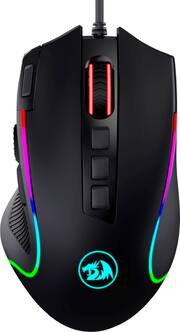
Rating 4.9 out of 5 stars with 21 reviews
4.9- RGB Lighting (4)
Customer Images
The vast majority of our reviews come from verified purchases. Reviews from customers may include My Best Buy members, employees, and Tech Insider Network members (as tagged). Select reviewers may receive discounted products, promotional considerations or entries into drawings for honest, helpful reviews.
- Rated 5 out of 5 stars
Gaming Mouse
It looks great, it work great, it feels great. Overall it’s an amazing mouse. Would prefer if it was wireless but ohh well, I still like it.
Posted by MrJeff
- Rated 5 out of 5 stars
"Fire" button added extra button function
Each button on Red Dragon M612 Predator mouse can be user configured for user selected custom function. This includes "Fire" button at left from left click can also be reconfigured for custom function. While M612 Predator has lower dpi than M711 Cobra, M612 Centrophorus2 lower DPI is almost as accurate as M711 Cobra. *RedDragon M612 Predator, M711 Cobra and Centrophorus2-M601 mice all require its own driver. If M612, 711 and M601 drivers are installed on same Windows PC, each Dragon Dragon mouse will show its own icon at Windows taskbar. M612 Predator driver is compatible with M11 Cobra. M612 Centrophorus2 mouse requires its own driver and cannot use M612 or M711 mouse driver.
Posted by Vortex
- Rated 5 out of 5 stars
Bargain Killer Looking Mouse
Easy to use, plug & play ability. Just had to make minor speed adjustments in the Mouse settings on my Mac. Only complaint is the cord snags sometimes but that’s the pro of a wireless mouse over wired. No true complaints though for the $17.99 price. Looks amazing with the alternating colors.
Posted by Dangitjefff
- Rated 5 out of 5 stars
Christmas gift
I bought this for my grandson who requested a gaming mouse for Christmas. He was very pleased with this and really liked the colorful lights.
Posted by Royo1953
- Rated 5 out of 5 stars
Great buy & great price
Great gaming mouse for someone just now getting into the pc gaming. Sensitivity takes some getting used to but I will definitely be changing settings on it when I’m more accustomed to the mouse.
Posted by McGoolaOblngata