Rating 4.7 out of 5 stars with 2926 reviews
4.7- Ease of use (464)
- Quality (414)
- Coaxial (104)
- Splitter (96)
- Installation (58)
- Signal Loss (151)
- Internet Speed (9)
Customer Images
The vast majority of our reviews come from verified purchases. Reviews from customers may include My Best Buy members, employees, and Tech Insider Network members (as tagged). Select reviewers may receive discounted products, promotional considerations or entries into drawings for honest, helpful reviews.
- Rated 4 out of 5 stars
t.v. splitter
good quality, easy as 1, 2, 3 to install on my electronic need.
This review is from Rocketfish™ - 3-Way Coaxial Splitter - Gold
Posted by nutdiego27
- Rated 5 out of 5 stars
Splitter Cable
The sales representative was very helpful. This worked great for what I needed for. I would definitely buying one again.
This review is from Rocketfish™ - 3-Way Coaxial Splitter - Gold
Posted by AntoinetteJ
- Rated 5 out of 5 stars
Coaxial Splitter
Very great product. Works great for two way-definitely!
Posted by Beach44
- Rated 5 out of 5 stars
Rocketfish™ 3‑Way Coaxial Splitter (Gold) Overall
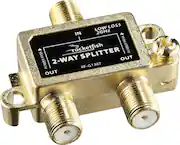
[Employee of bestbuy] The Rocketfish™ 3‑Way Coaxial Splitter is a reliable solution for splitting a single coaxial signal into three outputs. The gold‑plated connectors help reduce signal loss and resist corrosion, ensuring consistent performance over time. It’s compact and easy to install, making it a convenient choice for home theater or networking setups where multiple devices need a coaxial connection. While splitting signals can sometimes reduce overall strength depending on your setup, this splitter maintains solid quality for most everyday uses.
This review is from Rocketfish™ - 3-Way Coaxial Splitter - Gold
Posted by TerryR
- Rated 5 out of 5 stars
Solved my cable problem
Okay, this is a coax splitter. Hardly the most exciting product. But in this case, using it to replace an existing splitter in my cable wiring allowed my digital TV to get a nicer picture. Remember when digital TV was coming, but if you had cable, it would be no problem for you? Well like "if you like your health insurance, you can keep it" that was a lie. Older analog splitters do not handle the higher frequencies of digital TV. So, aside from junking your old TVs and VCRs, you should replace any old splitters in your cable wiring to get a proper signal.
This review is from Rocketfish™ - 3-Way Coaxial Splitter - Gold
Posted by TheOriginalModelCitizen