Rating 4.8 out of 5 stars with 1287 reviews
4.8Customer Images
The vast majority of our reviews come from verified purchases. Reviews from customers may include My Best Buy members, employees, and Tech Insider Network members (as tagged). Select reviewers may receive discounted products, promotional considerations or entries into drawings for honest, helpful reviews.
- Rated 5 out of 5 stars
Samsung Watch 6
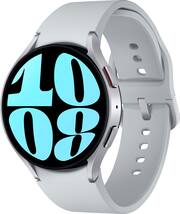
The Samsung Galaxy Watch 6 has been a great experience for me because it combines style, comfort, and performance in one device. I really like the bright AMOLED display and slim design, which makes it easy to wear all day and read at a glance. The health and fitness features have been especially useful—I’ve used the sleep tracking, workout detection, and body composition tools to stay on top of my goals. Battery life usually lasts me about two days, which is decent, though I do wish it were longer. Some features like ECG and blood pressure tracking only work with Samsung phones, but overall I feel the Watch 6 is one of the best smartwatches I’ve used, especially as an Android user in the Samsung ecosystem.
This review is from Samsung - Galaxy Watch6 Aluminum Smartwatch 44mm BT - Graphite - (2023)
Posted by user359554
- Rated 4 out of 5 stars
Great watch
Have had this watch for a few months now. Here are my thoughts, Battery life lasts 2 days with normal use, more if battery saver is turned on. I love being able to answer calls and texts from my watch, see the weather, my compass etc. The bezel sometimes sticks now but I also haven’t super cleaned it and I work outside all day so it’s due for a clean up. All in all great watch, tracks sleep, heart rate, steps. And charges super quick!
This review is from Samsung - Galaxy Watch6 Aluminum Smartwatch 44mm BT - Graphite - (2023)
Posted by WaltonT
- Rated 5 out of 5 stars
Watch6 fan
The Samsung galaxy watch6 is amazing its more than just a watch setup is easy and fast Samsung phones has the app pretty much built in to them once you connect it to your phone its simple to use you can change the watch faces and theres a ton to choose from in the app and on the watch itself too and you could listen to music have phone convos via Bluetooth of course you can check your exercise progress, heart rate, check your sleep, check the weather, get notifications sent to your watch overall great watch
This review is from Samsung - Galaxy Watch6 Aluminum Smartwatch 44mm BT - Graphite - (2023)
Posted by ToneyP
- Rated 5 out of 5 stars
Satisfied customer
This watch is new and improved. Its well built because I can work this watch better my first one (Samsung Galaxy Watch 2). I love that I can turn it off by swiping down from the top to reveal the power button; just tap it and that's it. I like electronics that are simple to use. I'm sold and I love the big face of the watch. I recommend this watch to everyone
This review is from Samsung - Galaxy Watch6 Aluminum Smartwatch 44mm BT - Graphite - (2023)
Posted by EleanorV
- Rated 5 out of 5 stars
Quality pick from Samsung
I upgraded from the Galaxy Watch 3, so it is a decent step up. The body composition feature is awesome and seems to be really close to my scale with the same function. Battery life is good. I have all the battery consuming options turned on (i.e. always on display, continuous HR monitoring, brightness levels up) and I still get about 36 hrs. of use, and it charges very quickly with the provided charger. My only gripe is there is still no BP support.
This review is from Samsung - Galaxy Watch6 Aluminum Smartwatch 44mm BT - Graphite - (2023)
Posted by WesleyS