Year-End SaleEnds 1/1/26. Limited quantities. No rainchecks.

Main Content
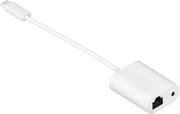
product image

Sonos - Combo Adapter - White

Model: CDNGLWW1
SKU: 6537699
This item is no longer available in new condition. See similar items below
  • Key Specs
    • Networking Cable Type: Cat 5e (Type of cable standard utilized.)
    • Connector Type (End 1): USB-C
    • Connector Type (End 2): 3.5mm (mini-phone)
  • General
    • Brand: Sonos
    • Model Number: CDNGLWW1
    • Product Name: Combo Adapter
    • Color: White
    • Quantity: 1
    • Compatibility: ERA 100, ERA 300
  • Connectivity
    • Cable Type: Analog audio, Networking
    • Product Type: Adapter
    • Networking Cable Type: Cat 5e (Type of cable standard utilized.)
    • Connector Type (End 1): USB-C
    • Connector Type (End 2): 3.5mm (mini-phone)
  • Environmental
    • Indoor Or Outdoor Use: Indoor (Indicates the appropriate environment product was designed to be used in.)
  • Warranty
    • Warranty - Parts: 1 year
    • Warranty - Labor: 1 year
  • Other
    • UPC: 840136805359

Split cable adapter allows you to hardwire Era 100 or Era 300 to your router and connect an external audio source via 3.5 mm. Auxiliary cable and ethernet cable not included.

  • Designed by and for Sonos: Use with Era 100 or Era 300 speaker.
  • Reliable audio performance: Connect a device that uses a 3.5 mm audio connection, such as a turntable or other media player, with an auxiliary cable (not included) and enjoy exceptional sound, free from any static feedback or interruption.
  • Reliable internet connection: Hardwire your speaker to your router using an ethernet cable (not included) and enjoy streaming audio without dropouts.
  • Works wherever you put it: Hardwire your router for improved performance using an ethernet cable (not included).
  • Designed by and for Sonos: Use with Era 100 or Era 300 speaker.
  • Reliable audio performance: Connect a device that uses a 3.5 mm audio connection, such as a turntable or other media player, with an auxiliary cable (not included) and enjoy exceptional sound, free from any static feedback or interruption.
  • Reliable internet connection: Hardwire your speaker to your router using an ethernet cable (not included) and enjoy streaming audio without dropouts.
  • Works wherever you put it: Hardwire your router for improved performance using an ethernet cable (not included).
Whats Included
  • Combo adapter
  • Documentation
  • Combo adapter
  • Documentation

Q: I have a SONOS ARC, will the Sonos Optical Audio Adapter work with my speaker to my Samsung QLED 85 4K TV

A: Yes, the Sonos Optical Audio Adapter is designed to work with Sonos products that support optical audio input, including the Sonos Arc soundbar. If your Samsung QLED 85 4K TV has an optical audio output port, you can use the Sonos Optical Audio Adapter to connect your Sonos Arc soundbar to the TV. Here's how you can set it up: Check TV Compatibility: Make sure your Samsung QLED 85 4K TV has an optical audio output port. This port is typically labeled as "Optical," "Digital Audio Out (Optical)," or "Toslink." Connect the Adapter: Plug one end of the optical cable into the optical audio output port on your Samsung TV. Then, connect the other end of the optical cable to the optical audio input port on the Sonos Optical Audio Adapter. Connect to Sonos Arc: Plug the Sonos Optical Audio Adapter into the HDMI input port on your Sonos Arc soundbar using the provided HDMI cable. Configure Audio Settings: On your Samsung TV, navigate to the audio settings menu and select "Digital Output" or "Optical Output." Ensure that the audio output is set to "PCM" (Pulse Code Modulation) or "Stereo" to ensure compatibility with the Sonos Arc. Set Up Sonos Arc: Follow the setup instructions for your Sonos Arc soundbar using the Sonos app on your mobile device or computer. During setup, you'll be prompted to select the input source for your Sonos Arc, so choose the HDMI input port connected to the Sonos Optical Audio Adapter. Test Audio: Once the setup is complete, test the audio playback from your TV through the Sonos Arc to ensure everything is working correctly. By using the Sonos Optical Audio Adapter, you can enjoy high-quality audio from your Samsung QLED 85 4K TV through your Sonos Arc soundbar, enhancing your home theater experience.

Q: Is this compatible with Sonos Move 2? Kirk

A: The Sonos Combo Adapter with Ethernet is not directly compatible with the Sonos Move 2. The Move 2 is designed as a portable speaker, primarily intended for wireless use, and does not have an Ethernet port for direct wired connections. The Sonos Combo Adapter with Ethernet is generally used with Sonos devices that have a dedicated Ethernet port, such as the Sonos Era 100 or Era 300, to provide a stable wired connection to your network. If you're looking to enhance connectivity for the Move 2, your best option is to ensure a strong Wi-Fi connection in the areas where you plan to use the speaker. Alternatively, you can use Bluetooth to stream music directly from your devices when Wi-Fi is not available. If you have any further questions or need assistance, feel free to reach out! We're here to help.