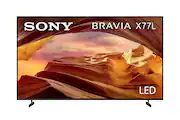
Experience all your favorite content in lifelike 4K HDR picture quality, powered by the 4K Processor X1. All your HD content is upscaled to near-4K resolution resulting in sharp details and real-world colors. Google TV with Google assistant makes it easy to find your favorite movies and shows from all the top streaming apps.
A: Geek Squad is here to help.
Q: What is the resolution of this Sony TV?
A: This Sony TV has a 4K (2160p) resolution.
Q: Does this TV have built-in speakers?
A: Yes, this Sony TV has built-in speakers.
Q: Can I control this Sony TV with my voice?
A: Yes, you can control this TV with your voice using Amazon Alexa.
Q: Does this Sony TV support HDR?
A: Yes, this TV supports High Dynamic Range (HDR).
Q: How many HDMI inputs does this TV have?
A: This Sony TV has a total of 3 HDMI inputs.
Q: What type of display does this Sony TV use?
A: This Sony TV uses an LED display.
A: Hi RalphRam, Thank you for reaching out to us. We're sorry to hear your difficulties on connecting your surround sound with the X77L TV. Allow us to help resolve this problem. The X77L doesn't have a 3.5mm headphone jack and doesn't support a direct surround sound connection. You may connect an audio device using these following connection methods: • BLUETOOTH connection (the audio system/soundbar that support the A2DP (Advanced Audio Distribution Profile) Bluetooth profile for wireless audio playback) • HDMI connection (Audio Return Channel (ARC) or Enhanced Audio Return Channel (eARC)) • Digital optical cable connection If you can't hear TV sound from the soundbar, home theater system, or home audio system, please try some solutions below: - Perform a power reset of your TV and audio system - Check and verify your cable connections Using an HDMI cable, connect the HDMI OUT (ARC or eARC) port on the audio device to the HDMI IN (ARC or eARC) port on the TV. Set the BRAVIA Sync control to On. Check the following settings on the audio device Set the Control for HDMI to On In the HDMI settings, set the Audio Return Channel (ARC) or TV Audio Input mode to On or Auto Using the optical audio cable, connect the Optical OUT port on the TV to the Optical IN port on the audio device. In the HDMI settings on the audio device, set the Audio Return Channel (ARC) or TV Audio Input mode to Off. Change the TV audio output setting to PCM and check whether the sound is output. - Check the audio output setting of your TV to verify it's set to use your audio device. If you have a BRAVIA TV, set the TV settings for Speakers to Audio System. - Make sure your audio system input is set to TV by pressing the INPUT or TV button on your audio system remote. - Check if your audio system is muted. - Update your TV and audio system to the latest software version May we contact you to help? Unfortunately, due to the current Best Buy phishing protocol for your protection, we cannot provide a direct email or phone number for customer support as of now. Please find Sony Electronics' Support information: Go to our support website > click on “Support” > scroll down click on “Contact Support” > click on "TV & Projectors" and from there you'll see different ways to contact us. Apologies if you disclosed some of this information in your review and to customer service, we just want to ensure that we have your accurate details at the time of communication. Name: Best Buy Username: Telephone Number: Model Number: Question/concern: We are sorry for the inconvenience and hope to speak to you to resolve this matter. - Kris

Experience all your favorite content in lifelike 4K HDR picture quality, powered by the 4K Processor X1. All your HD content is upscaled to near-4K resolution resulting in sharp details and real-world colors. Google TV with Google assistant makes it easy to find your favorite movies and shows from all the top streaming apps.

The Hisense QD6 Series gets you in on all the action. QLED Color displays over a billion brilliant shades of color on your screen, making your favorite games, shows and movies feel even more real. Dolby Vision HDR and Dolby Atmos immerse you in a world of dynamic images and all-encompassing sound, so you can see every blade of grass and hear every call of the ref.

Bring home 4K resolution in an impressive range of screen sizes with LG UHD TVs. Enjoy swift, easy browsing and tons of personalized recommendations including over 300 free LG Channels.¹ Spend less time searching and more time streaming with LG webOS 25. Focus on the screen with a slim and simple-to-mount design for a stylish view no matter where you hang it. For gamers, you can quickly customize your gaming experience in one location with the LG Game Optimizer. And, with GeForce NOW & Xbox Cloud Gaming included, you can automatically stream and get in the game.²

The advanced LG OLED evo C5-Series is better than ever. The LG OLED evo C5 is powered by the next-gen Alpha 9 Gen8 AI Processor —exclusively made for LG OLED—for ultra-realistic picture and sound along with boosted brightness for luminosity and high contrast, even in well-lit rooms. AI-assisted deep learning analyzes what you're watching and uses your preferences to choose the best picture and sound setting for your content. The C5's almost invisible bezel, ensures it blends with your surroundings. When you're finished watching, display art, photos and other content make the C5 a versatile statement piece. Search less and stream more, thanks to the next generation of AI technology from LG webOS 25. Every LG OLED comes loaded with Dolby Vision for extraordinary color, contrast and brightness, plus Dolby Atmos¹ for immersive sound you can feel all around you. FILMMAKER MODE allows you to see films just as the director intended. Packed with gaming features, the LG OLED evo C-Series comes with everything you need to win like a 0.1ms response time, native 120Hz refresh rate, with VRR for PC gaming and four HDMI 2.1 inputs.
| Pros for Sony - 75" Class X77L LED 4K UHD Smart Google TV (2023) | |||
|---|---|---|---|
| Picture Quality, Color, Ease of use, Remote Control, Price | Picture Quality | Picture Quality, Ease of Use, Size, Setup | Picture Quality, Ease of Use, OLED Quality, Brightness, Black Level |
| Cons for Sony - 75" Class X77L LED 4K UHD Smart Google TV (2023) | |||
| Screen | There were no cons for this product— | There were no cons for this product— | Remote Control |
Customers commend the 75" Class X77L LED 4K UHD Smart Google TV (2023) for its excellent picture quality, vibrant color rendering, and user-friendly design. The remote control and overall ease of use are also appreciated, with some finding the price and size to be appealing. However, a few customers have reported issues with the screen freezing or shutting off.
The vast majority of our reviews come from verified purchases. Reviews from customers may include My Best Buy members, employees, and Tech Insider Network members (as tagged). Select reviewers may receive discounted products, promotional considerations or entries into drawings for honest, helpful reviews.
My wonderful purchase is worth every penny. Im a older customer and does'nt like difficulty The instructions were ok to the letter. Uon it being installed i was able to follow. All of the features were satisfactory to my liking and i was and are extremely happy with the purchase and a added a beautiful sound bar, and of course it's a beautiful Sony .
Posted by AntoinetteV
This look like very good to me so far I like it very much
Posted by ChrisW
Best purchase on TV ever, with no dent no scratches, works great. It didn't come with the right legs to support the TV I went to another Best Buy and explained the situation and they gave me the right ones for free.
Posted by LailaL