Trezor - Model T - Advanced Crypto Hardware Wallet with LCD Touch Screen - Black
Customers are saying
Customers regard the Model T hardware wallet as having top-notch security and a fairly straightforward setup. Users appreciate the touch screen and ease of use, along with its software and overall performance. While the device integrates well and offers a clean interface, some users feel that coin support could be improved, and caution is advised regarding the USB-C port.
Features
Unmatched Coin Security
Give yourself peace of mind. Store your assets offline with your Trezor device, creating a physical barrier from online threats.
Quick and seamless app integration
Plug in your Trezor, download the Trezor Suite app, and swiftly take control 7000+ digital assets.
Direct Transaction Confirmation
Take control and personally confirm transactions directly on your Trezor Model T for unmatched security
Protection Against Threats
Use Trezor to shield your assets from malicious apps and exchanges, regain authority over your financial security.
Robust Device Security
Activate PIN and passphrase protection on your Trezor, making your wallet an impenetrable safeguard for your assets.
Effortless Wallet Backup
Easily create a wallet backup to ensure access to your coins, even if your Trezor faces unexpected mishaps.
Elevate your privacy
Use coinjoin, coin control, and the Tor network with your Trezor Model T for superior transaction security.
Dedicated Bitcoin Experience
Install an available Bitcoin-only firmware on your Model T to fully immerse in the original cryptocurrency experience
Specifications
- Connector Type(s)USB-CSupported CryptocurrenciesBitcoin, Ethereum and over 7000 more digital assets.
Reviews
Rating 4.8 out of 5 stars with 48 reviews
- Security (27)
- Setup (13)
- Touch Screen (12)
- Ease of use (11)
- Overall Performance (5)
- Coin Support (4)
- USB-C Port (3)
Customer Images
The vast majority of our reviews come from verified purchases. Reviews from customers may include My Best Buy members, employees, and Tech Insider Network members (as tagged). Select reviewers may receive discounted products, promotional considerations or entries into drawings for honest, helpful reviews.
Compare similar products

Begin your cryptocurrency adventure with the Trezor Model T — a perfect blend of open-source security and style, featuring a large and responsive color touchscreen. With the Model T's seamless integration with the free Trezor Suite app, managing all your digital assets has never been this straightforward. Easily send, receive, trade, and track your assets while maintaining transaction privacy through Trezor's advanced privacy features. Dive into the world of crypto, knowing that the Trezor Model T has your back.

Simply & securely take control of your digital assets and identity with the all-in-one Ledger Wallet crypto app and playful new Ledger Nano signer.

Unlock a world of crypto possibilities with the Ledger Nano X. The most advanced hardware wallet to securely trade all your crypto assets. Buy, secure, exchange, grow and manage your crypto on the go.
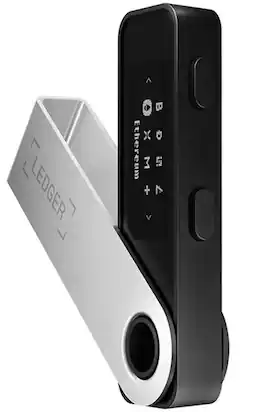
Secure and manage your crypto and NFTs with Ledger’ entry-level hardware wallet, Ledger Nano S Plus. You can review your transactions at home on your trusted display, all with uncompromising security.
| Pros for Trezor - Model T - Advanced Crypto Hardware Wallet with LCD Touch Screen - Black | |||
|---|---|---|---|
| Security, Setup, Ease of use, Overall Performance, Touch Screen | Overall Performance | Ease of use, Security, Overall Performance, Setup, Bluetooth | Ease of use, Security, Overall Performance, Storage, Price |
| Cons for Trezor - Model T - Advanced Crypto Hardware Wallet with LCD Touch Screen - Black | |||
| Coin Support, USB-C Port | There were no cons for this product— | Battery Life | Bluetooth, Compatibility, Battery |
Specs
Questions & Answers
Can you download directly from your phone to the device?
Answered by Trezor Product ExpertHi Blp23, If you are asking about the initialization of the Trezor devices, it can currently be done only on the Android device via the web version of Trezor Suite. More information on how to use the Trezor with the web version of Trezor Suite via your Android phone can be found at https://trezor.io/learn/a/trezor-on-android. The web version of Trezor Suite offers the same features as the desktop version. It means you can send and receive supported cryptocurrencies there. After the Trezor device is successfully initialized, you can also use the mobile app Trezor Suite Lite. Please, keep in mind that Trezor Suite Lite cannot be currently used for sending but only for receiving cryptocurrencies (so called watch-only wallet). More information on Trezor Suite Lite can be found at https://trezor.io/learn/c/trezor-suite-lite.

How does the Trezor Model T enhance transaction privacy?
The Trezor Model T allows you to use coinjoin, coin control, and the Tor network for superior transaction security and privacy.
This question and answer was generated by AI based on customer and product data.How many cryptocurrencies can the Trezor Model T manage?
The Trezor Model T can manage over 7000 digital assets, including Bitcoin and Ethereum.
This question and answer was generated by AI based on customer and product data.What is the primary function of the Trezor Model T?
The Trezor Model T is a hardware wallet designed to securely store your cryptocurrency assets.
This question and answer was generated by AI based on customer and product data.Does the Trezor Model T have a touchscreen?
Yes, the Trezor Model T features a large and responsive color touchscreen.
This question and answer was generated by AI based on customer and product data.
Explore tech essentials Sponsored
 $189.99The price was $229.99
 $249.99The price was $299.99
 $319.99The price was $465.99
Discover related products
 $249.00The price was $275.00
 $12.99The price was $13.99
 $149.99The price was $169.99