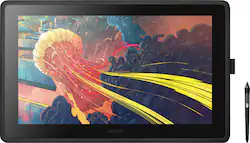
Wacom - Cintiq 22 Pen Display Drawing Tablet - Black
- Key Specs
- Screen Size: 21.5 inches (Size of the screen, measured diagonally from corner to corner.)
- Screen Resolution: 1920 x 1080 (Screens come in a range of resolutions (measured in pixels, horizontal x vertical). The higher the resolution, the greater the picture quality.)
- Active Area: 18.7" x 10.6" (The size of the screen area that a user interacts with, either by stylus and/or touch (if supported).)
- Total Storage Capacity: 0 gigabytes
- Battery Chemistry: Lithium-ion
- Pressure Levels: 8192 (Allows the device to recognize different pressures from a compatible pen or stylus, which may control line thickness, opacity, or color. The more pressure levels, the more responsive the pen will feel.)
- General
- Brand: Wacom
- Model Number: DTK2260K0A
- Product Name: Cintiq 22 Pen Display Drawing Tablet
- Color: Black
- Year of Release: 2019
- Display
- Display Type: LCD
- Screen Type: IPS
- Screen Size: 21.5 inches (Size of the screen, measured diagonally from corner to corner.)
- Screen Resolution: 1920 x 1080 (Screens come in a range of resolutions (measured in pixels, horizontal x vertical). The higher the resolution, the greater the picture quality.)
- Stylus Input: Active (Electromagnetic Resonance) (An active stylus/pen is able to communicate directly with a compatible device; active electromagnetic resonance (EMR) pens are powered via a device's screen and active electrostatic (AES) pens require an additional power source. A passive stylus does not have electronic features and is compatible with most capacitative touch screens.)
- Response Time: 22 milliseconds (The speed at which pixels can change colors is called response time. It is measured in milliseconds (ms).)
- Graphic Resolution: 5080 lines per inch (The resolution generated by the device. The higher the resolution, the finer the detail that can be seen and reproduced.)
- Active Area: 18.7" x 10.6" (The size of the screen area that a user interacts with, either by stylus and/or touch (if supported).)
- Aspect Ratio: 16:9 (The measurement of the width of a screen compared to the height of a screen, expressed as a ratio.)
- Brightness: 210 candela per square meter (A measure of the total light output.)
- Displayable Colors (Maximum): 16.7 million
- Contrast Ratio: 1000:1 (Measured difference between a displayed image's brightest whites and darkest blacks. The larger the first number, the more detail and color that can be displayed.)
- Storage
- Total Storage Capacity: 0 gigabytes
- Memory
- Expandable Memory Compatibility: None
- Compatibility
- Operating System Compatibility: Mac OS, Windows
- System Requirements: PC: Windows 7 or later, Mac: OS X 10.12 or later (The software that a product must have for it to be able to integrate with another product.)
- Connectivity
- GPS Enabled: false
- Interface(s): HDMI, USB 2.0 (Refers to the types of connections that devices use to interact and communicate with each other.)
- Power
- Charging Interface(s): DC jack (2.5mm) (The connection for transmitting power to charge the device.)
- Battery Chemistry: Lithium-ion
- Features
- Cable Lock Slot: Kensington Security Slot (K-Slot)
- Pressure Levels: 8192 (Allows the device to recognize different pressures from a compatible pen or stylus, which may control line thickness, opacity, or color. The more pressure levels, the more responsive the pen will feel.)
- Number Of Switches: 2
- Tilt Angle (Maximum): 82 degrees (Greatest angle of tilt between the pen and active screen area that the device can recognize. Allows for intuitive functions when using the pen, such as more natural brush strokes or shading.)
- Dimensions
- Product Height: 1.6 inches (The out of box height of the item. Height is measured as the vertical distance from the bottom of the item to the top as it would be primarily used or placed.)
- Product Width: 22.4 inches (The out of box width of the item. Width is measured as the horizontal distance from one side of the item to the other as it would be primarily used or placed.)
- Product Depth: 14.1 inches (The out of box depth of the item. Depth is measured as the distance from the front of the item to the back as it would be primarily used or placed.)
- Product Weight: 197 ounces (The out of box weight of the item.)
- Included
- Stylus Included: true
- Stylus Model Included: Wacom Pro Pen 2
- Tablet Stand Included: true
- Warranty
- Warranty - Parts: 1 year
- Warranty - Labor: 1 year
- Other
- UPC: 753218985989
Illustrate your ideas in digital form with this Wacom Cintiq creative pen display. The foldable legs let you work from any position, while the 8,192 levels of pressure sensitivity enable the pen to recognize every stroke. This Full HD Wacom Cintiq creative pen display has a detachable pen holder to help you stay organized.
- 21.5" Ips Lcd: Provides high color accuracy.
- Full HD 1920 X 1080 Resolution: Gives you the ability to hone in on every detail making it perfect for painting, retouching, and page layout.
- 210 Cd/M² Brightness: Offers a highly visible display and crisp on-screen images.
- 22 Ms Response Time: Allows pixels to change colors quickly to avoid streaking, blurring, and ghosting.
- Wacom Pro Pen 2: Features 8,192 levels of pressure sensitivity and two customizable side switches.
- Integrated Foldable Legs: Let you work at an inclined angle.
- Nibs Set Included: Comes with three replacement pen nibs and a nib removal tool.
- Bonus Software Pack: Level up your digital art skills and create comics, manga, concept art, illustrations with 6-months of Clip Studio Paint EX
Whats Included
- Wacom Cintiq 22 Pen Display Drawing Tablet
- Wacom Pro Pen 2
- Adjustable stand
- Detachable pen holder with 3 replacement nibs
- Nib removal tool
- HDMI to HDMI cable (2m)
- USB 2.0 cable (2m)
- AC adapter
- Power cable
- Owner's manual
Product Manuals
Q: What type of display does the Wacom creative pen display have?
A: This creative pen display features a 21.5-inch IPS LCD.
Q: Does this drawing tablet come with any extra nibs?
A: Yes, a set of three replacement pen nibs and a nib removal tool are included.
Q: Can I adjust the angle of the Wacom Cintiq for a comfortable drawing experience?
A: Yes, the Wacom Cintiq 22 features integrated foldable legs that allow you to work at an inclined angle.
Q: What is the screen resolution of this Wacom creative pen display?
A: This Wacom creative pen display has a Full HD resolution of 1920 x 1080.
Q: What is the maximum tilt angle supported by the Wacom Cintiq 22?
A: The Wacom Cintiq 22 supports a maximum tilt angle of 82 degrees.
Q: How does the Wacom pen display's pressure sensitivity work?
A: The Wacom Pro Pen 2 features 8,192 levels of pressure sensitivity, allowing it to recognize every stroke with precision.
A: The Wacom Cintiq 22 will work with just about any Windows 7, 8, 10 or macOS 10.12 or higher based computer. Generally the software you are running will dictate the specs needed. The Cintiq itself simply needs an HDMI connection for video and a USB connection for pen functionality, in addition to power.
Q: Is it mobile
A: For a $1000 and 25 lbs worth of equipment, unlikely. You might consider the 13 inch model.