Rating 4.6 out of 5 stars with 816 reviews
4.6- Performance (285)
- Price (96)
- Speed (88)
- Graphics (65)
- Ease of use (57)
- Motherboard (19)
- RGB Lights (9)
- Fan (4)
- Windows Installation (3)
Customer Images
The vast majority of our reviews come from verified purchases. Reviews from customers may include My Best Buy members, employees, and Tech Insider Network members (as tagged). Select reviewers may receive discounted products, promotional considerations or entries into drawings for honest, helpful reviews.
- Rated 4 out of 5 stars
Would recommend
I’ll start out by saying this is a very good pc, it’s fast and reliable. Would recommend for a beginner pc player. The 10700 is a really good processor I upgraded to liquid cooling, another tb ssd, and 32 on the ram and I can’t use it all because the motherboard is a cheap one the graphics card does get a little warm but nothing too concerning. Get around 100 FPS on a 144hz monitor good starter pc and honestly a amazing deal for the price and you can upgrade later just plan on a better motherboard if your going to do big upgrades I know I’ll upgrade motherboard in the future when I upgrade graphics card. Photos with upgrades and without
Posted by Solid
- Rated 5 out of 5 stars
Well-rounded bang for your buck rig! This kitten p
1st PC I've ever bought for myself. After talking to many PC gamers, it came down to guy that worked the floor. He knew what he was talking about and figured out what I wanted out of my PC, what games ide be playing, all of the above. He went above and beyond for me and I really appreciated it. He figured that for the price of this pre-build, it's the best bang for your buck and perfect for someone that's just getting into PC gaming. Ice got to say man, every review I've read about this particular rig isn't wrong. I've had her know for about 2 weeks and I couldn't be more happy. This thing just runs. The temperature never exceeds 64 degrees and that's not because of restrictions either.... **Achhemm*** yes I over locked it just a tiny bit just to see how she runs and shes rip for it. Of course I don't have an aggressive clock though because I want her to last. My question to anyone is, to the others that have gotten this particular rig and have overclocks, what is yours running at? Safe overclock tune Core clock: 130 Memory clock: 500 It will take more memory over clock but it's pointless because your already at maximum for what the limits are (I'm new to all of this so I know there's alot I'm not understanding but I'm trying to play it safe for that reason). The core clock will take 135 but if you do 140 it won't. So just to play it safe 130 is pretty much max for the core. If your new to PC Gaming like me, these are applications I suggest you download. There primarily for getting the most out of what you paid for, so just consider it a friendly gesture from one person out about $1000 to the next ;) make sure to do your research though before you even think about overclocking, and make sure to read your warranty guidelines so you know what your getting yourself into in case you blow up your mo'm's basement. :'D •GPU Z •QUICK CPU •NVIDIA GEFORCE EXPERIANCE •MSI AFTERBURNER •MSI KOMBUSTER OR HEAVEN BENCHMARK •7ZIP •CCLEANER •STEAM, & The EPIC STORE I'm sure there's others I'm leaving out, but these are ones I know for a fact off the top of my head I use the most. Anyways, hope it helps!
Posted by BigUnlucky
- Rated 5 out of 5 stars
a good deal for a fantastic & lightning-fast PC
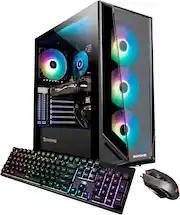
This is the best gaming PC I've ever had. It has a beautiful design & very fantastic performance at a very affordable price. It runs so quiet & lightning-fast, which saves me a lot of time doing my work and other daily tasks. The keyboard and mouse are very nice too. The only down point is that the keyboard can not change light colors, but it's good for typing. I'm not a heavy gamer, so I can't comment about the FPS things but many other buyers did verify & confirm its capability to run most of games at high/max setting without major issues. Additionally, this PC also has built-in Bluetooth after you run all Window updates even though Bluetooth is not mentioned in the SPEC. I can say I love everything about this cool PC. Many people ask how to change the fan color. It's very easy to do so. 1/ Google this phrase "MSI dragon center mystic light", click on the 1st result to go to the download page, download the app called Dragon Center, reboot your PC, and run the app as administrator to finish installing it. 2/ Select Mystic Light to change fan colors. If Mystic Light is not there, run Live Updates on Dragon Center to download & install Mystic Light feature. Good luck and enjoy the colors.
Posted by HollyDarkness
- Rated 4 out of 5 stars
Great PC
I've had this PC for about a week now and I have to say it's very good for it's price. I really like the RGB lighting and it's design. It's been running smoothly on max graphics for GTA IV and Euro Truck Simulator 2 giving me an average of 70 FPS for GTA and 140 FPS for ETS2. The only problem I've had was that the windows wasn't activated after I've connected it to the internet saying that the product key is invalid. If you run into this problem, just click on troubleshoot button. Another worry I had was that couple of cables were disconnected even though the PC was working perfectly, so I've just left them alone. Mouse that came in with the PC is great but I haven't seen worse keyboard before. The buttons are really hard to press on.
Posted by andrik1009
- Rated 5 out of 5 stars
What a machine!
Just got the PC yesterday, got it shipped to my local best buy. I gotta say, I'm absolutely impressed with the machine. As a game developer I use it for not only playing games but also creating them. The computer handles the unreal engine perfectly, quickly and smoothly. Been playing Warzone(90fps), Valorant(300-600fps) and Portal 2. All run amazing, 0 lag. Overall best value for your buck.
Posted by Iceman