“Most the speakers I have or look at have a 3.5 mm hookup on the actual speaker. How do you use with normal (not bluetooth speakers)”
Answer This Question
1-5 of 5 Answers
You actually need a 3.5mm cable to connect them up. It also supports optical connection but haven't used to date. If you have other inputs on the speaker an adapter should do (e.g: RCA). See my setup. Cheers.
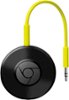
Sorry, there was a problem. Please try again later.The Google Chromecast audio has a 3.5 included (it doesn't run on Bluetooth, instead it uses WiFi to "talk" with your phone/laptop/tablet etc.). Super easy setup!
Sorry, there was a problem. Please try again later.The speaker must be amplified. In other words, if you are not using a bluetooth speaker, the speaker must already be connected to a receiver or some device which already drives the speaker with sound. Then the device must have an "AUX" input so that you can connect the Chromecast Audio. Select the "AUX" input on your device and your are good to go!
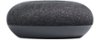
Sorry, there was a problem. Please try again later.The Audiocast as a 3.5mm output plug, so you wire it up to a powered speaker or amp. By the way, works well with Google Home Mini.
Sorry, there was a problem. Please try again later.If you would like to push the audio to other "normal" speakers through the Mini, you will need to connect a Google Chromecast Audio device to the normal speaker. This will allow the smart speaker to push the sound to the normal speaker using a 3.5 mm hookup.
I would recommend:
Sorry, there was a problem. Please try again later.