“Can the GCA plug into a receiver (Yamaha) so I can play music through multiple speakers? If so, how? Diagram shows device plugging into back of speaker only.”
Answer This Question
1-5 of 5 Answers
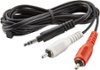
You sure can, I have it plugged into my Sony receiver. You'll need a 3.5mm (plugs into the Chromecast) to RCA cable (plugs into one of your receivers audio inputs), download the Google home app to configure it, and use a streaming service to play through it (I use Spotify). Then if you have another able speaker /receiver, you can hook up another Chromecast to it and stream in perfect harmony.
I would recommend:
Sorry, there was a problem. Please try again later.Yes, you will need to use an output that your AVR supports. Most newer receivers just have RCA and TOSlink (which I recommend if you have a nice receiver). It comes with a short AUX cable (shorter is better for quality) so you'll need to check your audio inputs on your AVR. Worst case you'll have to buy a cheap AUX to RCA or mini TOSlink to TOSlink (see Google for example pictures and then go find good cheap cables).
Sorry, there was a problem. Please try again later.You may have to get an additional cable to convert the 3.5 the gca comes with, but you should then be able to plug that in to one of the receiver's inputs. Select that input and cast to that gca and it should work.
Sorry, there was a problem. Please try again later.You plug it into the back of the receiver/amplifier and then the receiver/amplifier distributes it to the speakers.
Sorry, there was a problem. Please try again later.yes...just plug it into an unused inlet (CD Player, Phonograph, etc.) and leave your receiver on that channel!! Done deal!!
Sorry, there was a problem. Please try again later.