1-10 of 17 Answers
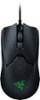
Yes, its located on the bottom of the mouse so you never accidentally miss-click it. I set mine at 400dpi and haven't changed it. But there are other levels you can utilize without downloading software.
Sorry, there was a problem. Please try again later.Yes but it is at the bottom of the mouse, but it does not interfere with movement.
Sorry, there was a problem. Please try again later.Yes its on the bottom
Sorry, there was a problem. Please try again later.yes. It is located on the bottom of the mouse.
Sorry, there was a problem. Please try again later.yes it does. It's on the bottom of the mouse.
Sorry, there was a problem. Please try again later.Yes on the bottom with a RGB LED indicator light above it. The mouse ships with five default DPI settings to choose from but this can be reprogrammed using the Razer Synapse software driver.
Sorry, there was a problem. Please try again later.there’s a button on the bottom that can change dpi.
Sorry, there was a problem. Please try again later.YES, under the mouse. You can also adjust on PC through Razer software.
Sorry, there was a problem. Please try again later.Yes the mouse has a dpi button which is placed on the base instead of on top.
Sorry, there was a problem. Please try again later.No have to adjust settings in razer synapse.
Sorry, there was a problem. Please try again later.