Customer Ratings & Reviews



- Model:
- 81MV0001US
- SKU:
- 6323665
Rating by feature
- Battery Life
Rating 4.0 out of 5 stars
- Speed
Rating 3.1 out of 5 stars
- Display
Rating 3.8 out of 5 stars
Customers are saying
Customers love the IdeaPad S145 15.6" Laptop for its budget-friendly price, easy setup, and lightweight design. However, some users have expressed concerns about its slow performance, limited RAM, short battery life, and touchpad issues.
This summary was generated by AI based on customer reviews.
Lenovo - S145-15IWL 15.6" Laptop - Intel
||Posted . Owned for 3 weeks when reviewed.This reviewer received promo considerations or sweepstakes entry for writing a review.The computer for is good for simple us and surfing the net.
I would recommend this to a friendBrand response from Lenovo Product Expert
Posted .The Lenovo IdeaPad S145-15 laptop is an entry level, light use system with its Intel Pentium processor. It is not meant for multi-tasking or demanding programs. It is good for Microsoft Office and light internet browsing. This model ships with Windows 10 S-Mode Operating System. Windows 10 S-Mode provides added security by only allowing APPs available ( and therefore certified by Microsoft) at the Microsoft Store. If you don't need the added security or you need to install APPs not available at the Microsoft Store, you can switch to standard Windows 10 Home 64-bit Operating System, at no additional cost.

Terrible product
||Posted . Owned for 6 months when reviewed.This reviewer received promo considerations or sweepstakes entry for writing a review.This laptop is a terrible product! I was in the middle of taking finals and it shut off on me during my 60 minute timed test causing me too fail. Refund please!
No, I would not recommend this to a friendBrand response from Lenovo Product Expert
Posted .The Lenovo IdeaPad S145-15 laptop, model number 81N3009BUS, ships with Windows 10 S-Mode Operating System and it should not shut itself off. Be sure any software you installed is compatible with Windows 10. There is no need to install Microsoft Office software. The software is already part of the operating system, you just need to activate the software with a purchased product key. If you have installed a copy of Microsoft Office, this is conflicting with the existing copy on the system and this will slow your system down. If you have installed a 3rd party anti-virus program, be sure that Windows Defender is turned off and that the trial version of McAfee Anti-Virus software is uninstalled. There can only be one anti-virus program on the system. You may need to restore your system to original factory default settings if any of the programming errors have occurred. You can do that by typing "restore" in the Cortana search window. Just click on the magnifying glass icon at the bottom left of your Windows 10 Desktop. Click on "Reset This PC" Then click on "Get Started" and follow the on screen directions to restore to factory defaults. If the problem persists, we recommend you contact Lenovo Tech Support at: 877-453-6686.
Nice computer but has a lot of restrictions
||Posted . Owned for 1 month when reviewed.This reviewer received promo considerations or sweepstakes entry for writing a review.It’s a great pc but windows got a lot of restrictions on it
No, I would not recommend this to a friendBrand response from Lenovo Product Expert
Posted .The Lenovo IdeaPad S145-15 laptop ships with Windows 10 S-Mode 64-bit Operating System. Windows 10 S-Mode provides added security by only allowing APPs available ( and therefore certified by Microsoft) at the Microsoft Store. If you don't need the added security or you need to install APPs not available at the Microsoft Store, you can switch to standard Windows 10 Home 64-bit Operating System, at no additional cost. Here is a link to instructions from switching from Windows 10 S-Mode to Windows 10 Home: https://support.microsoft.com/en-us/help/4456067/windows-10-switch-out-of-s-mode
No cd rom.. no mouse attachment to work mouse acti
||Posted . Owned for 3 weeks when reviewed.This reviewer received promo considerations or sweepstakes entry for writing a review.Not happy with the item..no cd rom or mouse attachments
No, I would not recommend this to a friendBrand response from Lenovo Product Expert
Posted .The Lenovo IdeaPad S145-15 laptop is an entry level, light use system with its Intel Pentium processor. It is not meant for multi-tasking or demanding programs. It is good for Microsoft Office and light internet browsing. This model ships with Windows 10 S-Mode Operating System. Windows 10 S-Mode provides added security by only allowing APPs available ( and therefore certified by Microsoft) at the Microsoft Store. If you don't need the added security or you need to install APPs not available at the Microsoft Store, you can switch to standard Windows 10 Home 64-bit Operating System, at no additional cost. There is no CD/DVD drive built in to this model. There is a touchpad on this laptop, that functions like a mouse. You can make adjustments to the touchpad in your system settings. You can get there by clicking on the magnifying glass at the bottom left of your Windows 10 screen. Type "touchpad" in the search window. Select "Mouse & touchpad settings" from the list of choices. You can make general adjustments to the touchpad there. You can also select "Additional mouse options" for more detailed adjustments to the touchpad sensitivity by increasing the delay of the touchpad.
Too slow Man!!!
||Posted . Owned for 1 week when reviewed.This reviewer received promo considerations or sweepstakes entry for writing a review.Please don't buy this, it's pointless.... This thing can barley use chrome and open Gmail. Save your money and buy a chrome book or just buy a better laptop
No, I would not recommend this to a friendBrand response from Lenovo Product Expert
Posted .The Lenovo IdeaPad S145-15 laptop is an entry level, light use system with its Intel Pentium processor. It is not meant for multi-tasking or demanding programs. It is good for Microsoft Office and light internet browsing. If this describes your computing needs, the IdeaPad S145-15 would be a good choice. This model ships with Windows 10 S-Mode Operating System. Windows 10 S-Mode provides added security by only allowing APPs available ( and therefore certified by Microsoft) at the Microsoft Store. If you don't need the added security or you need to install APPs not available at the Microsoft Store, you can switch to standard Windows 10 Home 64-bit Operating System, at no additional cost.
not a favorite
||Posted . Owned for 3 weeks when reviewed.This reviewer received promo considerations or sweepstakes entry for writing a review.Terrible!! The microphone, doesn’t work great and navigating through the menu is easy. Wished I’d purchased a different brand!
No, I would not recommend this to a friendBrand response from Lenovo Product Expert
Posted .The Lenovo IdeaPad S145-15 laptop ships with a built in microphone. If you are having issues with the performance of the microphone, here is a link to instructions for enabling the microphone within Windows 10: https://www.intowindows.com/how-to-enable-or-disable-the-microphone-in-windows-10/. If you continue to have issues, we recommend you call Lenovo Tech Support at: 877-453-6686.
Hate it
||Posted . Owned for less than 1 week when reviewed.This reviewer received promo considerations or sweepstakes entry for writing a review.I am very disappointed with this purchase . If I get started on how much I hate it then I will not leave this page today.
No, I would not recommend this to a friendBrand response from Lenovo Product Expert
Posted .The Lenovo IdeaPad S145-15 laptop is an entry level, light use system with its Intel Pentium processor. It is not meant for multi-tasking or demanding programs. It is good for Microsoft Office and light internet browsing. This model ships with Windows 10 S-Mode Operating System. Windows 10 S-Mode provides added security by only allowing APPs available ( and therefore certified by Microsoft) at the Microsoft Store. If you don't need the added security or you need to install APPs not available at the Microsoft Store, you can switch to standard Windows 10 Home 64-bit Operating System, at no additional cost.
Very slow procesaor
||Posted . Owned for 1 month when reviewed.This reviewer received promo considerations or sweepstakes entry for writing a review.Nice light laptop but processor was too slow for the program my husband wanted to use it for. He got very frustrated and returned it.
No, I would not recommend this to a friendBrand response from Lenovo Product Expert
Posted .The Lenovo IdeaPad S145-15 laptop is an entry level, light use system with its Intel Pentium processor. It is not meant for multi-tasking or demanding programs. It is good for Microsoft Office and light internet browsing. This model ships with Windows 10 S-Mode Operating System. Windows 10 S-Mode provides added security by only allowing APPs available ( and therefore certified by Microsoft) at the Microsoft Store. If you don't need the added security or you need to install APPs not available at the Microsoft Store, you can switch to standard Windows 10 Home 64-bit Operating System, at no additional cost. We recommend you check the requirements and compatibility of the programs you will need to run on your new computer before you invest. Be sure your new computer configuration can do the work you want it to do.
there is no disc drive on this computer.
||Posted . Owned for 3 weeks when reviewed.This reviewer received promo considerations or sweepstakes entry for writing a review.One of your sales associates recommended this computer to me for my wife. There is no way for her to download her printer on to it. So she can't scan anything that she needs to. I would not recommend this to anyone.
No, I would not recommend this to a friendBrand response from Lenovo Product Expert
Posted .Model number 81MV0001US of the Lenovo IdeaPad S145-15 laptop does not have a built in CD/DVD drive. This model ships with Windows 10 S-Mode 64-bit Operating System. Windows 10 S-Mode provides added security by only allowing APPs available ( and therefore certified by Microsoft) at the Microsoft Store. If you don't need the added security or you need to install APPs not available at the Microsoft Store, you can switch to standard Windows 10 Home 64-bit Operating System, at no additional cost. Here is a link to instructions for switching Windows 10 S-Mode to Windows 10 Home: https://support.microsoft.com/en-us/help/4456067/windows-10-switch-out-of-s-mode. Regarding the drivers for your printer, try going to your printer manufacturer's web site and find your printer model number. Look for driver downloads. You can download the latest Windows 10 Home drivers to the computer directly, then use your printer with this computer.
Disappointed in laptop quality
||Posted . Owned for 1.5 years when reviewed.This reviewer received promo considerations or sweepstakes entry for writing a review.I returned this laptop...very slow performance out of the box, felt very cheap, extremely slow to setup.
No, I would not recommend this to a friendNot impressed
||Posted . Owned for 6 months when reviewed.This reviewer received promo considerations or sweepstakes entry for writing a review.Returned this laptop. Purchased as an open-box & it locked up. Took it back to the store & it crashed & they tried to clear it of my info!
No, I would not recommend this to a friendBrand response from Lenovo Product Expert
Posted .This is a mid-level, moderate use configuration, with its AMD A6-9225 processor. This Dual-Core processor has a base speed of 2.6GHz and a boost speed of up to 3.0GHz. This configuration has 4GB of RAM. It is good with Microsoft Office type programs, internet browsing and other moderate work. This model ships with Windows 10 S-Mode Operating System. Windows 10 S-Mode provides added security by only allowing APPs available ( and therefore certified by Microsoft) at the Microsoft Store. If you don't need the added security or you need to install APPs not available at the Microsoft Store, you can switch to standard Windows 10 Home 64-bit Operating System, at no additional cost.
Horrible!! It no longer boots...
||Posted . Owned for 1 month when reviewed.This reviewer received promo considerations or sweepstakes entry for writing a review.This laptop stopped working and refuses to boot. I've had it about 45 days.
No, I would not recommend this to a friendBrand response from Lenovo Product Expert
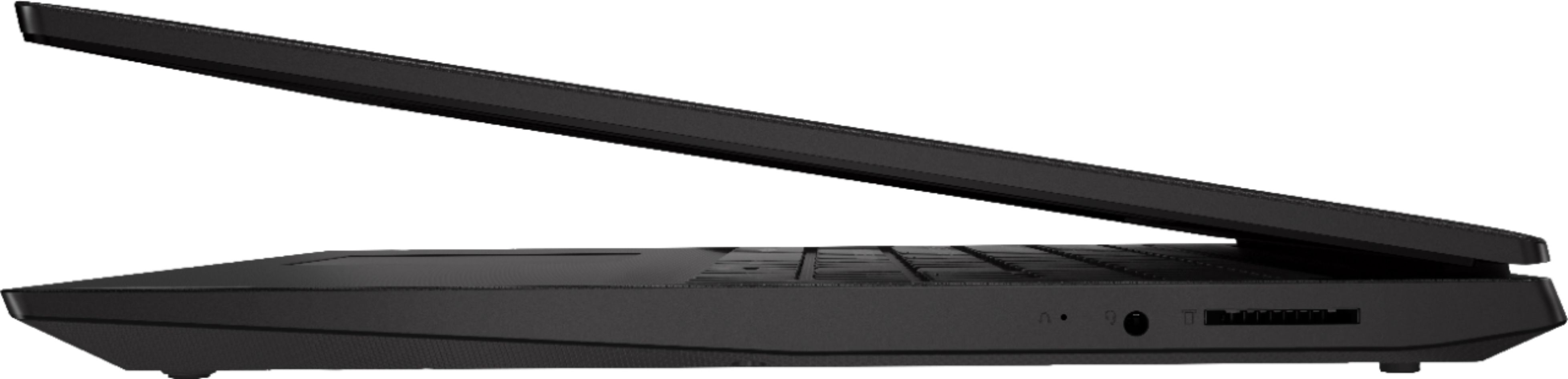
Posted .We are sorry to hear that you are having issues with your Lenovo IdeaPad S145-15 laptop. Restoring the device back to original factory settings may fix the problem. Since you can no longer boot the computer, this system is equipped with OneKey Recovery System. There is a very small pin hole on the right side of the device, right near the headphone jack on the device. You will need a pin to push this reset button. Plug the device in. Let the battery charge for about 15 minutes. Push the reset button. The system should boot to a choice screen where you can choose "Restore To Factory Default". Select this. It will delete everything from the hard drive except the original factory install of the operating system. You will need to reinstall all programs and files after the reset. If you don't have copies of the files, try to make one before you restore by selecting "Boot to desktop" and trying to back up your files. Once you have restored the computer back to original factory settings, first, remember, this computer ships with Windows 10 S-Mode 64-bit Operating System. Windows 10 S-Mode provides added security by only allowing APPs available ( and therefore certified by Microsoft) at the Microsoft Store. If you don't need the added security or you need to install APPs not available at the Microsoft Store, you can switch to standard Windows 10 Home 64-bit Operating System, at no additional cost. Second, the Lenovo IdeaPad S145-15 laptop is an entry level, light use system with its Intel Pentium processor. It is not meant for multi-tasking or demanding programs. It is good for Microsoft Office and light internet browsing. If this describes your computing needs, the IdeaPad S145-15 would be a good choice. Third, if you have switched to Windows 10 Home Operating system, be sure any software you installed is compatible with Windows 10. There is no need to install Microsoft Office software. The software is already part of the operating system, you just need to activate the software with a purchased product key. If you have installed a copy of Microsoft Office, this is conflicting with the existing copy on the system and this will slow your system down. If you have installed a 3rd party anti-virus program, be sure that Windows Defender is turned off and that the trial version of McAfee Anti-Virus software is uninstalled. There can only be one anti-virus program on the system. You may need to restore your system to original factory default settings if any of the programing errors have occurred. You can do that by typing "restore" in the Cortana search window. Just click on the magnifying glass icon at the bottom left of your Windows 10 Desktop. Click on "Reset This PC" Then click on "Get Started" and follow the on screen directions to restore to factory defaults. Finally, if the problem persists, we recommend you contact Lenovo Tech Support at: 877-453-6686.
Returned
||Posted . Owned for 9 months when reviewed.This reviewer received promo considerations or sweepstakes entry for writing a review.Didnt like it. The whole initial setup was weird and kept pushing me to use a weird browser. Was not friendly to this user.
I would recommend this to a friendBrand response from Lenovo Product Expert
Posted .The lenovo IdeaPad S145-15 laptop, model number
Great for nothing
||Posted .This reviewer received promo considerations or sweepstakes entry for writing a review.Wasted of money will be returned Bluetooth doesn’t work usb don’t work can’t download anything
No, I would not recommend this to a friendBrand response from Lenovo Product Expert
Posted .The Lenovo IdeaPad S145-15 laptop model number 81MV0001US, ships with Bluetooth 4.1 capability. The operating system is Windows 10 S-Mode 64-bit Operating System. Windows 10 S-Mode provides added security by only allowing APPs available ( and therefore certified by Microsoft) at the Microsoft Store. If you don't need the added security or you need to install APPs not available at the Microsoft Store, you can switch to standard Windows 10 Home 64-bit Operating System, at no additional cost. Be sure the Bluetooth device you are trying to pair with the Windows 10 S-Mode Operating System on this device is compatible with Windows 10 S-Mode first. You may need to switch to Windows 10 Home Operating System for the device to pair to the Bluetooth 4.1 receiver within this device. Here is a link to instructions for switching from Windows 10 S-Mode to Windows 10 Home: https://support.microsoft.com/en-us/help/4456067/windows-10-switch-out-of-s-mode
- Cons mentioned:Ram
Great laptop for basic tasks if you upgrade
Posted .This reviewer received promo considerations or sweepstakes entry for writing a review.From the factory this laptop is perfectly usable for the most basic tasks such as web-browsing, checking emails, watching videos on YouTube, Amazon Prime videos, or DVD, using Microsoft Office apps, etc. However, I would never use it for heavy video editing or graphic processing because the CPU will not be up to the task. For the most basic stuffs, however, it's a perfectly fine budget or second computer. In Windows 10 S mode, it boots up in about 40 seconds, which is not bad at all considering it uses a 5400rpm mechanical hard disk drive. The problem with the HDD is it's very noisy. After a few days, the arm movement noise from the HDD really began to bother me. The noise is compounded by the measly 4 GB RAM because the tiny 4 GB RAM means there is frequent paging activity to swap contents between memory and the windows swap file whenever some heavy-duty webpages or apps are open that use up a lot of RAM. Things that use up a lot of RAM include pdf files, webpages with Adobe Flash contents, and many others. Luckily, the laptop is upgradable. I immediately upgraded the 4GB RAM to a single stick of 16 GB 2666 DDR4 RAM (2400 would have also worked). I also upgraded the HDD to a 500 SSD that I salvaged from a dead laptop. Now I have a perfectly usable low budget computer. It still has a weak processor but the processor is perfectly adequate for basic uses including watching 4K videos. Be forewarned that removing the case back would break some interior tabs. Those tabs don't affect the integrity of the case. Breaking those tabs is unavoidable without possibly using very specialized factory tools to remove the case. The broken tabs would be a clear sign that the case had been opened by the user and so the warranty would be voided. Keep this in mind before choosing to upgrade. Then I did a fresh installation of Windows 10 from a USB drive. Now this upgraded laptop can boot up in 15 seconds and it's totally silent and totally stable. I'm keeping the Windows 10 S mode for now, although S mode is highly restrictive. I can't install the Chrome browser or on it in S mode. The only software that can be installed when running in S mode are software that are obtained through the Microsoft store.
I would recommend this to a friendBrand response from Lenovo Product Expert
Posted .Please keep in mind, this model is not user upgradable. A certified technician must do all of the work, so as to not void the warranty. The Lenovo IdeaPad S145-15 laptop is an entry level, light use system with its Intel Pentium processor. It is not meant for multi-tasking or demanding programs. It is good for Microsoft Office and light internet browsing. This model ships with Windows 10 S-Mode Operating System. Windows 10 S-Mode provides added security by only allowing APPs available ( and therefore certified by Microsoft) at the Microsoft Store. If you don't need the added security or you need to install APPs not available at the Microsoft Store, you can switch to standard Windows 10 Home 64-bit Operating System, at no additional cost.
Junk .....
||Posted . Owned for 9 months when reviewed.This reviewer received promo considerations or sweepstakes entry for writing a review.Going forward I will no longer purchase anything at Best Buy - just as bad as Fry’s Electronics.
No, I would not recommend this to a friendBrand response from Lenovo Product Expert
Posted .The Lenovo IdeaPad S145-15 laptop is an entry level, light use system with its Intel Pentium processor. It is not meant for multi-tasking or demanding programs. It is good for Microsoft Office and light internet browsing. If this describes your computing needs, the IdeaPad S145-15 would be a good choice.
My Microsoft Office would not download
||Posted . Owned for 3 weeks when reviewed.This reviewer received promo considerations or sweepstakes entry for writing a review.My Microsoft Office would not download. I exchanged it for another and that one would not download either. I returned back for my refund.
No, I would not recommend this to a friendBrand response from Lenovo Product Expert
Posted .There is a 30-day trial of Microsoft Office 365 included as part of the Windows 10 operating system. In order to keep the program active after the trial period, you will need to purchase a product key. You will not need to download any additional software. Just activate the program already installed within Windows 10 by putting in the 25-digital product code.
Bad product.
||Posted .This reviewer received promo considerations or sweepstakes entry for writing a review.Will not return! We hate this product! We are good customers with Best Buy. Please return
No, I would not recommend this to a friendBrand response from Lenovo Product Expert
Posted .The Lenovo IdeaPad S145-15 laptop is an entry level, light use system with its Intel Pentium processor. It is not meant for multi-tasking or demanding programs. It is good for Microsoft Office and light internet browsing. This model ships with Windows 10 S-Mode Operating System. Windows 10 S-Mode provides added security by only allowing APPs available ( and therefore certified by Microsoft) at the Microsoft Store. If you don't need the added security or you need to install APPs not available at the Microsoft Store, you can switch to standard Windows 10 Home 64-bit Operating System, at no additional cost.
Terrible save and buy a better laptop
||Posted . Owned for 1 year when reviewed.This reviewer received promo considerations or sweepstakes entry for writing a review.This laptop is terrible you better off buying a rock then using this
No, I would not recommend this to a friendSpeakers suck
||Posted . Owned for 1 month when reviewed.This reviewer received promo considerations or sweepstakes entry for writing a review.Speakers not helpful. Even turned up all the way, you can barely hear the videos. And no DVD player on this laptop.
No, I would not recommend this to a friendBrand response from Lenovo Product Expert
Posted .The Lenovo IdeaPad S145-15 laptop ships with stereo 1.5W speakers and Dolby Audio sound enhancement software. For the best audio experience, be sure you have Dolby Audio turned on and adjusted to your personal preferences. There is no CD/DVD drive within this model. The Lenovo IdeaPad S145-15 laptop is an entry level, light use system with its Intel Pentium processor. It is not meant for multi-tasking or demanding programs. It is good for Microsoft Office and light internet browsing. This model ships with Windows 10 S-Mode Operating System. Windows 10 S-Mode provides added security by only allowing APPs available ( and therefore certified by Microsoft) at the Microsoft Store. If you don't need the added security or you need to install APPs not available at the Microsoft Store, you can switch to standard Windows 10 Home 64-bit Operating System, at no additional cost.