Customer Ratings & Reviews




- Model:
- STCK1000100
- |
- SKU:
- 7420065
Customer reviews
Rating 4 out of 5 stars with 358 reviews
(358 customer reviews)Rating by feature
- Ease of Use3.7
Rating 3.7 out of 5 stars
Customers are saying
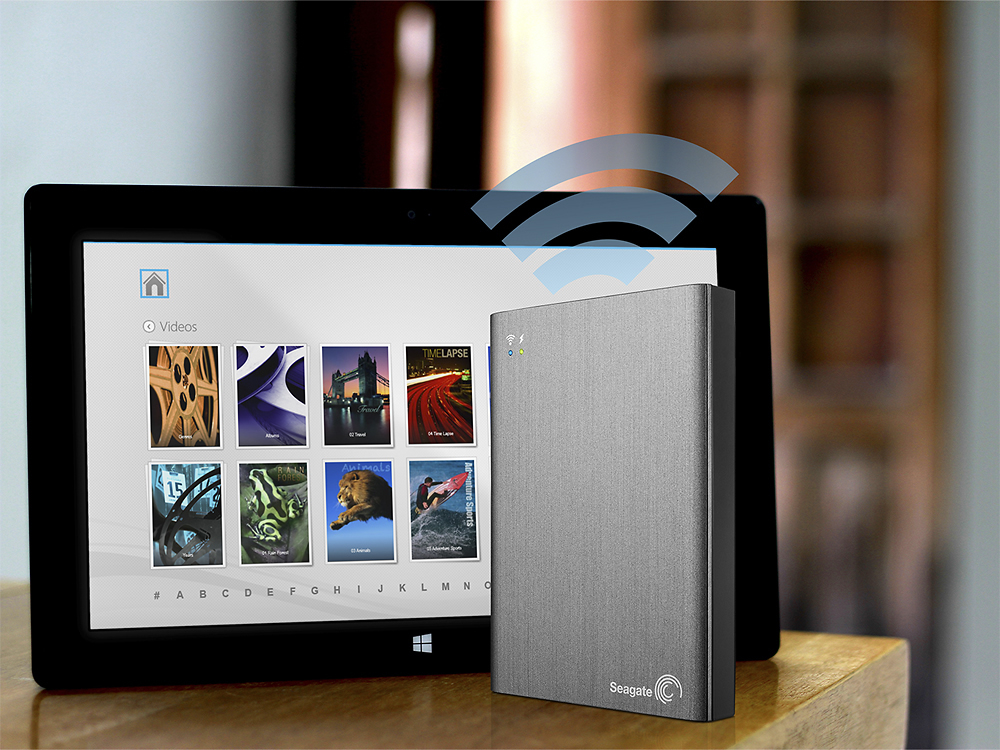
Customers have good things to say about the Wireless Plus 1TB Portable Hard Drive's storage capacity, portability, and ease of use. They appreciate its long battery life and find it great for streaming movies and music on trips. While some customers found the setup process frustrating and had issues with the app, others mentioned compatibility issues, particularly with Mac devices.
This summary was generated by AI based on customer reviews.
- Pros mentioned:Compatibility, Ease of use
Rated 5 out of 5 stars
Great little Drive!
Posted .This reviewer received promo considerations or sweepstakes entry for writing a review.After reading several reviews, I decided to give this drive a try. It works GREAT! Comes ready to play back audio and video, has help info. You may need to install Seagate Media Tools from the app store for your device ( PC/Mac/Android ), but it connects instantly. I was using mine in less than 5 minutes out of the box.
I would recommend this to a friend Rated 2 out of 5 stars
Not good for Downloaded movies
Posted .This reviewer received promo considerations or sweepstakes entry for writing a review.This is a great concept, however, if you're looking for a hard drive to store your downloaded movies and playback wireless, this isn't it. I purchased this product with the belief that you're able to purchase a movie on iTunes or Amazon, download, and store on the hard drive to stream to my iPad later. After hours and hours of frustration, I finally broke down and called Seagate Tech support only to be disappointed. Apparently iTunes and Amazon secures their legally downloaded movies with a "DRM" security software and sees loading a movie onto an external hard drive a no-no! If you want to watch these downloaded movies, you're going to have to load it directly onto your device from iTunes or other software. Very dissapointing!!!
No, I would not recommend this to a friend- Pros mentioned:Storage
Rated 5 out of 5 stars
Excellent way to add massive mobile storage
Posted .This reviewer received promo considerations or sweepstakes entry for writing a review.For older single core devices the streaming can be choppy depending on the size of your digital content. Streaming to newer devices like the Iphone 5 or Samsung GS3 works great. Ipad 2, Tab2 and Amazon Kindle Fire also ok. The Graphic User Interface could use some work. Reminds me of older Android, say 2.2 Froyo? I have not maxed out the battery. Not sure of the exact life of battery. It's 1TB of storage. It works great. For older devices recommend download content to mobile device than play. Also, Apple devices that download the app can bypass Itunes. No special permissions required. No access to internet needed. This device can be used to extend your reach to wifi. Awesome idea for RV'er's.
I would recommend this to a friend Rated 3 out of 5 stars
The Good, the Bad and the Ugly
Posted .This reviewer received promo considerations or sweepstakes entry for writing a review.Bought a WP to put all my movies on for traveling with the kids. Copied a ton of movies onto the drive from my PC. Installed their app onto my iPad. Connected easily and then the issues started. Scanned the list of titles, and there were lots of files that could not be played back. Evidently it does not recognize AVI files (converted them all). Then I copied the converted files and they did not appear alphabetically in the list.....suddenly they all were under "V" as they all had "Video_" preceding the titles, even though the titles on the drive are correct. Then I decided to sort my files with the folders they have in the app (genre/year). Oddly enough when I clicked on them, ALL of my files are in one folder in each of the genre and year folders. The app did not carry over any of that data. And if that wasn't bad enough, there is no way in the app to add or change any of this data. Not sure what they want us to do. Can't change it with their app, and if you change it with external app, it doesn't carry over. If you scan their community forums, the only advice they give is reinstall the app (which doesn't do anything productive). So, if you're not limited by the annoyances of their app and just want to carry your collection and playback across multiple devices, the drive is excellent. If you want it all, you're going to be as frustrated as I am.
I would recommend this to a friendRated 1 out of 5 stars
I actually paid for this experience?
Posted .This reviewer received promo considerations or sweepstakes entry for writing a review.I was extremely excited to pick this little guy up. A hard drive that allows tablets and phones to connect wirelessly and stream media? That's sounds awesome! Sadly, the experience is not so awesome. When upacking the device, I expected a user manual; oddly enough, there was none. That's ok, I'm tech savvy. I figured it couldn't be that difficult to set up. And it wasn't. I unpacked the materials, plugged it into my laptop, and began downloading media to the folders that were already set up on the hard drive. Sweet! The problems began when I actually tried to connect my tablet and smartphone to the hard drive's wireless network. Nope, wasn't going to happen. After connecting the drive to the interwebs, I received a message stating I needed to download a firmware update to the hard drive. Ok, fine. But before I could download THAT file, I had to download THIS file first. Ok, fine. Both files downloaded and dropped into the hard drive. Finally, I could connect! Wait...authentication error failure. Hmm, let's try again. Connected! Wait...nope, failed again. Aha! Connected! And...yes, it's official! I download the Seagate Media app and...huh. The app says I'm not connected to the hard drive. But the tablet says I am. Let me try my phone. After a few rounds of playing the "connect/disconnect" game, it does the same thing. My phone shows the wireless network for the drive...but the Seagate app says I'm not connected. So what does the Seagate support page say? "Android users...uninstall the app and reinstall!". Ok, I do. And it still doesn't work. "Difficulty connecting? Reset the hard drive!" Uh, yeah. That didn't do it either. "Wi-Fi no longer connects or drops offline? Reset the hard drive!" Uh...didn't we already try this? OK, maybe the generic troubleshooting guide isn't the way to go. I'll email support. Hmmm...I'll fill out their page here so I can start a support case. Let's see...Country, U.S., check. Language, English, check. Type of request, Technical Support, check. Operating System, Tablet Android 4.x Jellybean, check. Serial number, check. And Captcha...despite the fact that I tried numbers, text, and even having the computer read the code to me so I can type it in, it would not give me any kind of response when I selected "Create Case". So I opted to get help via chat...and wouldn't you know it? "Seagate Chat Support is currently unavailable due to maintenance". Great. Just great. I have been able to connect to the network a couple of times. And everything streamed nicely; a couple of movies I tested were choppy, but I'm not sure if it's the drive or an issue with the tablet and file type. But after streaming media for 5 minutes or so, I'm suddenly bumped out of the network, and the app tells me I'm no longer connected to the drive. It has a 150' range...but I can't keep a connection when it's sitting less than a foot from my tablet? As I type this review I check again, and my device is still trying to reconnect to the hard drive's wireless signal. It goes from "Connecting"...to "Authenticating"...to "Saved, Secured"...and back to "Connecting". It's a shame, I've always relied on Seagate for my storage needs. For me they've had a great track record. But considering the difficulty I'm having securing support for this purchase, and the fact that it isn't operating as advertised...I am greatly disappointed. I can't help but feel it is a waste of my money, and so it gets returned tomorrow.
No, I would not recommend this to a friendRated 1 out of 5 stars
Dissappointing!
Posted .This reviewer received promo considerations or sweepstakes entry for writing a review.I purchased a Seagate wireless plus to use with my iPad tablet. It worked until my iPad was upgraded from IOS8 to IOS9. According to Seagate, Apple IOS9 does not allow streaming of videos with DRM (all of my videos purchased through iTunes). Furthermore, Seagate has no intention of fixing this or providing a resolution. They do provide an article on the problem and a few suggestions on how to change file formats, etc. When it did work, the downloaded app was ok at best. It has/had a lot of potential but is definitely missing the finishing touches.
No, I would not recommend this to a friendRated 1 out of 5 stars
drive died after only a few uses
Posted .This reviewer received promo considerations or sweepstakes entry for writing a review.I only used this drive for backups once ever three months or so. It died after being used only 3 or 4 times! It is DEAD. I cannot reset it or get it to do anything. The lights blink once and then it will not do anything else. It was WAY too expensive for this life span!
No, I would not recommend this to a friendRated 2 out of 5 stars
Not compatible with Time Machine backup
Posted .This reviewer received promo considerations or sweepstakes entry for writing a review.I should have read page 6 of the online user manual before buying this first, which states it can not be used with Time Machine, or any other backup software that requires the drive to have a specific structure. This requires organizing by file type, and won't let you change the folder structure. Why anyone would have a 1 TB drive they can't also use as a backup is beyond me, when other options such as the Corsair Voyager Air or G Connect can (and have similar specs). Although you can use Seagates proprietary software to sync media, I would rather just perform a sync with my whole computer, via first party backup software. Other than this, the device performs as expected, and I had no issues.
No, I would not recommend this to a friendRated 1 out of 5 stars
I couldn't get it to work via WiFi
Posted .This reviewer received promo considerations or sweepstakes entry for writing a review.It's too bad that this product was not what I expected. I was looking for a hard drive that I could use as extra storage at home, accessible through WiFi for my Windows XP computer as well for a tablet I still wanted to buy. When I bought it in the store I asked if this was possible, e.g. use the hard drive as extra storage for my Windows XP computer and for a future tablet. I also asked if I could access the hard drive through the Internet when I was not at home, e.g. as cloud storage. The answer to all these questions was "yes". Back home I found the hard drive in the box, a USB cable plus connector to connect the hard drive via USB to a computer, and an adapter with cable to connect it to an AC outlet. This was more or less what I had expected. However, one thing I noticed was that the box said several times "No Internet needed" and I thought "Mmmm ...." There was a really small user manual that told me how to use the hard drive with a tablet. Although the outside of the box said clearly that I could use it with several Windows versions, the manual didn't say anything on how to connect to a Windows computer. Nevertheless the hard drive connected as expected through the USB cable. It already contained folders such as "Documents", "Music", "Pictures", etc. . I prefer to set up the folders in my own way (i.e. one folder per user directly under root, and then organize each of those the way it works best for each user. With other devices that I had bought in the past it happened that, after deleting those predefined folders, the device simply recreated them again. So I rather not see those predefined folders after plugging in a hard drive. I didn't delete them, because if I were to return the product I wanted to return it as original as possible. On the hard drive I had expected to find a utility to tell the device to which WiFi at home to connect and what the pass phrase was. I found a Setup program and started it. The first screen asked me to register, including the serial number of the hard drive, email address, phone number, my name, etc. Too bad, I'm one of those who wants to be left alone and the best way to do that is to leave all fields blank and I clicked "next". Surprise, because the program insisted that these details be entered. Seagate, I appreciate that you want to keep me informed, but I really don't want all kinds of offers in my mailbox and the best way to prevent that is not to register. If you force me to register before I can use your products, then your product may very well be on its way back to the store. No matter what, I started to believe that this hard drive was a WiFi hotspot of it's own. So I tried if any new signal showed up in the list of WiFi networks on my Windows XP computer, but nothing new showed up. The manual for the tablets showed a page on Seagate's website so I went there. Surprise again, the Seagate website was changed and that page no longer existed. I called the helpdesk of Seagate, but they were closed on Sundays. Trying to call them the next day wasn't an option for me as today I had some time, the next day I would be busy again. I called the helpdesk of Best Buy. They were very helpful, but with their help we couldn't make the drive work either. Of course I could still use the hard drive as a USB hard drive, but then there are other USB hard drives for less than half the price of this one, so that was not my preference either. Eventually I returned the hard drive back to Best Buy and I returned it without major problems. However, one thing I didn't understand is why Best Buy needed my ID and most of all, why my driver's license needed to be swiped (!). The representative explained that it was to prevent fraud, but with that remark he only raised more questions. I have returned items at other stores before and those store didn't need to see an ID, let alone that they needed to swipe drivers licenses. Even more, when buying the hard drive I had used my credit card and I had showed my drivers license. So Best Buy already knew who I was and this had already been checked. (Although I had showed my driver's license when buying, it wasn’t' swiped at that moment.) In short, if other stores don't need an ID to make returns possible, and if Best Buy already knows who I am, then why does Best Buy want the extra information from my driver's license? The representative answered that I didn't' have to worry because the data was protected in the safest ways possible. Errr ... that's really nice, but then we're skipping an important question; "Why is it that this data is being collected in the first place?" In short, if other companies don't need ID's to make returns possible, then Best Buy doesn't either. If Best Buy doesn't need that extra data, then they don't need that extra data, period. The remark "All data is stored in a safe way" doesn't change that. The remaining question is "Why is that information stored?" Anyway, for Seagate I have two suggestions ; - This hard drive seems to have all the hardware it needs to set it up at home as an extra hard drive, connect it to the WiFi at home and from there to all the devices at home for extra storage. This even includes TV's, game stations and anything else we can think of. Can I persuade Seagate to include a setup utility so that we can configure the hard drive to work at home as extra storage? (It seems to have all the hardware it needs. ;-) ) - Can I ask to include a little manual that shows Windows users how to use the hard drive?
No, I would not recommend this to a friend- Cons mentioned:Speed
Rated 1 out of 5 stars
Using this product, I felt I was a beta tester.
Posted .This reviewer received promo considerations or sweepstakes entry for writing a review.I've stuck with it for a week, and while it does what it's supposed to do, stream audio and video to another connected device on it's network, it does it very slowly, and not without intermittent freezes. It just feels like the product is incomplete, rushed to market. It's slow to transfer files to and from the device, and that's when you are using the USB 3.0 hookup! It's even slow to turn off. You have to depress the on/off button down and hold it there for >10 secs as the drive spins down. I keep hoping that a firmware update drops soon, or a software update. My adventures with this drive occurred on an ASUS Windows 8 laptop with and i7-3630 CPU and 8 GB's of RAM. As always, YMMV.
No, I would not recommend this to a friend - Pros mentioned:Storage
Rated 1 out of 5 stars
Not compatible with wifi network
Posted .This reviewer received promo considerations or sweepstakes entry for writing a review.I thought this would be an answer to a small desk top area but this is not the case. If you want to store movies, music etc. to take on a camping trip this is a fair drive. However since Seagate elected to use a dedicated wifi connection (unsecured) instead of bluetooth, you cannot be access an existing network while using the Seagate drive network. As a wireless drive, it is useless as a backup and is reduced to a standard usb if you want to download files from the internet or existing network drives.
No, I would not recommend this to a friend Rated 2 out of 5 stars
would not recommend
Posted .This reviewer received promo considerations or sweepstakes entry for writing a review.I would think twice about buying this product. If the need is greater than the risk than; would buy it, although expensive $$$$. Had a hard time installing it, wifi is slooooow when i connect to hard drive, still trying to find a way to delete my things from the hard drive (?), the app is not easy to use, not the best interface with other apps, i spent 2 hours setting it up. not good. Seagate had a good idea and created a mess...
No, I would not recommend this to a friendRated 1 out of 5 stars
Doesn't work
Posted .This reviewer received promo considerations or sweepstakes entry for writing a review.Started up, ran for a few seconds, dropped dead and never ran again. It's going back.
No, I would not recommend this to a friendRated 1 out of 5 stars
Wireless maximum 54mbps
Posted .This reviewer received promo considerations or sweepstakes entry for writing a review.The mainly attraction for this product is your function wifi, but after I bought when I connect, the maximum speed was 54mbps, so after i read that is wireless g. Its not acceptable one product today with wireless g, its too slow to transfer files or watch movies in hd or full hd. Don`t buy
No, I would not recommend this to a friendRated 1 out of 5 stars
Great Idea. A lot of promise, but a BIG NO GO.
Posted .This reviewer received promo considerations or sweepstakes entry for writing a review.Started fine was very excited looked like it was going to deliver what they averts it can do. Down loaded movies,photo's and music and tried to connect thru the WIFI and it wouldn't connect. tried to turn it off and it would not turn off. checked forms for help not much help. let battery drain and tried it again the next day and it did the same thing. took it back to best buy and they couldn't turn it off or get the computer to recognize it. Exchanged it for another. Thinking everyone deserves a second chance. And guess what its doing the same thing tried to call Seagate Tech support and they were closed because of bad weather. I didn't check reviews before i bought it I wish I did. Would of saved me a lot of time and energy. BUYER BEWARE.
No, I would not recommend this to a friendRated 1 out of 5 stars
Absolute Garbage and Waste of good Money!
Posted .This reviewer received promo considerations or sweepstakes entry for writing a review.This Would have been an awesome product if it would have work properly. I am soo upset I spent $212.69 on this product. The sales rep kid had no knowledge on this product told me to purchase it and if wasn't what I needed to return it, now that it takes for ever to connect and when it does connect it crashes and it more of a headache than an actual life saver, the store sales rep now tells me I can't return it. DO NOT PURCHASE THIS PRODUCT UNTIL THE MANUFACTURER FIXES THESE HUGE ISSUES!
No, I would not recommend this to a friendRated 1 out of 5 stars
Stay away from this junk!
Posted .This reviewer received promo considerations or sweepstakes entry for writing a review.Seagate did a horrible thing by upgrading their firmware. Now the drive is useless and they are not even acknowledging that there is a problem. I have called their "customer service" twice and all they will do is offer to send another one to me, at my cost, which does not fix the problem of their horrible firmware. Do yourself a favor and just but a regular drive for backup and stay away from this $200 drive. I cannot explain how dissatisfied I am with this drive.
No, I would not recommend this to a friendRated 1 out of 5 stars
Worst product I ever purchased
Posted .This reviewer received promo considerations or sweepstakes entry for writing a review.I spend several hours trying to get this to work. Wireless will drop, the unit locks up. Was very difficult to connect to a MAC. I have never had so much trouble with any product that I purchase in my whole life! Can not get hold of anyone at Seagate tech support for help.
No, I would not recommend this to a friend