Writing Pen For MacBook Pro
-
Apple - Pencil Pro - White
SKU: JJGCQ35H4QGreat pen great store i love best buy inhope i win this gift card...I love best buy great service and great prices, perfect !!
See all Tablet Stylus PensProduct Description
A white stylus featuring haptic feedback, squeeze controls, and precise gyroscope support for creative tasks.Your price for this item is $129.00 -
Apple - Pencil (USB-C) - White
SKU: JJGCQXK6ZJWorks great love this purchase best pen for drawing /coloring ❤️❤️❤️...i love best buy...the best product, I reallylove it, I love best buy
See all Tablet Stylus PensProduct Description
A white stylus with USB-C charging, magnetic attachment, and broad iPad compatibility for seamless creativity.Your price for this item is $79.00 -
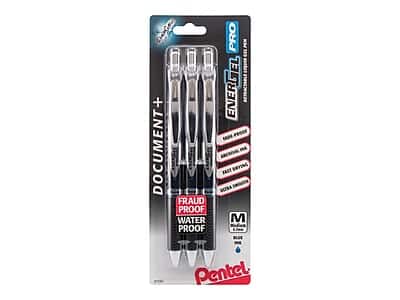
Pentel - EnerGel Pro Retractable Gel Pen, Medium Point, 3/Pack - Blue Ink
SKU: J7S578PYR9See all PensProduct Description
A retractable gel pen pack with quick-drying blue ink and a latex-free grip for comfortable writing.Your price for this item is $11.69 -
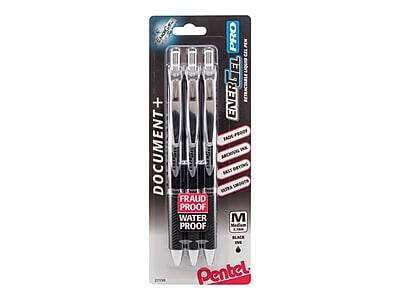
Pentel - EnerGel Pro Retractable Gel Pen, Medium Point, 3/Pack - Black Ink
SKU: J7S578PY6VSee all PensProduct Description
A retractable gel pen pack with quick-drying, permanent black ink and a comfortable latex-free grip.Your price for this item is $12.21


Best Sellers


Related Pages




FAQ
Yes, compatible writing pens can be used with supported apps on your MacBook Pro to take handwritten notes, annotate documents, and draw sketches.
Most writing pens require specific apps or drivers to function properly. Popular note-taking and drawing applications like Notability, Adobe Photoshop, and GoodNotes support pen input.
Some writing pens use Bluetooth to connect with your MacBook Pro, while others may work via USB or through specialized touchpads. Check the pen's compatibility details for connection requirements.
Absolutely! Many artists use writing pens with their MacBook Pro for digital illustration, graphic design, and photo editing using compatible creative software.
Compatibility may vary depending on the pen and your MacBook Pro model. Always verify that the writing pen supports your specific MacBook Pro version and operating system.