Rating 4.6 out of 5 stars with 779 reviews
4.6- Ease of use (238)
- Speed (113)
- Range (95)
- Performance (72)
- Setup (66)
- Ethernet Ports (35)
- Price (8)
- Features (7)
- Connection (6)
Customer Images
The vast majority of our reviews come from verified purchases. Reviews from customers may include My Best Buy members, employees, and Tech Insider Network members (as tagged). Select reviewers may receive discounted products, promotional considerations or entries into drawings for honest, helpful reviews.
- Rated 4 out of 5 stars
Google OnHub Dual-Band Wireless-AC1900 Gigabit Rou
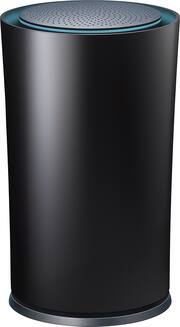
This versatile router does everything EXCEPT be its own independent unit. Upon purchase of the Google OnHub Dual-Band Wireless-AC1900 Gigabit Router I was led to believe that it was a stand alone router. Wether that was a misunderstanding on my part or bad info from he sales person IT DOES NOT replace your home router. Nevertheless it does provide you with a powerful option of disseminating your wifi signal to any device connected. It also allows you to decide the length of time you can prioritize any device. For instance, if you want your computer to be at maximum bandwidth for about 2 hours you can do so through the easy to use OnHub application. The router can easily handle up to 50 devices (the package says 100) and manages to run them all smoothly. It does not have an onboard cloud service (at least not at present). There are two different versions, so consult your sales person for specifics. Bottom line is this devices delivers real well on its intended purpose. That is to separate and manage your wifi channels. Other uses: provides guest with wifi lines, prioritizes channel use, app lets you manage usage, and fast ease of connection. This is a great router that even got my internet company to drop a charge for its dual bandwidth channels in the given router. It is an overall great product.
Posted by Gabe
- Rated 5 out of 5 stars
Excellent Product
After suffering with very poor internet and telephone service from Time Warner, I decided to take their repair tech's advice and purchase my own WiFi Router. The set-up was super easy and I have not had one hiccup from the time it was installed. I love the sleek profile and the fact that it talks with my phone to tell it if something is amiss. However, I would not have chosen this if I did not have the assistance of Best Buy's very excellent and knowledgeable tech person who guided me through the attributes and price points of various routers. I am very happy with my purchase.
Posted by MickiDee
- Rated 5 out of 5 stars
Can't complain
Easy setup, and haven't had internet problems since I got this. One Ethernet port want a problem, because I just used my old wifi router for extra. I can't recommend enough
Posted by Cweb
- Rated 5 out of 5 stars
Perfect first router with exciting possibilities
If you are looking for a first router then this is a perfect device for you. I really love the look of the TpLink Google OnHub. It would look great in any room of my home. Its very easy to use and not complicated at all. I was especially amazed as how easy it was to set up with the Google On app. The app is available in both Android and iOS. The app walks you through all of the setup and I was up and running in about 10 minutes. You just plug it in, set a network name and security key and let it worry about how to connect all your wireless devices and keep them running smoothly. It has a USB 2.0 port but is not operational at this time. Im sure that software and firmware updates in the near future will fix this. I was also reading that it has a built in Bluetooth 4.0 and ZigBee radio (Im guessing for smart home automation devices) that will be turned on sometime in the future. I see this turning into a very valuable asset to my home network. Range and speed of the OnHub is comparable to other dual band routers I have had. Overall I was impressed and will be leaving this hooked up. Im really excited to see what software and firmware updates TpLink has in store for the Google OnHub. This was a review of a free product received from TpLink as part of a review program.
Posted by arrellr
- Rated 5 out of 5 stars
WiFi without dead spots...
Lots of routers are fast, but fast, stable and providing dense coverage across a 3 floor townhouse, this has always been a challenge. I gave up long ago and the monstrosities from Linksys, Asus, etc... with 3 giant antennas and runway lighting and went to an Airport Extreme. And while not perfect it was... adequate. So I was skeptical when one day Google just announced the OhHub and figured it would equal the Airport at best. I am happy to report I was wrong. The antenna array on this thing is amazing and the range is unparalleled, I get coverage in the far corner of my third floor and outside the garage on the lower level. I don't get bandwidth sags in the evening as all the neighbors come home and the many other routers in range of mine go into use. How good is it, stuff that I always insisted needed a wired connection are now on WiFi and having zero issues. 2x tablets 2x smartphones 1x Windows 10 laptop Nest Thermostat 3x Lifx bulbs FireTV stick Sony SmartTV Apple TV (2015) Chromecast Audio PS4 (wired port) The app is simple but easier to navigate and gives far better control than Apple's AirPort app. I've been doing IT support for 17 years, when I get home I want my stuff to just work. The OnHub delivers exactly what I was hoping for and then some. Five stars, would buy again.
Posted by BobB