Appliances Memorial Day SaleFree delivery. Ends 6/3. Terms apply.Shop now

Skip to contentGo to Product Search
Main Content

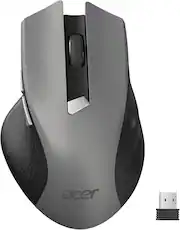
Acer - Wireless Mouse for Laptop, 2.4GHz Computer Mouse 3 Adjustable DPI Office Cordless USB Mice with USBA Receiver - Wireless - Gray

Model: ACER-M04B-Grey-BBY
SKU: 11973041
Sold & shipped by
Acer Gadget Partner-Newease
$13.99
Availability
FREE shipping to
Sold & shipped by
Acer Gadget Partner-Newease
4.59(255)
Specifications
  • Connection Type
    Wireless
  • Key Specs
    • Connection Type: Wireless
  • General
    • Brand: Acer
    • Model Number: ACER-M04B-Grey-BBY
    • Product Name: acer Wireless Mouse for Laptop, 2.4GHz Computer Mouse 3 Adjustable DPI Office Cordless USB Mice with USBA Receiver
    • Color: Gray
  • Features
    • Mouse Type: Standard
  • Performance
    • Tracking Method: Optical (There are several types of computer mice, optical and laser being among the most common. Optical mice detect less detail and provide more precise and accurate movement. Laser mice detect more detail and can be used on a wider variety of surfaces, but are more sensitive to small movements.)
  • Connectivity
    • Connection Type: Wireless
    • Operating System Compatibility: Universal
  • Dimensions
    • Product Height: 0.1 inches (The out of box height of the item. Height is measured as the vertical distance from the bottom of the item to the top as it would be primarily used or placed.)
    • Product Length: 5.1 inches (The out of box length of the item. Length is measured as the longest dimension of the item.)
    • Product Width: 3.2 inches (The out of box width of the item. Width is measured as the horizontal distance from one side of the item to the other as it would be primarily used or placed.)
    • Product Weight: 85.2 grams (The out of box weight of the item.)
  • Warranty
    • Warranty - Parts: 1 year
  • Other
    • UPC: 195133334211

acer Wireless Mouse for Laptop, 2.4GHz Computer Mouse 3 Adjustable DPI Office Cordless USB Mice with USBA Receiver, 6 Buttons, 1600 DPI, Medium to Large Sized Hands Compatible with PC, Laptop, Desktop

  • Plug and Play for Home Office: The wireless computer mouse features 2.4GHz connectivity, delivering a stable, interference-free connection up to 32ft. Designed for medium to large sized hands, it ensures comfortable use all day. Simply plug in the USB-A receiver for instant pairing—no drivers needed. 📌📌 If the mouse isn’t suitable, place the USB receiver in the battery compartment and return both.
  • 3-Level Adjustable DPI for Smooth and Precise Cursor Control: This travel USB mouse offers 3 adjustable DPI settings (800, 1200, 1600), allowing you to customize sensitivity for precise design work. Effortlessly switch to match your task and elevate your productivity. 📌 Please remove the film at the bottom of the mouse before use.
  • Effortless Browsing for Smooth and Comfortable Navigation: Equipped with forward and backward buttons, this computer mice streamlines your workflow, making it easy to navigate through web pages and files with a simple click. 📌Side button does not work on Mac.
  • Visible Indicator Light: The pc mouse features a visual indicator for DPI levels and low battery alerts. The red light flashes once for 800 DPI, twice for 1200 DPI, and three times for 1600 DPI. When the battery level is below 10%, the light flashes red until the mouse is completely out of power.
  • Click to Wake for Instant and Convenient Activation: With smart sleep mode, it saves power by standby after 10 inactive minutes, just 2-3 clicks to wake. This efficient design delivers 3-month battery life—3x longer than motion-wake mice. Engineered for durability, its buttons and scroll wheel are tested for 10 million clicks, ensuring long-term reliability and consistent performance.

Q: Why does the mouse go to sleep when not in use? Is their any way to turn this feature off ?

A: The Wireless Mouse for Laptop (2.4GHz) goes to sleep to save battery life, automatically entering a low-power mode after 5–10 minutes of inactivity. This feature is usually hard-coded into the mouse's firmware, meaning you cannot completely turn it off; however, you can wake it instantly with a click.

Q: How do I set the right and left buttons to do anything?

A: To customize your Acer-M04B wireless mouse buttons, use the operating system's mouse settings to swap left/right clicks or remap buttons with a third-party utility like XMouse Control. For basic swaps, go to Settings > Devices > Mouse in Windows and change the "Primary button" to Left or Right

Sponsored

Compare similar products

Acer - Wireless Mouse for Laptop, 2.4GHz Computer Mouse 3 Adjustable DPI Office Cordless USB Mice with USBA Receiver - Wireless - Gray
4.7(24)

acer Wireless Mouse for Laptop, 2.4GHz Computer Mouse 3 Adjustable DPI Office Cordless USB Mice with USBA Receiver, 6 Buttons, 1600 DPI, Medium to Large Sized Hands Compatible with PC, Laptop, Desktop

Best Buy essentials™ - Wireless Optical Standard Ambidextrous Mouse with USB Receiver - Wireless - Black

Eliminate the most common computer mouse issue—the cord. With the Best Buy Essentials Wireless Mouse with USB Receiver, you can navigate the web with speed and accuracy. Compatible with both Windows and Mac computers, simply insert the included nano receiver into one of your computer’s USB ports to wirelessly connect the mouse. It has just 3 buttons and an ambidextrous design for simple control. Optical technology detects when the mouse moves to deliver an accurate 1600 DPI response. We also included a AA battery, so you won’t have to worry about keeping the mouse powered until the LED indicator starts to blink. Let us improve your computer navigation by going wireless with this Best Buy-backed mouse.

Macally - Wireless Bluetooth Mouse for Mac, MacBook Pro/Air, iPad, and PC - Wireless - White
5.0(1)

Elevate your computing experience with the Macally BTDYNAMOUSE, a sleek and wireless Bluetooth mouse that brings a perfect blend of elegance and functionality to your desk. Whether you use a Mac, PC, or even an iPad, this Bluetooth mouse for Mac and Bluetooth mouse for PC is engineered to meet your needs. Key Features: Dependable Bluetooth Connectivity: This Bluetooth mouse easily connects to any Bluetooth-enabled Mac or PC, as well as iPads, providing a reliable connection up to 30 feet away. It's the perfect Bluetooth mouse for iPad and Bluetooth mouse for iPad Pro. Silent, Quiet-Click Buttons: Equipped with a silicon membrane, the buttons of this Apple Bluetooth mouse reduce noise by 90%, making it ideal for quiet environments. Smooth and Precise: Featuring an optical sensor with adjustable DPI settings (800/1200/1600), this Bluetooth wireless mouse allows for smooth and precise control. It’s a must-have Bluetooth mouse for MacBook Air and Bluetooth mouse for MacBook Pro. Slim and Compact: The sleek, ambidextrous design not only looks great on any desk but also makes it an excellent Bluetooth travel mouse. This cordless mouse is also perfect for on-the-go scenarios. Comfortable Design: The ambidextrous form factor ensures that both right-handed and left-handed users can enjoy the comfort of this Bluetooth Mac mouse. Long Lasting Battery: Enjoy up to 3 months of usage with just two AAA batteries (included), making it a great choice as a rechargeable Bluetooth mouse. Whether you're looking for a small Bluetooth mouse to carry in your laptop bag, a Bluetooth mouse for laptop, or a Bluetooth computer mouse to use at your desk, the Macally BTDYNAMOUSE is your go-to solution. Also ideal as a Bluetooth mouse for Chromebook, this versatile device ensures compatibility across devices. Don't wait any longer! Add the Macally BTDYNAMOUSE to your cart and start enjoying a quieter, more efficient workflow today. Trust Macally for dependable support and hassle-free returns with every purchase.

Acer - Bluetooth Wireless Mouse for Laptop(BT5.2+2.4GHz), Small to Medium Size, Left & Right Handed Office USB Mice - Wireless - Black
5.0(5)

Bluetooth & 2.4GHz, Left & Right Handed, light 2oz(63g), Adjustable DPI, Small to Medium Size Hands, Not Rechargeable, 【Requires a AA battery (Not Included)】

Pros for Acer - Wireless Mouse for Laptop, 2.4GHz Computer Mouse 3 Adjustable DPI Office Cordless USB Mice with USBA Receiver - Wireless - Gray
Overall Performance, Ergonomics, Button QualityOverall Performance, Ease of use, Price, Size, WirelessThere were no pros for this productPortability
Cons for Acer - Wireless Mouse for Laptop, 2.4GHz Computer Mouse 3 Adjustable DPI Office Cordless USB Mice with USBA Receiver - Wireless - Gray
There were no cons for this productClick Sound, GripThere were no cons for this productThere were no cons for this product

Specs

Reviews

Rating 4.7 out of 5 stars with 24 reviews

100% would recommend to a friend
Customers are sayingCustomers are pleased with the ergonomics of the Wireless Mouse for Laptop, with users noting it fits perfectly in the hand. The overall performance and button quality also receive positive feedback, with users reporting the mouse is very good and the buttons feel just right.
This summary was generated by AI based on customer reviews.
  • Ergonomics (7)
  • Overall Performance (4)
  • Button Quality (3)

Customer Images

The vast majority of our reviews come from verified purchases. Reviews from customers may include My Best Buy members, employees, and Tech Insider Network members (as tagged). Select reviewers may receive discounted products, promotional considerations or entries into drawings for honest, helpful reviews.

No content

Customers often buy these together

Sponsored

Similar products from outside of Best Buy

sponsored