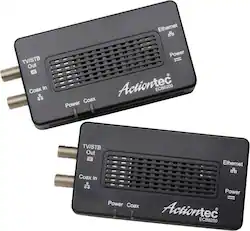
Actiontec - Bonded MoCA 2.0 Wired Network Adapter (2-Pack) - Black
- Key Specs
- Adapter Type: Wired
- General
- Brand: Actiontec
- Model Number: ECB6200KIT01
- Product Name: Bonded MoCA 2.0 Wired Network Adapter (2-Pack)
- Color: Black
- Dimensions
- Product Height: 0.01 inches (The out of box height of the item. Height is measured as the vertical distance from the bottom of the item to the top as it would be primarily used or placed.)
- Product Length: 0.01 inches (The out of box length of the item. Length is measured as the longest dimension of the item.)
- Product Width: 0.01 inches (The out of box width of the item. Width is measured as the horizontal distance from one side of the item to the other as it would be primarily used or placed.)
- Product Weight: 0.01 pounds (The out of box weight of the item.)
- Warranty
- Warranty - Parts: 1 year
- Warranty - Labor: 1 year
- Other
- UPC: 789286809247
Strengthen your home Wi-Fi with this Actiontec bonded MoCA 2.0 network adapter kit. Two adapter units connect to your router and an access point such as an HDTV, set-top box, laptop or any compatible device for seamless 4K streaming and gaming. This Actiontec bonded MoCA 2.0 network adapter kit utilizes coaxial connections to provide speeds up to 1 Gbps.
- Works over your home's existing coaxial wiring: Lets you enjoy the reliability and performance of a wired connection without having to wire the home for Gigabit Ethernet.
- Bonded MoCA 2.0 technology: Just plug this adapter into the coaxial port in your home theater, living room, or anywhere else, and you can enjoy wired Gigabit speeds for a superior streaming, gaming and networking experience.
- Compatible with cable TV: Designed specifically for homes with cable TV. Does not support homes with satellite TV.
- MoCA certified: Bonded MoCA 2.0 is backward-compatible with MoCA 1.1/1.0.
Whats Included
- Actiontec Bonded MoCA 2.0 Wired Network Adapters (2-Pack)
- Two power adapters
- Two 3' coaxial cables
- Two ethernet cables
- Splitter
- Quick start guide
Product Manuals
A: At least 2 - one to put the Ethernet into coax, one to get Ethernet out of coax
Q: Will Comcast X1 work when using these for a local network in the house?
A: The X1 platform is basically a cable modem its self and should not interfere with the operation of this device or it mess with the x1 box. This device basicly uses the unused frequency in the coax to transmit data so it should co exist peacefull.
Q: Does this device turn a standard TV into a smart TV?
A: No, this does not turn TVs into Smart TVs.
A: Yes, in fact the kit comes with a splitter (they recommend using this over the built-in secondary coax jack for continuing the run to the TV). However, if your splitter is REALLY old, you may find you need to replace it. When I first put internet in the house, the cable team replaced all the old splitters throughout the house, as they weren't passing the full frequency spectrum of the updated system.
A: Have you checked if the coax in the wall connected it could be damaged. or it could also be a very long run check if there is continuity in the line. Also be sure you have the right cable in the basement the device works best in a single isolated cable to the room from the mains not from Coax outlet to coax outlet.
A: You will need to hookup the transmitter box to your upstairs coax connection and use the other box for your xbox. If you use the lower coax connection for a TV you need to use the coax splitter (included in the dual MOCA combo set) to split the signal from the MOCA receiver box: one for your xbox and one for TV (if you need it). Follow the directions it's pretty easy to setup. I bought this system so my son could get internet for his computer in the basement. I have my router in the main level of my house. He tells me all latency and issues he had with the wireless connection have disappeared since I hooked up the MOCA system for him. Its a great product!
Q: is there a drop of MBPS speed with 2 or more devices used on these converters?
A: Not 100% sure on the meaning of the question. I am guessing that you are asking if simply by putting an ethernet device into one of these that the speed drops? The short answer is "no." One has to think a bit on how this works. All this is doing, with two of these, is creating the equivelant of ONE WIRE from point A to B. My hookup is using 3 of these. One plugs into a cable modem/router. 2nd plugs into a SWITCH (think "router" but slightly different), the third Plugs into a ROUTER. Thus at the SWITCH I can plug in up to 24 different devices. At the 2nd router I can plug in another 4 devices, plus the second router acts like a WiFi hotspot for the media room, which is completely across the house from the main house. Thus, I have effectively about a dozen devices plugged into three of these. If only 1 is active, I am going to get the full cable/modem speed. But of course if two computers are using the internet at the same time, the "speed" for each them HAS TO drop. The total coming from you cable modem is always a total and the devices all share that total. These devices are simply converting your cable wire into an ethernet wire (effectively).
A: I had same dilemma when purchased mine. Installed MoCA adapter prior to cable modem. I split coax cable line-in with and sent one coax cable to direct to cable modem and the other coax cable direct to MoCA adapter. Connected cable modem via ethernet wire direct to router and connected MoCA adapter direct to router. This configuration has worked excellently for me. I leveraged this to make Tivo network (Tivo Roamio plus two Tivo minis) to seamlessly connect and to enhance streaming on these devices. Working perfectly for me now!
People also viewed
 $49.99The price was $75.52

Today's top picks
 Black Friday in July Deal$749.99The price was $1,199.99
 Black Friday in July Deal$199.99The price was $399.99
 Black Friday in July Deal$69.99The price was $129.99
 $249.99The price was $399.99
 Black Friday in July Deal$199.99The price was $249.99
 Black Friday in July Deal$199.00The price was $419.00