Rating 4.9 out of 5 stars with 191 reviews
4.9- Refresh rate (34)
- Gaming (18)
- 240hz (16)
- Price (16)
- Picture quality (12)
- Bezel (2)
- Dead pixels (2)
- Viewing area (2)
- Customer service (1)
- Led (1)
Customer Images
The vast majority of our reviews come from verified purchases. Reviews from customers may include My Best Buy members, employees, and Tech Insider Network members (as tagged). Select reviewers may receive discounted products, promotional considerations or entries into drawings for honest, helpful reviews.
- Rated 5 out of 5 stars
Perfect!! 240hz is the best!
This is the best monitor I’ve used so far. The 240hz refresh rate is amazing. I play Fortnite constantly and it’s so much smoother than the 60hz. Great buy!
Posted by Justin
- Rated 5 out of 5 stars
THIS IS CAPABLE OF G-SYNC!!!!
Nvidia just launched new drivers that are 100% free to use which makes this AMD free sync monitor capable to use G-Sync. I paid the extra $100 for the G-Sync model almost a year ago and after buying the free sync model and looking at gameplay between my G sync model and AMD free sync monitor I completely see no difference. If you're a pc gamer like me, save your money and choose this monitor over the other gync model unless you feel like paying an extra $100 for three LED light strips which now is the only difference between that monitor and the "G-sync" mondel Alienware offers. (P.S Best Buys price matches with Dell). Since when I bought this it was $500 on the website and Best buys was kind enough to price match with dell, Saving me another $100!
Posted by Mikethepcguy
- Rated 5 out of 5 stars
Beautiful picture
Just got this set up the other day and the difference is incredible. The upgrade from 60 to 240 hz is crazy. And the design on the monitor and the stand is awesome
Posted by Obalit
- Rated 5 out of 5 stars
Gaming monitor in all its glory
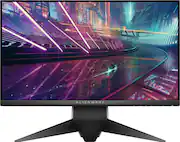
The monitor is rich in features and will certainly add some street cred to your gaming rig. Although its high in price, it does have 240hz refresh rate and 1ms response time. 240hz! That’s crazy fast and buttery smooth. These are the reasons why one would even gravitate to this caliber of a gaming monitor. The G-sync/freesync, adaptive sync technology is also the latest in gaming monitors as this allows the video card to control the refresh rate of your monitor to prevent screen tearing. The 25” screen size is just the right size where you feel fully immersed the moment you turn it on. The colors are vibrant straight out of the box. You will need to calibrate it if you want color accuracy but its pretty close to begin with. There are a bit more buttons on it then you will find on a standard monitor. You have a dedicated button for profile setups, brightness & contrast, dark details slider, and full menu. I’m pleased with the black levels but it may not wow the hardcore contrast ratio junkies. The USB 3.0 ports are a bonus. In summary, I do recommend this monitor if you’re building your gaming rig to play the latest and greatest. The performance is outstanding. Just make sure your video card and your games can even take advantage of the capabilities of this monitor. It does take the latest AMD or Nvidia video card to take advantage of the g-sync/freesync technology. The price is a bit steep for a 1080 and not 4k but it does do 240hz and that’s no easy feat. ON A MORE TECHNICAL NOTE: Do note that there is two versions of this monitor. While they might look the same, it’s a bit different. The AW2518H is the Nvidia version and the AW2518HF is the AMD version. There is a price difference of the two and I will briefly note why. The Nvidia version has the g-sync enabled chip that does g-sync only via displayport and supports nvidia 3d games. This also has the alienware FX lighting where the back side of the monitor glows whichever color you choose. The slightly cheaper AMD version doesn’t have the alienware FX lighting but it does have the Freesync over HDMI 2.0 instead of displayport. While both monitors have HDMI and displayport, they both prefer one over the other. Nvidia prefers displayport and only has HDMI 1.4. The AMD prefers HDMI and is equipped with HDMI 2.0. This may sound confusing at first but just match the monitor version to the video card. If you have neither video card that supports the g-sync/freesync technology, aka adaptive sync, then decide if the “FX lighting” the Nvidia has is worth the extra money. I would just get the AMD version as it has the same 1920x1080, 240hz, and 1ms that you’re longing for anyways. Game on!
Posted by TonyMSP
- Rated 4 out of 5 stars
Excellent and Fluid Gaming Monitor
The Alienware AW251HF is actually the first monitor specifically designed for gaming that I have personally used so I was quite eager to compare it with my current monitor (HP 2511x). At 240 Hz and a 1 millisecond response time, this monitor is sure to grab the attention of most gamers looking for high specifications. With the addition of Free Sync, the monitor should be free from any ghosting or tearing that would otherwise distract during gaming sessions. From a design perspective, I was actually quite surprised at how heavy and sturdy the stand was. The style of the stand was actually quite innovative, with two legs branching out and seemed secure and sturdy. On the back, the silver had a nice brushed finished and, while plastic, it did not feel cheap. In addition, there was a stylish alien logo in the back. Once the stand is installed, the monitor can be rotated to the left or right, as well as up or down depending on how high you want it. Lastly, the monitor can pivot around in 90-degree increments to fit your needs. At eye level, the monitor looked amazing and was actually more comfortable than the current viewing angle on my monitor. In the back of the monitor, you will note two HDMI 2.0 ports and a Display port connection; only an HDMI cable is included along with a bracket to cover up the cables once they are rerouted through the hole in the stand. There are two USB 3.0 ports and a audio jack directly underneath the Alienware logo. A USB 3.0 cable is included as well. On the monitor, there are several modes that are worth mentioning. First, there are several presets based on which type of game you are playing such as FPS, RPG, and RTS. Additionally, there are 3 different game settings for your own personal customization. Standard is default and implies both 75% brightness and contrast. On max contrast, the colors are actually quite vibrant especially for an anti-glare monitor. Additionally, max brightness was actually fairly bright especially at its rated 400 nits. Another feature that is worth noting is the dark mode, which improves viewing on dark images. However, I noticed it almost sharpens the image too much if your game is not extremely dark or your game's brightness is too high. In addition to those presets above, you will also find warm, cool, comfort view and custom presets. Custom allows you to adjust the standard red, blue, and green colors with an additional yellow, magenta, and cyan setting. As for image quality, overall I think most will be pleased with the image, provided that you know what to expect from an anti-glare monitor. For me personally, as my last 3 monitors have all had a glossy screen finish, the color reproduction can be somewhat of an adjustment. Thus, I was actually surprised that on standard preset, the color is crisp and was not as dull as I was expecting. Whites were a bit muddy at first but after adjusting the settings, it improved. In addition, with a screen size of 25'', it was perfect for viewing 1080p content. At this resolution, I typically avoid anything higher than 25'' as it tends to look washed out to me. Additionally, the pixel pitch is listed at 0.2832mm by 0.2802mm. Usually, pixel pitch is listed with one number but I would assume the first number would be for the horizontal portion of the display (1920) though I could be wrong. In addition, I viewed and set several different wallpapers as backgrounds to view the color. The blacks were actually handled fairly decent, though understand they aren't the deepest or as rich as some of the IPS panels. Greens looked fairly deep as well. I also looked at some backgrounds with more orange and red and the color seemed fairly accurate. Dell also lists this as 90 pixels per inch. With these specs, text and color seemed perfectly adequate and everything was sharp and concise. As for game performance, all of the games played fluid and smooth and obviously, there was no evidence of ghosting. One feature I would like to mention is that the monitor has a built in frame rate display so while playing games I had that enabled as well as fraps. When you have the monitor's frame rate overlay enabled, it would seem that it only works while Free Sync is enabled. There was one instance while playing Rise of the Tomb Raider where when I would set the graphic settings high enough, the monitor's frame rate counter was higher than what fraps showed. Thus, I assume that the monitor's frame rate counter was only showing the monitor's Free sync rate instead of the game's FPS once it gets low enough. Once the settings were lowered, both the fraps and monitor counter matched. Conversely, when you have the Free Sync disabled, it would just display the monitor's 240 Hz refresh rate and never moved. Overall, every time I played normally though, the monitor and the game play remained fluid and smooth. As for Free Sync itself, I tested several games to see if I could feel a difference or see any when I had it enabled versus with it turned off. For the most part, I could not detect a noticeable difference even when it was disabled. However, when Free Sync was enabled, game play on this monitor, even in the 40-55 FPS range, was smooth just like it was when it was off. The feature, nonetheless, is great to have as it does seem to work while it was on, as evident by the monitor's frame rate overlay. In conclusion, I would recommend this monitor for those who are looking for a high performance gaming monitor that are not afraid of the price tag. Personally, while I have had always preferred monitors with glossy screens, this monitor surprised me more than I thought it would. Its image isn't as washed out as some others tend to be and the brightness is actually better than my current monitor. With that said, you will need adjust the image to your liking and I caution those especially who are coming from either gloss finish monitors or even IPS ones that it may take some time to get used to it. Perhaps the best feature for me was that ability to adjust and pivot the monitor to my needs. Playing at eye level is actually comfortable rather than having to look down at a monitor. At 240 Hz and a 1 millisecond response time, it offers everything that those who play games would require of such a monitor. Games were smooth and pictures looked as they should. As such, I think it would fulfill the needs of gamers at a price that most are willing to pay. Recommended.
Posted by Dragonhunter281