Aluratek - Wireless Adapter for Apple CarPlay - White
- Key Specs
- Model Compatibility: Apple iPhone
- General
- Brand: Aluratek
- Model Number: AWCPA01F
- Product Name: Wireless Adapter for Apple CarPlay
- Color: White
- Compatibility
- Brand Compatibility: Apple
- Model Compatibility: Apple iPhone
- Operating System Compatibility: Apple iOS 10, Apple iOS 11, Apple iOS 12
- Connectivity
- USB Connectivity: true
- Number Of Connectable Devices: 5
- Mobile Device Syncing: Apple CarPlay
- Dimensions
- Product Height: 6 inches (The out of box height of the item. Height is measured as the vertical distance from the bottom of the item to the top as it would be primarily used or placed.)
- Product Width: 2.6 inches (The out of box width of the item. Width is measured as the horizontal distance from one side of the item to the other as it would be primarily used or placed.)
- Product Depth: 0.75 inches (The out of box depth of the item. Depth is measured as the distance from the front of the item to the back as it would be primarily used or placed.)
- Product Weight: 1.5 ounces (The out of box weight of the item.)
- Warranty
- Warranty - Parts: 1 year
- Warranty - Labor: 1 year
- Other
- UPC: 812658015448
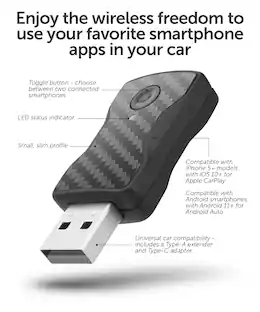
Aluratek’s wireless car adapter for CarPlay provides instant Apple CarPlay capability without needing to connect your phone’s cable to the vehicle’s CarPlay enabled USB port. You can easily enjoy music, navigation, Siri, and many more CarPlay features without needing to connect your cable.,
- Easy setup/Plug & Play: Plug & Play, no need to download any apps, you can enjoy wireless CarPlay easily and effortlessly. Plug it in then forget about it as it self-powers from your vehicles USB port.
- Auto reconnect: The adapter also supports auto-connection. Once you've paired your device, the adapter will automatically activate the wireless CarPlay connection every time you start your car, eliminating the need for connecting cables.
- Pair multiple devices: Pair up to 5 devices. Great for vehicles with multiple drivers or passengers. Only 1 device can be actively connected to your CarPlay.
Whats Included
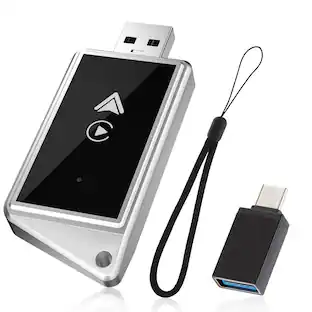
- Wireless car adapter for CarPlay
- USB-A to USB-C adapter
- Instruction Manual
Product Manuals
Q: Is it easy to set up this wireless adapter?
A: Yes, the setup is easy with plug and play feature.
Q: What Apple operating system is compatible with this adapter?
A: This adapter is compatible with Apple iOS 10.
Q: What Apple models are compatible with this adapter?
A: This adapter is compatible with Apple iPhones.
Q: Does this adapter support auto reconnection?
A: Yes, this adapter supports auto-connection for convenience.
Q: Does this adapter allow mobile device syncing?
A: Yes, this adapter supports Apple CarPlay for mobile device syncing.
Q: Can I connect multiple devices to this adapter?
A: Yes, you can pair up to 5 devices with this adapter.
Q: Does this adapter have USB connectivity?
A: Yes, this adapter has USB-A and USB-C connectivity.
A: I don't think so. Apple made some changes that made it difficult to connect. Try the following: -->> TRYING TO RESET THE UNIT Here are the steps to reset the CarPlay Adapter 1. Connect the adapter to a USB power source (a computer in your home is best) 2. Go to the WIFI setting on your PHONE (not Bluetooth in this case) and select the CarPlay/Android adapter, password is 88888888 3. Open safari on you Mac or any web browser on your PC and type in 192.168.1.101 -- then hit the enter key on your computer keyboard. 4. You should then be presented with an option to factory reset. You may also see an update option. How try the unit in your car and try connecting your phone to the adapter via Bluetooth. 5. If none of this is working then return the unit to the retailer or send us your proof of purchase. We can then send you an RMA number, you can return the adapter to us and we will send you a new replacement.