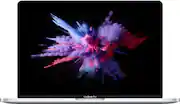
Apple - Geek Squad Refurbished Good - MacBook Pro - 13" Display with Touch Bar - Intel Core i5 - 8GB Memory - 256GB SSD - Silver
Customers are saying
Customers are satisfied with the performance, price, and overall experience of using this computer. Many find the Touch Bar to be a valuable asset. However, some customers have expressed concerns regarding the battery life and the condition of the product upon arrival. Additionally, a few customers have noted that the device tends to overheat easily.
Quad-core 8th-generation Intel Core i5 processor
Brilliant Retina display with True Tone technology
Touch Bar and Touch ID
Intel Iris Plus Graphics 645
Ultrafast SSD
Two Thunderbolt 3 (USB Type-C) ports
Up to 10 hours of battery life²
802.11ac Wi-Fi
Latest Apple-designed keyboard
Force Touch trackpad
Available in space gray and silver
macOS Mojave, inspired by pros but designed for everyone, with Dark Mode, Stacks, easier screenshots, useful built-in apps, and more
¹ Compared to previous 13-inch MacBook Pro with dual-core processor.
² Battery life varies by use and configuration. See www.apple.com/batteries for more information.
- Screen Size13.3 inchesScreen Resolution2560 x 1600 (Retina)Touch ScreenNoProcessor ModelIntel 8th Generation Core i5Storage TypeSSDTotal Storage Capacity256 gigabytes
Reviews
Rating 4.1 out of 5 stars with 66 reviews
- Performance (10)
- Computer (4)
- Price (4)
- Touch Bar (4)
- Battery Life (4)
- Condition (4)
- Overheating (3)
Customer Images
The vast majority of our reviews come from verified purchases. Reviews from customers may include My Best Buy members, employees, and Tech Insider Network members (as tagged). Select reviewers may receive discounted products, promotional considerations or entries into drawings for honest, helpful reviews.
Compare similar products

MacBook Pro has a new eighth-generation quad-core Intel processor with Turbo Boost up to 4.1GHz. A brilliant and colorful Retina display with True Tone technology for a more true-to-life viewing experience. The latest Apple-designed keyboard. And the versatile Touch Bar for more ways to be productive. It's Apple's most powerful 13-inch notebook. Pushed even further.

The 13-inch MacBook Air features 8GB of memory, a fifth-generation Intel Core processor, Thunderbolt 2, great built-in apps, and all-day battery life.* It’s thin, light, and durable enough to take everywhere you go—and powerful enough to do everything once you get there.

Ready for whatever your day brings, MacBook Neo flies through everyday tasks and apps. Choose from four stunning colors in a durable aluminum design. With a brilliant 13-inch Liquid Retina display, the A18 Pro chip built for AI and Apple Intelligence, and up to 16 hours of battery life, it’s an amazing Mac at a surprising price.

MacBook Air with the M5 chip brings blazing speed and powerful AI capabilities into an incredibly portable design. With Apple Intelligence, up to 18 hours of battery life, and fast SSD storage starting with 512GB, you can work, create, and play anywhere life takes you.
| Pros for Apple - Geek Squad Refurbished Good - MacBook Pro - 13" Display with Touch Bar - Intel Core i5 - 8GB Memory - 256GB SSD - Silver | |||
|---|---|---|---|
| Performance, Computer, Price, Touch Bar | There were no pros for this product— | Overall Performance, Portability, Battery Life, Design, Processor Speed | Overall Performance, Portability, Battery Life, Processor Speed, Design |
| Cons for Apple - Geek Squad Refurbished Good - MacBook Pro - 13" Display with Touch Bar - Intel Core i5 - 8GB Memory - 256GB SSD - Silver | |||
| Battery Life, Condition, Overheating | There were no cons for this product— | Storage Capacity, Port Selection, Biometric Security | Port Selection, Storage Capacity, Touchscreen, Surface Finish |


![esc ~ ! 1 tab caps lock shift ctrl F2 Fl # 2 3 Q W A S Z start opt L F3 $ 4 E D X alt cmd3 ) FS F4 A % 5 6 R T F G V C logi 44 HI & F9 FID FB F7 F6 * ) - - & 0 8 9 7 O P U I Y K L H J > < N M 1 B PM + = { [ : I ; ? I alt cmd D 2 4 300 3 1 F12 . * page I insert home up clear backspace 8 9 + 7 page A pg up end down home } I delete ] / 6 4 5 4 enter 2 3 enter 1 dn Pg end shift = 0 del ins etrl fn opt](https://pisces.bbystatic.com/image2/BestBuy_US/images/products/6539/6539505_sd.jpg;maxHeight=232;maxWidth=233?format=webp)
![logi esc 1 F1 2 F2 3 F3 F4 F5 F6 F7 F8 x F9 NI F10 x F11 F12 ins del ~ ! 1 2 # 3 $ 4 % 5 ^ 6 & 7 8 ( 9 ) 0 e - + = backspace tab Q W E R T Y U I O P { [ } ] I / caps lock A S D F G H J - K L : ; " enter shift Z X C V B N M < > ? / shift ctrl fn L start opt H alt cmd alt cmd ctrl opt](https://pisces.bbystatic.com/image2/BestBuy_US/images/products/6478/6478163_sd.jpg;maxHeight=232;maxWidth=233?format=webp)


![The text on the image reads:
888 DD DI DD 4 DSC i F2 F3 4 FS T6 ET 1. 1N IN F.. 11 1.. 114 1n F1 F12 118 in9 - a ee 1 8F 2 3 $ 4 % 5 A 6 & 7 . 8 I 9 I 0 ee I + = delete fn home page up clear - / + tab Q W E R T Y U I 0 P { [ ] ] | I delete end page down 7 8 9 ee caps lock A S D F G H J K L : I - return 4 5 6 + shift Z X C V N M < F > ? / shift a 1 2 3 control option 2 command 3 command option control Y - 0 enter
After grouping and correcting the text, it reads:
888 DD DI DD 4 DSC i F2 F3 4 FS T6 ET 1. 1N IN F.. 11 1.. 114 1n F1 F12 118 in9 - a ee 1 8F 2 3 $ 4 % 5 A 6 & 7 . 8 I 9 I 0 ee I + = delete fn home page up clear - / + tab Q W E R T Y U I 0 P { [ ] ] | I delete end page down 7 8 9 ee caps lock A S D F G H J K L : I - return 4 5 6 + shift Z X C V N M < F > ? / shift a 1 2 3 control option 2 command 3 command option control Y - 0 enter](https://pisces.bbystatic.com/image2/BestBuy_US/images/products/f4059d3a-0c2a-46ef-bcfd-4e11b9b26d5d.jpg;maxHeight=232;maxWidth=233?format=webp)
![The text on the image is a list of keys on a keyboard. Here is the grouped and corrected text:
1. Function keys: F1, F2, F3, F4, F5, F6, F7, F8, F9, F10, F11, F12
2. Numeric keys: 1, 2, 3, 4, 5, 6, 7, 8, 9, 0, -, =, +, (, )
3. Modifier keys: shift, control, option, command, caps lock, and return
4. Navigation keys: arrow keys (up, down, left, and right), and home and end keys
5. Punctuation keys: [, ], |, /, and ;
6. Numeric keypad keys: 7, 8, 9, *, -, and =
7. Other keys: tab, Q, W, E, R, T, Y, U, I, O, P, J, K, L, and Z
This list includes all the keys on a standard keyboard, grouped by their functions and types.](https://pisces.bbystatic.com/image2/BestBuy_US/images/products/eba31cb9-2606-42ab-9643-ed4280533545.jpg;maxHeight=232;maxWidth=233?format=webp)


