Rating 4.3 out of 5 stars with 1964 reviews
4.3- Speed (379)
- Ease of use (374)
- Wi-Fi (195)
- Performance (180)
- Setup (91)
- Compatibility (46)
Customer Images
The vast majority of our reviews come from verified purchases. Reviews from customers may include My Best Buy members, employees, and Tech Insider Network members (as tagged). Select reviewers may receive discounted products, promotional considerations or entries into drawings for honest, helpful reviews.
- Rated 4 out of 5 stars
Works very well but set up may be a challenge
Four Stars for Set Up Five Stars for Operation Five Stars for Tech Support A recent upgrade by Comcast made my old router/modem obsolete overnight. Rather than renting Comcast equipment I opted to buy one compatible with their system and on the approved list. Set up was pretty easy but accessing the router was a bit of a challenge. The instructions were not very clear and the issue I was having required a call to their tech support. I am pretty tech savvy so I had no issue with tech support and followed their direction to access the modem to complete set up. The unit performs as designed and works very well. Great range and it delivers the speeds needed for the Comcast Service I have. Not really what I would call a plug and play in the true sense. However if you are pretty good with this type of equipment or have a friend or relative who is I highly recommend his unit. I also would like to note that their tech support was very well versed in providing a precise solution to my issue. But on the other hand the instructions and/or their website could have listed a little more info on troubleshooting set up to eliminate having to even call.
Posted by Dyson
- Rated 5 out of 5 stars
Best Cable Router I have ever Own!!!
I have used NETGEAR Cable Routers for many many years but was never really happy with the range of its wifi. So when our lastest Router needed to be replaced, I decided to go with this ARRIS Router after reading many many reviews and talking to the salesperson at Best Buy. When I finally got it up and going, I was immediately impressed not just at the increase in my download speed (it went up 3 fold) but the wifi range is just freaking amazing. My router sits in the living on the backside of my house and my RING Garage Camera connected with NO issues just from the Router directly. That is over 100 feet between them with many rooms and walls. With my old NETGEAR Routers I ALWAYS had to use a wifi extender. Not this time!!! In total i have 28 devices connected via wifi and all devices have a strong connection. I am an ARRIS Fan for life now. I will highly recommend this router!!! To give you an example my Internet plan is 500mb. On my my xbox I could never get more than 250mb (hard wired) well now after purchasing the ARRIS Router, i now get 399mb on my Xbox…WOW just Wow. You need to get an ARRIS Router!!!’
Posted by Sammy
- Rated 5 out of 5 stars
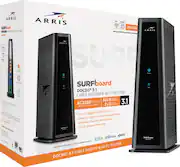
ARRIS - SURFboard DOCSIS 3.1 Cable Modem/Router
I highly recommend this modem/router combo. Its very easy to setup, impressive speed, and reasonable price. It was a bit expensive, but you definitely get what you paid for. This DOCSIS 3.1 modem can handle up to 2.5 Gbps broadband speeds. It’s cute, compact, and supports two static IP addresses3.
Posted by DominoNelz
- Rated 5 out of 5 stars
Great for faster internet speeds
Great for those whose ISP has upgraded their internet speed. To get those speeds however, a Docsis 3.1 Modem/Router is needed. A Docsis 3.0 router will still work but won't allow for today's faster gigabit speeds. The Arris Surfboard Model SBG8300 Cable Modem and Router in one fits the bill. Has four ethernet ports for multiple connections and one coaxial cable input. No telephone line connection for services requiring this. All in all a decent upgrade.
Posted by Silvergreen
- Rated 4 out of 5 stars
Great So Far Some Helpful Hints
I was skeptical to purchase the 8300 based on the reviews, most stating perpetually dropped wifi problems. Purchased, (to upgrade to "GIG") Connected coax cable then power, logged in, called (COX) ISP to set up, chose the same wifi names and passwords for 2.4 and 5ghz, booted PC, my printer immediately connected. Wow this is easy! Not so fast.... other wifi devices were not connected (including smart plugs, thermostat, wifi extenders, Ring etc.) Restarted modem a few times using the ISP interface, tried to connect smart devices and wifi kept dropping and I had a sinking feeling that I made a bad purchase. I took a break (about 2 hours in) then decided to uplug and reconnect the 8300, disconnected the power source from smart devices and reconnected them and BAM! most connected and no more wifi dropping. had to delete and reinstall a few others. I'll update if anything changes, but as of day 2, I am completely satisfied. As far as the time I spent, I wish it were more of a PNP experience, but I used the opportunity to explore and learn a few things about the 8300. I love the new interface btw. Unrelated, I wish I could hide unused (neighbors) wifi SSID's.
Posted by Andreb11