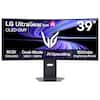
The ROG Swift OLED PG27UCDM is a 27-inch, 240Hz 4K gaming monitor that boasts the latest fourth-generation QD-OLED technology to deliver supersharp visuals and crisp text. The cutting-edge QD-OLED panel offers greater longevity compared to previous OLED technologies and minimal flicker―even when frame rates fluctuate. With the addition of the Neo Proximity Sensor in the new ROG OLED Care Pro suite, the monitor transitions to a black screen when no user is detected, guarding against burn-in. Built-in DisplayPort 2.1a UHBR20 provides a full 80Gbps bandwidth to support uncompressed 4K visuals at a stunning 240Hz to elevate viewing experiences to the next level.
Q: Is this monitor wall-mountable?
A: Yes, it is wall-mountable and compatible with the 100mm x 100mm VESA standard.
Q: How does the ASUS OLED Care+ feature work?
A: The new ASUS OLED Care Pro functions with a Neo Proximity Sensor that detects when the user is away and switches to a black screen to reduce burn-in risk.
Q: Does this monitor support HDR?
A: Yes, it supports HDR and is VESA Certified DisplayHDR 400 True Black compliant.
Q: What type of connectivity does this monitor offer?
A: It offers extensive connectivity including DisplayPort 2.1a UHBR20, USB-C (90W PD), HDMI 2.1, and a tripod socket.
Q: Does the monitor have built-in speakers?
A: No, the monitor does not have integrated speakers.
Q: What is the refresh rate of the monitor?
A: The refresh rate is 240Hz.
Q: What is the response time of this monitor?
A: The response time is 0.03 milliseconds.
A: The other model doesn't have DisplayPort 2.1 or Dolby Vision.

The ROG Swift OLED PG27UCDM is a 27-inch, 240Hz 4K gaming monitor that boasts the latest fourth-generation QD-OLED technology to deliver supersharp visuals and crisp text. The cutting-edge QD-OLED panel offers greater longevity compared to previous OLED technologies and minimal flicker―even when frame rates fluctuate. With the addition of the Neo Proximity Sensor in the new ROG OLED Care Pro suite, the monitor transitions to a black screen when no user is detected, guarding against burn-in. Built-in DisplayPort 2.1a UHBR20 provides a full 80Gbps bandwidth to support uncompressed 4K visuals at a stunning 240Hz to elevate viewing experiences to the next level.

The ROG Strix OLED XG27ACDMS is a 27-inch, 280Hz QHD gaming monitor. With the addition of the Neo Proximity Sensor in the new ROG OLED Care Pro suite, the monitor transitions to a black screen when no user is detected, guarding against burn-in.

The 27-inch ROG Strix OLED XG27ACDNG gaming monitor boasts an exclusive 1440p QD-OLED panel with a 360 Hz refresh rate, OLED Anti-flicker technology and 0.03 ms gray-to-gray (GTG) response time for immersive, fast-paced gaming. Custom heatsink provides exceptional cooling performance, while ASUS OLED Care+ functions reduce the risk of burn-in to ensure longevity of the OLED panel.

The ROG Strix OLED XG27UCDMG is a 27-inch, 240Hz 4K gaming monitor that boasts the latest fourth-generation QD-OLED technology to deliver supersharp visuals and crisp text. The cutting-edge QD-OLED panel offers greater longevity compared to previous OLED technologies and minimal flicker―even when frame rates fluctuate. With the addition of the Neo Proximity Sensor in the new ROG OLED Care Pro suite, the monitor transitions to a black screen when no user is detected, guarding against burn-in.
| Pros for ASUS - ROG Swift 27" 4K OLED 240Hz 0.03ms Gaming Monitor with FreeSync Premium Pro and HDR (DisplayPort, HDMI) - Black | |||
|---|---|---|---|
| Color Quality, Refresh Rate, Resolution | Color Quality, Refresh Rate, HDR Performance, Software | Color Quality, Refresh Rate, Performance | Color Quality, Refresh Rate, Resolution, Design, Gaming Performance |
| Cons for ASUS - ROG Swift 27" 4K OLED 240Hz 0.03ms Gaming Monitor with FreeSync Premium Pro and HDR (DisplayPort, HDMI) - Black | |||
| There were no cons for this product— | There were no cons for this product— | There were no cons for this product— | Proximity Sensor, HDR Performance, Speakers |
Customers commend the ROG Swift 27" monitor for its vibrant and detailed color quality. The monitor's unmatched refresh rate and resolution are also highly appreciated. There are no cons mentioned for this product.
The vast majority of our reviews come from verified purchases. Reviews from customers may include My Best Buy members, employees, and Tech Insider Network members (as tagged). Select reviewers may receive discounted products, promotional considerations or entries into drawings for honest, helpful reviews.
Amazing in almost every way, the screen part of the monitor is amazing 4K OLED on a 27inch monitor is phenomenal and having up to 240 fps as well is crazy. The colors are amazing, the blacks are black (gets hard to see in dark places in games XD). HDR on monitors, according to professional reviewers, isn't all that great, and I can confirm this as when I turned it on I didn't like how it looked and even in games that support HDR (cyberpunk 2077) it looked like all it did was up the brightness which made the colors not pop and have the deep rich colors like it does without HDR. I'm supposed to be using the pixel cleaning function every 8 hours or less to improve the longevity of the OLED screen but using that function renders the screen unusable for a few minutes so I only do it when I first turn my computer on, and the computer has to be in to do this (unfortunately I can't only have the monitor on and use the pixel cleaning feature). Now onto easily the worst "feature" (more like gimmick), the neo proximity sensor is awful, I'll be in the middle of intense gameplay and the monitor will just turn off and I have to wave at it to wake it up. I set the neo proximity sensor to the max distance and the max timer and it still randomly turns it off while I'm using it, so I just manually turn the monitor off whenever I get up to do something that will be longer than a few minutes. The ROG logo projector on the bottom is neat though unfortunately the only color option is ROG red which is a bummer given the fact all the other settings the monitor has are great and allow for a lot of customization to the end users liking. Overall this is a great monitor, it does what I bought it for exceptionally well and the only drawbacks are extras asus packed into the monitor that I can simply disable. 9/10
JoelB Posted
recently upgraded to the ASUS ROG Swift 27” 4K OLED 240Hz, and wow… this thing is on another level. I’ve owned plenty of gaming monitors over the years, but nothing comes close to the combination of speed, picture quality, and overall smoothness this display delivers. Picture quality: The OLED panel is insanely sharp with perfect blacks and ridiculous contrast. Games look like they come to life, shadows are deep, colors are vibrant, and HDR actually looks like HDR is supposed to look. Watching movies on it feels like having a mini-OLED TV on your desk. Performance: 240Hz at 4K with a 0.03ms response time is just wild. Everything feels instant. Motion clarity is buttery smooth whether I’m playing FPS, racing games, or just scrolling around on desktop. FreeSync Premium Pro also works flawlessly with my setup. Build & design: ASUS really nailed the premium feel. The stand is sturdy, adjustable, and the whole monitor just feels high-quality. Cable management is actually solid too. It has plenty of ports, including HDMI and DisplayPort, so connecting everything was simple. Final thoughts: If you want the BEST gaming experience you can get right now in a 27” form factor, this is it. The price is high, but you immediately see where every dollar went. Easily one of the best gaming monitors on the market today. Highly recommend, 100% worth it. The craziest thing is how the OLED literally looks invisible because of the deep blacks. When I put it next to my regular monitor, you can clearly see the frame and backlight glow on the regular one… but the OLED? The blacks are so deep that the whole screen just disappears. It looks like the letters are floating in mid-air on a pitch-black void. You can’t even tell where the panel ends or begins. I’ve never seen a monitor pull off that effect before — it really shows how insane the contrast on this thing is.
BryanSalgado Posted
This monitor (PG27UCDM) could have been perfect and was so very close. The combination of rich colors, response time, refresh rate and resolution is unmatched. However, given this is one of the most expensive gaming displays you can buy, this display's surface quality is completely unacceptable. My display has a manufacturing defect. Near the top of the display, there is a cluster of numerous fine surface imperfections that it casts a shadow within the display; see picture. These imperfections could not have been caused by merely wiping the display, which causes problems described below. Unfortunately, I did not notice this within the exchange window as I was out of town for a few weeks immediately after the purchase and mostly operated in low-light conditions. An important warning for potential buyers: DO NOT purchase this monitor if you are precious about scratches. I have been using computers professionally and for entertainment for four decades and never in my life have I had a panel scratch until now. I used the supplied cleaning cloth and the surface is completely swirled with scratches from a single instance of circular motions. Again, this is a separate issue from what I described above. I do believe both issues, however, are related to the extremely soft surface. Search for this display and "scratches" and there are threads on Reddit about these panels and scratching. To be clear, my rating has nothing to do with the price. I happily pay premium prices for quality products. This is a premium product with an absolutely inexcusable panel quality for any monitor at any price. Furthermore, requiring customers to navigate warranty procedures immediately after purchase fundamentally violates the basic transaction they've entered into. When consumers pay full price for a product, they're purchasing a working item—not the mere possibility of one after repairs or replacements. The warranty process should be a safety net for issues that develop over time, not an immediate hurdle for buyers who've just exchanged their hard-earned money for what was sold as a functional product.
robomalo Posted