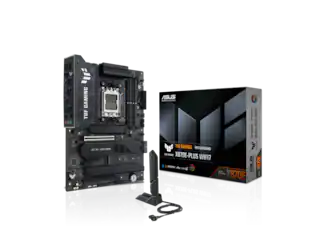
TUF GAMING Z890-PRO WIFI ATX motherboard, Advanced AI PC-ready, 16+1+2+1 80A DrMOS power stages, DDR5 slots, PCIe 5.0, DisplayPort, HDMI, two Thunderbolt 4 USB Type-C ports, front panel USB 20Gbps Type-C port, 4 x M.2 slots, Wi-Fi 7 with Q-Antenna, Intel 2.5 Gb Ethernet, M.2 Q-Release, PCIe Q-Release Slim, Pre-mounted I/O shield, BIOS FlashBack botton, Aura Sync
Q: What is the maximum memory supported by the motherboard?
A: The maximum memory supported by the motherboard is 192 gigabytes.
Q: What is the processor compatibility of the motherboard?
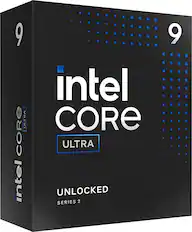
A: The motherboard is compatible with Intel Core Ultra 9 Series 2 processors.
Q: Can the motherboard support RAID 0?
A: This motherboard does support RAID 0.
Q: How many memory slots does the motherboard have?
A: The motherboard has four memory slots.
Q: Does the motherboard support Wi-Fi 7?
A: This motherboard does offer support for Wi-Fi 7.
Q: Is the motherboard compatible with Intel processors?
A: This motherboard is compatible with Intel processors.

TUF GAMING Z890-PRO WIFI ATX motherboard, Advanced AI PC-ready, 16+1+2+1 80A DrMOS power stages, DDR5 slots, PCIe 5.0, DisplayPort, HDMI, two Thunderbolt 4 USB Type-C ports, front panel USB 20Gbps Type-C port, 4 x M.2 slots, Wi-Fi 7 with Q-Antenna, Intel 2.5 Gb Ethernet, M.2 Q-Release, PCIe Q-Release Slim, Pre-mounted I/O shield, BIOS FlashBack botton, Aura Sync

ASUS ROG STRIX Z890-E GAMING WIFI, Intel Z890 LGA 1851 ATX motherboard, Advanced AI PC-ready, 18+2+1+2 power stages, DDR5 slots with NitroPath DRAM Technology, DIMM Fit, DIMM Flex, AEMP III, WiFi 7 with ASUS WiFi Q-Antenna, seven M.2 slots, three PCIe 5.0 NVMe SSD slots, PCIe 5.0 x16 SafeSlot with PCIe Slot Q-Release Slim, and full support for next-gen graphics card, two Thunderbolt 4 ports, USB 10Gbps Type-Crear I/O port with up to 30-watt Power Delivery fast charging, NPU Boost, ASUS AI Advisor, AI Overclocking, AI Cooling II, AI Networking II and Polymo Lighting

ASUS TUF GAMING Z790-PLUS WIFI takes all the essential elements of Intel processors and combines them with game-ready features and proven durability.

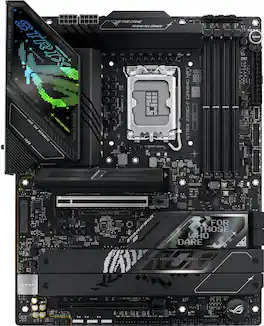
ROG STRIX Z890-F GAMING WIFI, Intel Z890 LGA 1851 ATX motherboard, Advanced AI PC-ready, 16+2+1+2 power stages, DDR5 slots , DIMM Flex, AEMP III, WiFi 7 with ASUS WiFi Q-Antenna, five M.2 slots, one PCIe 5.0 NVMe SSD slot with M.2 Q-release, PCIe 5.0 x16 SafeSlot with PCIe Slot Q-Release Slim, and full support for next-gen graphics card, two Thunderbolt 4 ports, USB 10Gbps Type-C rear I/O port with up to 30-watt Power Delivery fast charging, NPU Boost, ASUS AI Advisor, AI Overclocking, AI Cooling II, AI Networking II and Polymo Lighting
| Pros for ASUS - TUF GAMING Z890-PLUS WIFI (Socket LGA 1851) Intel Z890 ATX DDR5 Wi-Fi 7 Motherboard - Black | |||
|---|---|---|---|
| M.2 Slots, WiFi, Cooling, BIOS, Build Quality | Overall Performance | Overall Performance, Connectivity, I/O Port, Installation Ease, Compatibility | There were no pros for this product— |
Customers admire the TUF GAMING Z890-PLUS WIFI motherboard for its cutting-edge features, particularly the inclusion of Wi-Fi 7, which offers blazing-fast internet speeds. The durable construction of the motherboard is also praised for its sturdiness and reliability.
The vast majority of our reviews come from verified purchases. Reviews from customers may include My Best Buy members, employees, and Tech Insider Network members (as tagged). Select reviewers may receive discounted products, promotional considerations or entries into drawings for honest, helpful reviews.
PRODUCT TUF GAMING Z890-PLUS WIFI The Goldilocks Win 11 / Intel ASUS Motherboard QUICK OVERVIEW This Motherboard is a nice “step up” from entry level, without being overkill and while keeping most of the important features of the premium offerings from ASUS. I don’t think you can go wrong with this motherboard for all but the most fanatical hard-core users. It even, in many cases, offers more flexibility than some other higher-end models. NOTE: Windows 10 is not fully supported (see below) • Multiple Card Slots for Flexible Expansion • Plenty of USB Ports (rear ports and MB headers) • Plenty of M2 Slots • Plenty of SATA ports • Thunderbolt 4 (40 Gb) and USB (20 Gb) Ports • Advanced Overclocking for RAM and CPU (same as the higher end boards) • WiFi 7 built in (requires Windows 11) • Bluetooth 5.4 built in (requires Windows 11) • Many helpful quick release tabs for M.2 slots, graphics cards, etc make this truly easy to use motherboard, with almost no tools needed on a regular basis. GOLDILOCKS BOARD If you go back a level or two in ASUS motherboard models, then you might lose Thunderbolt 4 (depending on the board) or have a slower RAM top end speed, or fewer card slots or no 20Gb USB ports. If you go up a level or two, you gain more Thunderbolt 4 ports and M.2 slots a little more RAM top end speed, but then you start to lose expansion card slots, due to the limitation of total available PCI lanes. You must decide where to allocate your bandwidth (ports or slots) before you buy a Motherboard. This board should perform well with good flexibility to meet most, if not all, of your current and future needs even if you are not sure what your future needs will be. SETUP The very first thing I did was to flash the BIOS. This was due to several warnings on the ASUS website. One surprise (to me) was the lack of WiFi / Bluetooth and other drivers for Windows 10 from ASUS for this motherboard. After several days of experimentation, I gave up and decided to install Windows 11. TIP: make sure that you download the ASUS LAN or WIFI drivers and have them unzipped on a thumb drive as the compatible drivers are not included by default in the Windows Installation Media. After you finish installing Windows 11, ASUS will detect you need more drivers and prompt you through the process. Regardless, though, you must have a network driver to even get Windows installed. For Windows 11 and with this test/review, I let ASUS install the suggested driver update tool and let it do its thing. Everything was installed properly with no errors in device manager control panel. BIOS If you are familiar with ASUS BIOS screens you will be right at home. It looks similar to the several other ASUS MB’s I use around the house. I’m not a big over-clocker, but it nice to know that everything you would need seems to be there for you, including several “AI” tools to optimize performance. I tend to run my systems STOCK to keep power consumption and cooling requirements low. In my open bench builds (4 so far), I don’t use any extra cooling fans other than a CPU air cooler fan, so I try not to get too crazy with performance boosting. MY USE I’m building an arcade cabinet and I need a ton of USB Ports for various controllers as well as to power external LED lighting effects. Between the 8 Rear Panel Ports and 7 Front Ports (that I wired to the rear of the case with optional not included cables), I now have 15 USB ports. After adding my GPU, I still have 4 PCI Slots left over for additional expansion if I need it. I will use one M.2 slot and still have 3 left over. I will use one SATA port and still have three left over. In short, there is plenty of room for any expansion I could imagine. So far, I can’t think of anything else I need from this Motherboard. NOTE: With my arcade (Windows 10) build I will have to sacrifice 2 USB ports to make up for unsupported motherboard WiFi and Bluetooth, but I still have plenty of ports left over. PERFORMANCE I decided not include a bunch of performance specs in this review, there are simply too many variables between CPU speed, RAM speed, Storage Speed, and overclocking variables to be meaningful unless you have my exact same build down to the component level. I am not (in this case) trying to build a rocket ship, but it is nice to know that I could if I wanted to. I have an I7 CPU, prior generation mid-range GPU (RTX3060), and a large / slow spinning disk. It feels zippy due to my M.2 NVME boot drive and meets my needs perfectly. RECOMMENDATION The more I researched this line from ASUS, the more the TUF GAMING Z890-PLUS WIFI seemed the perfect MB for me. It is just the right balance of ports / slots / performance / expandability and value. I have some misgivings about the lack of full Windows 10 support (at least at the time of this review). I don’t like having unsupported / improperly configured devices in my Device Manager. Nevertheless, I realize that Windows 10 days are all but over, and I need to get on board with Windows 11. This MB from ASUS will likely force the issue for me to upgrade the rest of my systems to Windows 11. I do recommend this MB.
Posted by TheOffice1234
I grew up with a technical uncle always preferring ASUS hardware and quality and it has always had me leaning towards Asus. I’m glad that after a decade, I can still trust their hardware and can customize it to my liking. Where to start off! Asus’ TUF Gaming branding is meant to show military style durability for the parts used on their motherboards. On this model specifically, it contains an 8 layered PCB board, tough capacitors (can handle hotter temperatures and are made to have a longer lifespan), and is equipped with multiple heatsinks throughout (on the PCH chipset, VRM, and even one for an M.2 SSD). Still worried about overclocking due to deterioration on the capacitors or RAM slots of the motherboard? Don’t know where to start? Asus ensures their parts are tested to withstand overclocking’s harsher conditions like heat and wear and tear and comes with 3 years of warranty just in case (supports memory overclocking using AMD’s EXPO and in this case, Intel’s XMP tech). Asus even offers their’ AI overclocking tool if you aren’t sure where to start if you’re interested in pushing your hardware. This motherboard is meant for stability and durability. The best part was that everything worked outside of the box. I didn’t experience any issues, didn’t have to update the BIOS (has the Intel Z890 chipset and therefore supports the latest CPU Ultra 2 Gen), and was able to quickly connect all of my hardware very easily. If Intel decides to keep the same socket for the next few processors, it’s nice to know that this motherboard has ASUS’s BIOS FlashBack capability (ability to use a USB drive to flash an older/ newer version of the BIOS without a CPU or memory) and I don’t need to install an old processor to update the BIOS for future processors. Asus had some very handy features like the “Q” connector system where screws aren’t needed to keep in place installed M.2 SSDs and can be easily switched out. Another feature I liked was the included Wifi 7 “Q-Antenna” Wifi 7 where the antenna’s connectors don’t need to be screwed on and plug straight in and fit nicely. Thirdly, it comes with it’s own TUF branded M.2 SSD heatsink! It is blank on arrival and on the M.2 PCIe 5.0 slot ready for an SSD. Lastly, like previously mentioned, AI enhanced features were added for better performance and overclocking support. These software features include an “AI Advisor,” (an AI Chatbot where you can ask questions in conversational language and can help with overclocking and motherboard features) “AI Cooling,” (auto adjusts case fans for efficient cooling) and “AI Networking” (adjust your Wifi channel, antenna orientation, and to show Wifi signal strength). All in all, I tried ASUS’ AI Overclocking and AI Cooling and didn’t experience any issues. I didn’t notice a whole lot of improvement temperature wise with AI Cooling on versus without it but it didn’t hurt to leave it on. Within the BIOS, ASUS includes tons of customization and tuning for CPU and memory voltages and thermals. Undervolting and overclocking settings are not enabled by default but are simple to enable. This is also true with Intel’s XMP; it needs to be enabled to overclock your memory. In my case, after enabling, it automatically recognized my memory (Corsair Dominator series) and set the correct speed profile for it. I found BIOS settings to be straightforward for what I was looking to do in ASUS’ Advanced Mode although with all of the customization settings available, I can imagine it looking daunting. Over on the software side, ASUS’ Armoury Crate adjusts several settings including the Motherboard’s AURA effect, monitoring CPU and memory temps, and best of all, installing all of the computer’s missing drivers. I experienced an issue where my computer was waking up after a few seconds of putting it to “sleep.” I checked in Device Manager and found a few drivers were missing and after checking Armoury Crate, I found I hadn’t installed all of the drivers. After installing and updating the drivers, my “sleep” issue was gone. For some, Armoury Crate can be a love-hate relationship, but I found it to be more helpful than anything. Tip, if and when installing Windows, remember to add Asus’ MediaTek Wifi drivers from their support site to your installation media USB drive. Windows 11 did not let me continue with the setup without Wifi access (it was very annoying). Overall, the simplicity, features, and stability of Asus’s Z890 TUF Gaming motherboard was what attracted me and I could confidently recommend it compared to other motherboards. It made my PC building and hardware install enjoyable and a breeze! I also love that I can easily swap out parts like my SSD and video card with the board’s push connectors.
Posted by MoGJ
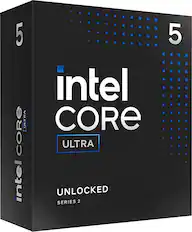
I have built many custom PCs over the years, majority with ASUS motherboards and plenty of overclocking. This ASUS TUF GAMING Z890-PLUS WIFI (Socket LGA 1851) Intel Z890 ATX DDR5 Wi-Fi 7 Motherboard is a very well engineered and excellent build. In my opinion it is just the right blend of features and high-end performance but closer to a mid-range price. My current setup is very stable, runs cool and quiet thanks to generous heatsinks and has plenty of headroom for higher performance with a more expensive CPU and GPU. I started off with the base model Intel Ultra 5 Series 2 CPU and scavenged an NVIDIA GeForce RTX 4060 for now and plan to upgrade to the latest Ultra 9 CPU and RTX 4090 when the prices come down a bit. Make sure you do your research before you purchase this Mobo, as the socket LGA 1851 only supports the Intel Ultra Series 2 CPUs, not the Core-I5,7 or 9 series. This motherboard has an insane number of internal and external ports that will satisfy any gamer, power user or peripheral lover alike. It also has the latest PCI 5.0 slots, the latest gen4 M.2 NVMe slots as well as Thunderbolt 4 and 20 Gbps USB Type-C ports. Most motherboards only have two M.2 slots, this one has FOUR and 4x SATA 6Gb/s ports, so 8 hard drives anyone?! As for network connectivity, it has a built-in 2.5 Gb Ethernet port and Wi-Fi 7 with a nice external antenna. I was able to get a 925/920 Mbps speed test over Wi-Fi from my 1 Gbps ISP, that’s pretty much the same as wired speeds. You must use Windows 11 and the latest BIOS and NIC drivers which you should anyway. Almost forgot, the latest Bluetooth v5.4 is also built-in. Tons of USB ports of various versions built-in to the back panel I/O, 6x USB Type-A and 2x USB Type-C, Thunderbolt, DisplayPort and HDMI ports. The classic DTS 7.1 surround sound 5x audio jacks and one optical S/PDIF output ports are still included - very nice touch. Modern UEFI BIOS with tons of tweaking/overclocking features ASUS is well known for. Overall, I’m really excited about this ASUS Z890 - PLUS WIFI 7 motherboard and the nearly limitless capabilities it offers for years to come, not to mention it comes with 3-years warranty - a testament to ASUS quality.
Posted by SUHD