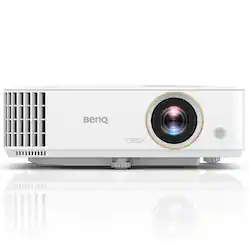
BenQ - TH585 1080p DLP Projector - White
- Key Specs
- Product Weight: 6.2 pounds (The out of box weight of the item.)
- Light Source: Lamp
- Resolution: Full HD (1080p) (Refers to the number of pixels, both horizontally and vertically, used to capture video/images. The higher the resolution the finer the detail that can be seen.)
- White Brightness (ISO): 3500 lumens (Measurement of the device's white light output measured in accordance with standards established by the International Organization for Standardization (ISO). The more lumens, the brighter the output. In large and/or well-lit environments, such as auditoriums or rooms with plenty of natural light, a higher brightness improves the quality of the projected image.)
- Contrast Ratio: 10,000:1 (Measured difference between a displayed image's brightest whites and darkest blacks. The larger the first number, the more detail and color that can be displayed.)
- Projector Use: Home Theater
- Projector Throw Type: Standard Throw (The distance from the screen that the projector can be placed to project images. Standard throw projectors typically need to be at least 6 feet away while short throw and ultra short throw projectors can be placed closer to the screen for use in smaller rooms.)
- Portability: Portable (Fixed projectors are ideal when creating an authentic theater atmosphere in your home. Often designed to stay in one place they may require significant recalibration if moved. Portable projectors, weighing around 5 pounds, are easy to move, but will still require set-up calibration and often have technology to reduce the complexity. Ultra-portable projectors are very light, often battery-powered, and ideal for on-the-go use.)
- Wireless Connectivity: None (The manner in which a device sends data to another device over a short distance without the use of wires or cables.)
- Display Connector(s): No external display connection (The number and type of connectors used to connect to an external display.)
- Power Source: Plug-in
- General
- Brand: BenQ
- Model Number: TH585
- Product Name: TH585 1080p DLP Projector
- Color: White
- Dimensions
- Product Height: 4.3 inches (The out of box height of the item. Height is measured as the vertical distance from the bottom of the item to the top as it would be primarily used or placed.)
- Product Width: 12.3 inches (The out of box width of the item. Width is measured as the horizontal distance from one side of the item to the other as it would be primarily used or placed.)
- Product Depth: 8.9 inches (The out of box depth of the item. Depth is measured as the distance from the front of the item to the back as it would be primarily used or placed.)
- Product Weight: 6.2 pounds (The out of box weight of the item.)
- Display
- Light Source: Lamp
- Display Technology: DLP (Denotes the product’s visual process, sometimes manufacturer specific, used to display an image.)
- Resolution: Full HD (1080p) (Refers to the number of pixels, both horizontally and vertically, used to capture video/images. The higher the resolution the finer the detail that can be seen.)
- Resolution (Native): 1920 x 1080 (Native resolution of a screen refers to its single, fixed resolution. Sometimes screens must scale an image up or down in order to fit the native resolution. This can cause a loss of resolution or detail.)
- White Brightness (ISO): 3500 lumens (Measurement of the device's white light output measured in accordance with standards established by the International Organization for Standardization (ISO). The more lumens, the brighter the output. In large and/or well-lit environments, such as auditoriums or rooms with plenty of natural light, a higher brightness improves the quality of the projected image.)
- High Dynamic Range (HDR): false (An HDR-compatible 4K TV or other HDR-compatible product displays HDR video content when it's available from sources like 4K Ultra HD Blu-ray Discs and 4K streaming services.)
- Light Source Life (Normal Mode): 4000 hours (The light source's estimated length of operating time when normal operating mode is enabled.)
- Contrast Ratio: 10,000:1 (Measured difference between a displayed image's brightest whites and darkest blacks. The larger the first number, the more detail and color that can be displayed.)
- Aspect Ratio: 16:9 (The measurement of the width of a screen compared to the height of a screen, expressed as a ratio.)
- Throw Ratio Range: 1.5 - 1.65:1 (This measurement indicates what size of projected image can be produced from a certain distance. The smaller the ratio, the closer the projector can be to the screen while still producing a large image.)
- Digital Keystone Correction: true ("Keystone effect" refers to the distortion of an image when it is projected on an angled surface or when the projector is positioned too high or too low from the center of the display. Projectors with a digital keystone correction feature are able to scale the image as needed before it is projected, resulting in the correct image orientation no matter where it is displayed.)
- Horizontal Scan Rate: 102kHz (Number of horizontal lines displayed per second on the device.)
- Vertical Scan Rate: 120Hz (Number of vertical lines displayed per second on the device.)
- 3D Technology: true
- Features
- Projector Use: Home Theater
- Projector Throw Type: Standard Throw (The distance from the screen that the projector can be placed to project images. Standard throw projectors typically need to be at least 6 feet away while short throw and ultra short throw projectors can be placed closer to the screen for use in smaller rooms.)
- Portability: Portable (Fixed projectors are ideal when creating an authentic theater atmosphere in your home. Often designed to stay in one place they may require significant recalibration if moved. Portable projectors, weighing around 5 pounds, are easy to move, but will still require set-up calibration and often have technology to reduce the complexity. Ultra-portable projectors are very light, often battery-powered, and ideal for on-the-go use.)
- Remote Control Included: true
- Exposure Control
- Focus Adjustment: Manual (The method used to focus the device in order to view or display a sharper image.)
- Connectivity
- Number of HDMI Inputs (Total): 2
- Wireless Connectivity: None (The manner in which a device sends data to another device over a short distance without the use of wires or cables.)
- Display Connector(s): No external display connection (The number and type of connectors used to connect to an external display.)
- Network Connector(s): No network connectors
- Audio Only Outputs: No audio only outputs
- Audio
- Sound Mode: Mono
- Integrated Speaker(s): true
- Speaker(s) Included: true
- Watts Per Channel: 10 watts
- Power
- Power Source: Plug-in
- Warranty
- Warranty - Parts: 3 years
- Warranty - Labor: 3 years
- Other
- UPC: 840046042059
Watch movies and play games with this BenQ Full HD projector. Native Full HD resolution makes shows and games look crisp and detailed, and the low input latency provides a responsive gaming experience. This BenQ Full HD projector has a powerful lamp that delivers up to 3500 lumens and produces large, bright images.
- Portable design: Weighs 6.15 lbs. for easy transport to meetings, presentations and more.
- DLP image technology: Offers crisp visuals.
- ±30° vertical keystone correction: For distortion-free images.
- 3500 lumens of brightness: Offer a highly visible display with clear on-screen images.
- 10,000:1 contrast ratio: Provides a multitude of shades between black and white for rich color saturation.
- 1080p (1920 x 1080) native resolution: Creates a sharp, detailed high-definition picture.
- Dual HDMI inputs: Make it easy to connect to high-definition sources.
- 1.5 - 1.65:1 throw ratio range: Reproduces wide images in their correct proportions.
- Supports a variety of signals: Including 1080/24p, 1080/60i, 720/60p, 1080/50i, 720/50p, 1080/50p, 1080/60p, 1080/30p, 1080/25p, 2160/24p, 2160/25p, 2160/30p, 2160/60p and 2160/23p for a wide range of compatibility options.
- 29-35dBA fan noise: Ensures quiet operation.
- Built-in 10W speaker: Provides crisp sound.
- Included remote: Provides simple control from across the room.
Whats Included
- BenQ TH585
- 2 x AAA batteries, wireless remote control
Q: Is this compatible with iPhone
A: Yes, this is going to be compatible with the iPhone as long as you have the right HDMI adapter.
Q: Can you connect external speakers via the HDMI port? Or is the 3.5mm jack the only audio out option?
A: undefined
Q: I judst bought a benqth585 from best buy. Does it have a video output?
A: The Th585 does not have video output
Q: Can you hook a Roku or Fire stick up to this?
A: Yes, I have attached firestick, its working great. you will have to attach it to HDMI port and USB port for Power, both provided on Projector.
Q: Can I play a video from a usb thumb drive? Will pictures play like a slideshow?
A: Hello, we regret to inform you that the USB Type-A slot is not for file access but for power supply to external devices.
A: Hi there, we appreciate you reaching out with your questions and we're happy to help. The projector will have a quick start guide that will help you get the projector up and running. If you would like a User Manual, you can find a digital copy on our website. The projector has an HDMI input where you can connect a Blu-ray player or DVD Player to view Blu-Ray discs or DVDs. The Q Cast is a wireless dongle that will allow for you to connect devices like a laptop wirelessly and mirror content.
Q: Does this include the BenQ Qcast adapter that's shown in the pictures?
A: Thanks for your interest on TH585; the Qcast adapter is an optional accessory you can find or purchase either at BestBuy.com or BenQ.com; also TH585 is with two HDMI inputs and a USB A power port you can plug in any additional wireless adapter like Chromecast for your wireless solution. Hope this helps; thanks
Q: Does this have Bluetooth to send signal to soundbar?
A: Thanks for your interest on BenQ projectors; you can connect your external speakers via Bluetooth by adding a Bluetooth adapter onto the 3.5mm Audio-out port of our projectors, or via a 3.5mm audio cable. Hope this helps
People also viewed
 $583.49The price was $749.00
 Black Friday in July Deal$899.99The price was $999.99
 Black Friday in July Deal$1,499.99The price was $1,749.99
 $699.00The price was $799.99
 $949.99The price was $999.99
 Black Friday in July Deal$1,099.99The price was $1,299.99
Today's top picks
 Black Friday in July Deal$749.99The price was $1,199.99
 Black Friday in July Deal$199.99The price was $399.99
 Black Friday in July Deal$499.99The price was $999.99
 Black Friday in July Deal$199.99The price was $249.99
 Black Friday in July Deal$199.00The price was $419.00
 $1,999.99The price was $2,649.99