Rating 4.6 out of 5 stars with 128 reviews
4.6- Print Quality (44)
- Overall Performance (21)
- Setup (13)
- Connectivity (9)
- Speed (8)
- Size (20)
Customer Images
The vast majority of our reviews come from verified purchases. Reviews from customers may include My Best Buy members, employees, and Tech Insider Network members (as tagged). Select reviewers may receive discounted products, promotional considerations or entries into drawings for honest, helpful reviews.
- Rated 5 out of 5 stars
PRINT AWAY
EVEN THOUGH THIS IS A BIG PRINTER, ILOVE IT,( SO FAR ). IT WAS EASY TO SET UP, MY DEVICES HOOK UP TO WITH NO PROBLEMS WHEN AIR PRINTING. IT'S FAIRLY QUIET. I NEEDED TO BE ABLE TO PRINT 11X17 PAPER AND IT HAS WORKED OUT GREAT. I HAVEN'T USED IT A WHOLE LOT, BUT SINCE I'VE HAD IT I HAVEN'T NEEDED ANY INK YET.
Posted by TONY
- Rated 4 out of 5 stars
Printers review
Very reliable all photos I printed came out really nice. Documents are good. Scanner great.. i was satisfied with the performance of this printer. And the ink slightly reduced..
Posted by MiloH
- Rated 5 out of 5 stars
Brother printer
Was a lot bigger then I expected I thought it would be about the same size as my old one it was doubled
Posted by CharlesF
- Rated 4 out of 5 stars
Printing, copying, scanning Letter, A4, Legal, A3
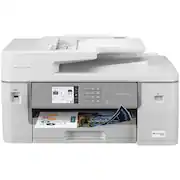
First impression: What an impressive printer, beautifully designed, with awesome print quality, and which supports printing letter-sized, A4, legal-sized (11x17), and A3 paper, and more, on both sides (duplex/2-sided) of paper. It’s huge. It measures about 22.5”/57cm wide, 25.5” (65 cm) deep, and 12” (30.5 cm) high / 24” (61cm) high when the scanner cover is opened. It’s fast and quite rugged with 44 lbs. (20 kg) of weight. There are 2 paper trays where one of which you could use for regular printer paper and the other one, the “Multi-Purpose” (MP) tray, for different document sizes, such as legal. In general, all machine settings can be performed locally via the printer’s 3.5” (8.8cm) LCD control panel and via remote through Web-based management (mobile app or desktop). It includes 1 set of starter cartridges (4 separate ones) which are estimated to last one year. You can connect to the printer via Ethernet (cable not included), wireless LAN, and USB (cable not included). There is a phone cable included, though. Basic features include: • [1 star] Automated Document Feeder (ADF); it supports all paper sizes for copying, scanning, and faxing; however, the document feeder does not support 2-sided documents, which is a rather large inconvenience to me. Most documents I need to scan and/or want to make copies of are 2-sided. The only workaround for 2-sided printouts is to manually do that using the scanner glass which is very time-consuming. Interestingly enough, the LCD control panel provides 2-sided copy/scan/fax feeder options but shouldn’t show these as they are applicable to the Brother J6940DW and J6955DW printers only. If you try to use these options you will be informed the AFD cannot handle 2-sided documents. • [5 Stars] Printing documents from Windows and macOS, the iPrint&Scan utility, macOS AirPrint, email attachments (up to 10 various file types including PDF and JPG), and from a USB flash drive; note that the default is single-side print, and as such, if you want to print on both sides (duplex/2-sided) best verify your printer properties on your Windows or macOS system are set to 2-sided print prior to printing. • [5 Stars] Scanning documents; a very rich selection of supported devices is provided to which the scans are being stored: Scan to Mobile (where your smartphone does not need to be connected to the network the printer is connected to, scan to a USB flash drive attached to the printer (use your own), and/or scan to a defined folder on a SharePoint server. Note that it scans the actual document size, meaning, it won’t convert, for example, A4 to Letter, or Legal to Letter. • [5 stars] Copying documents; cool options include enlarging or reducing copied images (from 25% to 400%) and “fit-to-page” (does not support legal-size documents) • [Not tested and not rated] Faxing (send & receive) documents with typical options including fax reports. Use the PC-Fax utility for Windows and/or macOS (via AirPrint only) to send and receive faxes directly from/to your computer. The modem speed is 33,600 bits per second (bps). • Total score: (3 * 5) stars + 1 star = 16 stars / 4 categories = 4 stars for this printer Setting up the printer • Easy to unbox thanks to the use of a bad that enables you to lift the printer from the box. • The Quick Setup Guide is included in the box. When following all instructions in this step-by-step guide, initially through the printer LCD control display and then the mobile app to connect the printer to my home network wirelessly, I did not encounter any problems. All instructions were straightforward and easy to follow (note: I am not a printer setup expert). • Note when using the mobile app to connect the printer to your home network, you will be prompted to temporarily join the printer’s own network after which reverts to your home network after the printer has connected to the home network. • Right after the printer is connected to the home network successfully, it checks for updated Firmware and will prompt you to install it when one is found. The green LED blinks during Firmware Update; when finished updating, the printer reboots. • Note that the printer will only print when all cartridges are installed and are above low ink level regardless of whether or not you want to print in color or black/white. Brother Mobile Connect App (iPhone and Android-based mobile phones) • What makes this printer especially practical and powerful to use is the mobile app, Brother Mobile Connect”, downloadable from the Apple Store for iPhone devices and/or Google Play Store for Android devices, and the corresponding desktop app for Windows and macOS which are downloadable from setup.brothers.com. • Using Brother Mobile Connect on an iPhone allows you to browse through the files you have in your iCloud. You can select the ones you want to print (e.g., PDF files, Photo files, etc.) and change printer settings to your needs (e.g., 2-sided printing, number of copies, print quality, etc.) • The app also walks you through Scan and Copy options and prompts you for the file format you want to save your scan, PDF or JPG, and allows you to share the scanned document via text message, email, etc. Using the Brother Web Connect utility, you are provided with options to print and download documents as well as save scanned documents to Google Drive, box, Dropbox, Evernote, and OneNote.
Posted by UweZ
- Rated 5 out of 5 stars
Store quality printing, very fast and affordable
After going through a variety of printer brands over the past couple decades, this is the second Brother printer I have decided on investing in over four years. Brother brand printers are now firmly locked in as my go to manufacturer for a variety of reasons. First off, and one of the main reasons, the cost of ink has always left a bitter taste in my mouth as, for years, it always seemed to be cheaper to just buy a whole new printer versus investing nearly $100 in ink for a machine that was already out of date. That is definitely not the case with the Brother INKvestment all-in-one series printer line. I was still using the Brother printer I got in 2018 and never once had to replace the ink; I still had about 10% ink left before I got this new MFC-J6555DW model. I didn’t exactly use the printer daily or in bulk but it has handled amazingly and never had any issues with in besides having to perform the standard head cleaning and maintenance, as expected. The advertisement claims the printer has enough ink included in the box to last a year but I would bet that it will last much longer with our household use, even with five people in the house and children printing coloring pages almost daily. Having owned the new J6555DW model only for a short period, I would expect this one will handle just as well, or potentially even better, than my last one that is almost five years old. Some notable specifications are the paper tray can hold up to 250 pages, the multipage copy, scan or fax feeder can handle up to 50 pages, you can print and scan a variety of page sizes including legal 11” x 17” paper and photo size paper, the document glass size is oversized measuring 11.7” x 17” for those larger projects, it has a convenient 3.5” color touch screen that is very easy to navigate and set up, can connect to 2.4 GHz and 5 GHz bands, Apple AirPrint, USB 2.0 or wired to a PC or laptop using a USB cable. At this stage in technology, Brother has made wireless printing a breeze using their software you can install on your PC, laptop, tablet or smartphone. One concern that might be a hard stop for some is this new model is HUGE in comparison to my last printer; I would honestly say a good 40-50% larger. I did not know that upon ordering this new model and it does not come close to fitting in the same space as the old model. It measures nearly two feet in width, a foot high and about 19” deep (over 30” if you have both trays out). That being said, this all-in-one is a huge beast for a reason. I have never used an at home office printer that performed like a small business office printer. Standard color and black and white page printing is extremely fast however it’s the photo printing that really caught me by surprise. Not only were the prints on 4” x 6” glossy printer paper crystal clear, up to 1200 x 4800 dpi, they were spit out faster than any at home printer I have ever experienced. It was as if I sent an order to the local print shop to distribute to family members, display in a frame or put in a photo album but done in record time right in the convenience of my house. No more pricey trips to the local print shop. I can print 30 pages, color or black and white, in a minute and the scanner is just as fast. After owning just about every brand of printer over decades, there is a reason I don’t expect to switch to another manufacturer besides Brother. Their printing products are of great quality, very durable, and easy to use and have recommended them to many others in the printing market over nearly the past five years.
Posted by Grouticus