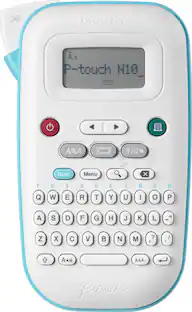
Brother - P-touch, PT-D210, Easy-to-Use Label Maker, One-Touch Keys, Multiple Font Styles, 27 User-Friendly Templates - White/Gray
About this product
For those in search of an easy to use home or office label printer, the P touch PT-D210 should be on your wish list. The Brother P touch PT-D210 makes it easy to create great looking labels for your home and home office. With its convenient one touch keys, you can quickly access fonts, symbols, frames, and templates. Plus, users have the flexibility to preview the text for each label that is highlighted on the display to reduce printing and type errors. This helps to save time, money, and supplies. This easy to use label maker allows you to design professional looking labels. The PT-D210 features 14 fonts, 10 unique styles, 97 frames, and more than 600 symbols. The use of one touch buttons allows users to access fonts, styles, and frames to create elegant labels for personal or business use. There are also 27 quick and easy templates. Simply select the template, type in the content, and print. These labels are great for scrapbook pages, gift tags, and more. The PT-D210 is lightweight and portable. It is powered by 6 AAA batteries or an AC power adapter (AD 24) (both sold separately) . The PT-D210 also has an optional, sturdy protective case (CC D210) that is great for storage and travel. You can store the printer as well as extra supplies with ease. Whether you choose to create labels for general storage, file folders, food storage, or crafts, using the PT-D210 is easy, portable, and efficient.
Features
One Touch Keys
Provides quick access to fonts, frames, symbols and more.
Preview Labels
Preview button so you can see how your label will look before you print.
Personalize
Comes with 14 fonts, 97 frames, and more than 600 symbols.
Memory
Stores up to 30 labels for quick reprinting
Pre-Designed Templates
Select from more than 27 templates for file and gift labels, even decorative labels with patterns
Wide selection of tapes
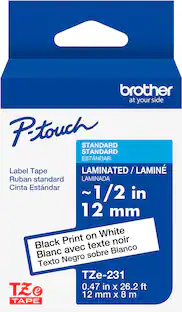
Uses a variety of easy to apply TZe label tape including laminated, extra strength, acid free adhesive, cable and wire, fabric iron on and more label tapes up to ~1/2” wide.
Specifications
- BrandBrotherModel NumberPTD210Product NameP-touch, PT-D210, Easy-to-Use Label Maker, One-Touch Keys, Multiple Font Styles, 27 User-Friendly TemplatesColorWhite/GrayWarranty - Parts1-year Limited WarrantyWarranty - Labor1-year Limited Warranty
Reviews
Rating 4.6 out of 5 stars with 97 reviews
The vast majority of our reviews come from verified purchases. Reviews from customers may include My Best Buy members, employees, and Tech Insider Network members (as tagged). Select reviewers may receive discounted products, promotional considerations or entries into drawings for honest, helpful reviews.
Compare similar products
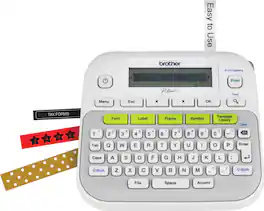
For those in search of an easy to use home or office label printer, the P touch PT-D210 should be on your wish list. The Brother P touch PT-D210 makes it easy to create great looking labels for your home and home office. With its convenient one touch keys, you can quickly access fonts, symbols, frames, and templates. Plus, users have the flexibility to preview the text for each label that is highlighted on the display to reduce printing and type errors. This helps to save time, money, and supplies. This easy to use label maker allows you to design professional looking labels. The PT-D210 features 14 fonts, 10 unique styles, 97 frames, and more than 600 symbols. The use of one touch buttons allows users to access fonts, styles, and frames to create elegant labels for personal or business use. There are also 27 quick and easy templates. Simply select the template, type in the content, and print. These labels are great for scrapbook pages, gift tags, and more. The PT-D210 is lightweight and portable. It is powered by 6 AAA batteries or an AC power adapter (AD 24) (both sold separately) . The PT-D210 also has an optional, sturdy protective case (CC D210) that is great for storage and travel. You can store the printer as well as extra supplies with ease. Whether you choose to create labels for general storage, file folders, food storage, or crafts, using the PT-D210 is easy, portable, and efficient.
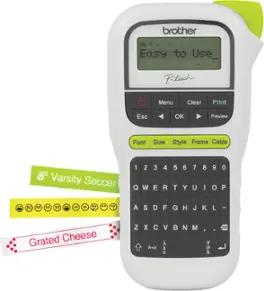
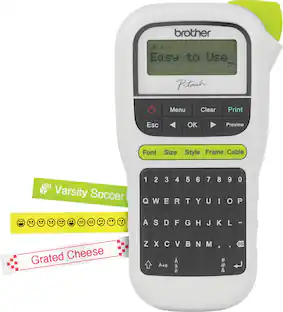
If simplicity in designing and printing labels for office or personal use is important to you, this easy to use portable label maker is an exceptional choice. The Brother P-touch PT-H110 is portable and lightweight and was designed to make printing labels simple. The PT-H110 features a QWERTY keyboard that makes typing simple and reduces text errors. Before submitting the print job, users can review the content of each label thanks to an easy to read graphical display. There are several features built into this portable label maker that help users create labels for personal or business applications. The useful cable labeling feature is intended to help you easily organize your wires and cables. The PT-H110 also has a memory feature that allows you to save up to 15 labels for quick reprinting tasks. It prints one or two lines of text on labels up to 12mm or approximately ½” wide. Users can select from 3 fonts, 14 frames, and more than 250 symbols to create professional looking labels The PT-H110 uses Brother TZe tapes in a variety of sizes, colors, and types, including standard, acid free, extra strength adhesive, cable and wire, and fabric iron on, among others. It’s powered by 6 AAA batteries (not included) or an optional AC adapter that can be purchased separately. This P-touch label maker is great for home, home office, and on the go use.Maximum Number of Print Copies: 9; Number of Font Styles: 14; Number of Text Frame Types: 14.
This is how to achieve next level home and office organization! Presenting the Brother P-touch PT-D410 Home / Office Advanced Label Maker. Simply connect it to a PC or Mac with the included USB cable to unlock the power of P-touch Editor Software(1). Designed to add even more flexibility to organization solutions, it provides access to a wide selection of pre-designed templates with 15 fonts, 13 font styles, 120 frames, and 700 symbols to choose from. Want to create custom labels instead? No worries! It’s simple to add symbols or barcodes using intuitive, built-in drawing tools. Plus, the P-touch Editor(1) makes ordering compatible Genuine Brother TZe label tapes as easy as a mouse click. Looking for a few ideas to put the Brother P-touch PT-D410 to work? We’ve got plenty! Personalize office equipment, label drawers to keep supplies in their proper place, add a little organizational zen to your workspace, identify vials to keep samples separate, arrange file boxes for easy retrieval, track inventory with bar codes, and so much more. And, if you find yourself repeatedly printing the same label, you’ll appreciate having the option to save up to 50 commonly used labels for quick access and reprinting. Featuring a built-in QWERTY keyboard with easy one-touch formatting keys, creating labels that help you organize and personalize items around any home and office space is sure to become your new favorite activity. With the ability to preview labels before they’re printed, the large 15-character, 2-line display screen promises the effortless ease of error-free confidence. Includes one 4m Black Print on White Sample Label Tape ~3/4” (18mm), AC Adapter and USB cable. Optional VP model includes carry case and 4m Black Print on Clear Sample Label Tape ~1/2” (12mm).

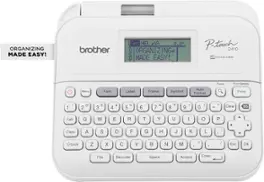
When you want an easy-to-use label maker to organize any home or office area, choose the Brother P-touch PT-D220 Home / Office Label Maker! Crush the chaos of clutter! The Brother P-touch PT-D220 Home / Office Everyday Label Maker is versatile, easy-to-use, and a simple way to de-clutter any home or office area. You can organize almost any space with a Brother P-touch Label Maker. Featuring a QWERTY keyboard and one-touch formatting keys, using this portable label maker will make you a hero of home and home office organization. Handheld and portable, you’re going to love how many ways there are to create, print, and use labels. Quickly restore order in your home office by alphabetizing your files and organizing the contents of your desk, cabinets, and bookshelves to perfection. Show off your one-of-a-kind style by choosing from 14 different fonts, 11 font styles, 99 frames, and over 600 symbols. Afraid of making an error? Don’t be! You can preview before you print, thanks to the 15-character display screen. Is there a specific label you rely on repeatedly? No problem – you can store up to 30 frequently used label layouts for quick reprinting. For use with Brother Genuine TZe label tapes. Available in a wide assortment with options including, laminated tapes, waterproof tapes, premium tapes with glitter, extra-strong adhesive for uneven surfaces, tamper-proof security tapes, and more. Completing your organizational to-do list just couldn’t be any easier or more satisfying.
| Pros for Brother - P-touch, PT-D210, Easy-to-Use Label Maker, One-Touch Keys, Multiple Font Styles, 27 User-Friendly Templates - White/Gray | |||
|---|---|---|---|
| There were no pros for this product— | Overall Performance, Ease of Use, Print Quality | Ease of use, Overall Performance, Label Quality, Font Options, Price | Ease of use, Overall Performance, Label Maker |
| Cons for Brother - P-touch, PT-D210, Easy-to-Use Label Maker, One-Touch Keys, Multiple Font Styles, 27 User-Friendly Templates - White/Gray | |||
| There were no cons for this product— | Battery Consumption | Tape Cutting | There were no cons for this product— |
Specs
Questions & Answers
Was running my D-200 P-touch labeler on batteries but the batteries did not last very long so purchased a charger. Took the batteries out and plug ed in the charger, NOTHING! Do you have to have the batteries (6) installed with the ES charger?
Answered by BrotherNo, the adapter will work when batteries are installed. The adapter must has a 9 Volt output in order to power on that label maker.

Labels for this machine
Answered by BrotherWe understand you would like the tapes that are compatible with your Brother PT-D210 label maker. We'd like to help. Here is a link to the compatible tapes for this model. https://support.brother.com/g/b/colist.aspx?c=us&lang=en&prod=d210eus&cao=tape
Can you adjust the length of the tape to shorten it?
Answered by BrotherYes, you will be able to set the length and also the margins of your labels, below will leave a link to guide you on both processes. https://help.brother-usa.com/app/answers/detail/a_id/102770 https://help.brother-usa.com/app/answers/detail/a_id/102775
How many lines does this p-touch have?
Answered by maz94protege2 Lines Max
Is it easy to use and easy to buy supplies
Answered by maz94protegevery simple and easy to use. supplies can be bought online through various retailers or in-stores

Customers often buy these together
Customers ultimately bought
Discover lifestyle innovations Sponsored

Discover related products
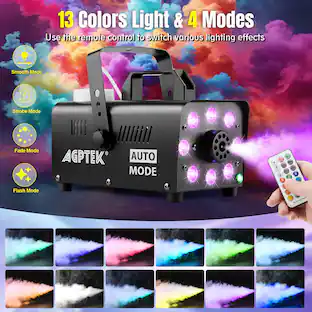 $59.99The price was $61.99

Keep exploring
 $18.99The price was $19.99
 $26.99The price was $40.66
 $29.99The price was $39.99
 $119.99The price was $149.99
 $79.99The price was $88.88
 $18.99The price was $19.99