Rating 4.5 out of 5 stars with 508 reviews
4.5- Overall Performance (5)
Customer Images
The vast majority of our reviews come from verified purchases. Reviews from customers may include My Best Buy members, employees, and Tech Insider Network members (as tagged). Select reviewers may receive discounted products, promotional considerations or entries into drawings for honest, helpful reviews.
- Rated 5 out of 5 stars
Absolute beast of a gaming PC
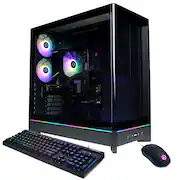
This PC is an absolute monster. From the moment I turned it on, I could tell it was built for serious performance. The i9-14900F paired with the RTX 5070 is just insane everything runs buttery smooth, no lag, no stutter, just straight power. I’ve been playing on high/ultra settings and it handles everything effortlessly. Frame rates stay consistent, and the graphics look incredible. The 32GB of DDR5 RAM makes a huge difference too—I can game, stream, and have multiple apps open without slowing anything down. The 1TB SSD is crazy fast. Boot time is basically instant, and games load in seconds. It honestly feels like a huge upgrade from anything I’ve used before. Not gonna lie, it can get a little loud when you’re really pushing it, and I’ll probably add more storage later but that’s expected with a setup this powerful. Overall, this thing is FAST, smooth, and 100% worth it. If you want a prebuilt that can handle anything you throw at it, this is the one. Highly recommend.
Posted by IsabellaY
- Rated 4 out of 5 stars
Strong perfomance with some upgrade challenges
As the Windows 10 expiration drew near, and my wife's favorite website is no longer supporting Windows 10, and newer games seem to bog down, a new Windows 11 PC was needed. I've already purchased a Cyberpower PC for my son last year, and he really likes it as it allowed him to play the latest games. The CyberPowerPC Gamer Xtreme Gaming Desktop met my wife’s needs exceptionally well. I planned several upgrades after purchase: Expanding the RAM to 64 GB Adding another SSD Moving one of the existing HDDs from the older case into this new system Unboxing and Preparation As my son and I unboxed the PC, we recalled the steps from setting up his own computer — particularly removing internal packing material before installing additional components. I paid close attention to the manuals, as this model features a top-mounted power supply, unlike most modern cases, which typically sit at the bottom. This layout piqued my curiosity for future PC builds, as case design is shifting to this form factor. Installing Additional RAM Accessing the RAM slots required removing metal brackets and the graphics card, as the slots were positioned tightly between the CPU cooler and the GPU. Once the GPU was out, installing the extra 32 GB of RAM was straightforward. Re-installing the graphics card, however, was trickier — the bracket screws seemed to install at an angle before they flattened, making alignment difficult. It took a few attempts to seat and secure it properly. Installing Additional Storage (SSD and HDD) This case allows drive installation behind the motherboard and below the power supply: The rear tray supports either two SSDs or one HDD, without the need for additional brackets. The SATA connector placement on the motherboard was tight — close to the chassis divider — so only straight SATA cables fit (angled ones did not). Initially, I intended to install the SSD on the motherboard bracket and mount the HDD on the power-supply cover. However, the HDD’s connectors were too close to the edge for reliable cable seating. Final configuration: HDD installed behind the motherboard tray. SSD installed below the power supply, where the bracket provides a mounting area Cable management required cutting some factory zip ties, as the power cables were densely bundled and obstructed the available space. Build Quality Notes I noticed electrical tape securing one of the lighting connectors. While it appeared functional, it gave a slightly improvised impression, and the connectors themselves felt somewhat fragile. Some screw holes in the chassis also seemed soft, so care is advised when re-attaching brackets or tightening screws. Performance The PC powered on smoothly, and the motherboard Wi-Fi and antenna quickly connected to the network. After setting up the system, external NAS drives, and applications, everything ran efficiently. Most importantly, my wife is very pleased with the performance and speed. Summary Pros: Excellent performance for the price Straightforward upgrade potential No additional brackets required for drive expansion Cons / Cautions: Tight interior layout complicates RAM and GPU access SATA port placement limits cable options Some minor quality-control quirks (e.g., taped lighting connector, soft screws) Overall: A good PC for gaming and high CPU work — handle internal upgrades with patience and the right tools.
Posted by W33k3nd
- Rated 5 out of 5 stars
SUPER FAST, FANTASTIC GRAPHICS
This Gaming PC is so awesome, very easy set up. I had been holding off buying a new gaming PC, and with all the choices out there it was tough to decide should I build one, or go with the Dell which was my last pc. Decided to buy CyberPower and I just cannot believe how awesome and FAST this runs. I’ve had ZERO problems and we game every day, large file games, it handles it all with no problems. I would definitively encourage you to buy CyberPower.
Posted by BurtW
- Rated 4 out of 5 stars
Solid PC that benefits from a couple of upgrades
I bought this PC knowing I was going to replace and upgrade a few components right away, specifically the PSU and fans. It came with an Apevia 850W PSU, which may be functional enough for most users but is clearly the weakest part of the system for long-term reliability and everyday use. I also replaced the stock RGB fans with Arctic P12 fans, and the system immediately ran cooler and quieter. I have some minor annoyances with the case itself, but overall, following my upgrades, it's been performing well and has been stable.
Posted by AnthonyA
- Rated 5 out of 5 stars
Fast PC but had some issues out of the box
Great PC. Very fast. Had a couple issues out of the box. The rear most case fan RGB cable was disconnected out of the box. The RGB fan controller is not connected to the motherboard out of the box. Can connect to motherboard and have full software or hardware control by holding button for 3 to 5 secs. This allows full sync of RGB on VGA card, memory and case fans using the Gigabyte software. CPU cooler is junk, throttles under load. NVME drive choice was also slow in comparison to the rest of the system. Did not unbox the included mouse and keyboard. Despite the couple of kinks out of the box, I think this is an awesome system and worthy of the money. The case is killer! Video card is: Gigabyte GV-N5070GAMING OC-12GD, Had all ROP's! Motherboard is: Gigabyte B760M C V2. Memory is: Team Group Inc. UD5-6000. NVME: is ADATA LEGEND 800 GOLD. PSU: Apevia
Posted by Scott