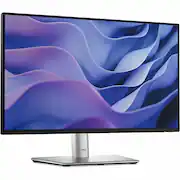
Dell - 21.5" IPS LED FHD 100Hz Monitor (VGA, USB, HDMI) - Black, Silver, Multicolor
Customers are saying
Customers have good things to say about the product's setup ease. They found the setup process to be very simple.
Screen Size
21.5"Highlights
Full HD
21.5in screen size with 1920 x 1080 resolution provides a native display of Full HD video sources without any degradation due to down-sampling technologies
Viewing angle
This stylish LED Monitor offers 178/178 degree viewing angles for some great viewing experience no matter where and how you look at it
VESA compatible
VESA mount compatibility allows you to mount the display on a wall or with a stand depending on your specific needs
Brightness
View your content easily in well-lit areas with 250 Nit brightness
- Refresh Rate100HzMaximum Resolution1920 x 1080Response Time5 millisecondsPanel TypeIPSSynchronization TechnologyNot Applicable
Reviews
Rating 4.8 out of 5 stars with 6 reviews
- Setup Ease (3)
The vast majority of our reviews come from verified purchases. Reviews from customers may include My Best Buy members, employees, and Tech Insider Network members (as tagged). Select reviewers may receive discounted products, promotional considerations or entries into drawings for honest, helpful reviews.
Compare similar products

Dell P2225H Monitor for all-day productivity. Get enhanced visual comfort and seamless connectivity with this 21.5-in FHD monitor. Environmentally-forward thinking with sustainable materials and elevated standards with packagining innovation and energy conservation. Get a seamless viewing experience and focus on your task with ultra-thin bezel design. Varied and multiple interfaces to ensure that whatever device you need has a connection.

The New Definition of High Definition: This FHD monitor feels as good as it looks, packing IPS technology for 178 degrees ultra-wide viewing angles, 99% sRGB color gamut for color accuracy, and FreeSync to keep your eyes up to speed with your imagination. Looks Good, Feels Good, Does Good: Increase viewing comfort with HP Eye Ease with Eyesafe certified technology that doesn't sacrifice color quality. Monitor designed with sustainability in mind with 85% postconsumer recycled plastics and packaged in recycled materials. Doing good never looked so good. Streamlined & Seamless: Streamline your setup with its slim profile, innovative cable containment, and seamless design for side-by-side screens.

A 24-inch FHD monitor that optimizes eye comfort and features impressive visuals with outstanding acoustics in a lifestyle-inspired design.

Delve into the world of awesome with Acer's EK220Q Full HD monitor, which offers an unmatched viewing experience. A large 21.5” screen delivers astonishing, 1920 x 1080 Full HD resolution with excellent detail! Through AMD FreeSync technology, the game’s frame rate is determined by your graphics card, not the fixed refresh rate of the monitor, giving you a serious competitive edge.The remarkable 100 Million:1 contrast ratio ensures a crystal-clear viewing experience while rapid 5ms response time keeps moving images sharp. It also supports HDMI & VGA inputs offering greater compatibility.
| Pros for Dell - 21.5" IPS LED FHD 100Hz Monitor (VGA, USB, HDMI) - Black, Silver, Multicolor | |||
|---|---|---|---|
| Setup Ease | Screen Size, Ease of use, Quality, Design, Weight | There were no pros for this product— | Screen Size, Ease of use, Overall Performance, Refresh Rate, Price |
| Cons for Dell - 21.5" IPS LED FHD 100Hz Monitor (VGA, USB, HDMI) - Black, Silver, Multicolor | |||
| There were no cons for this product— | Speakers, VESA Mount, Refresh Rate | There were no cons for this product— | Speakers, Adjustability, Connectivity, Tilt |


![Sure, here is the corrected and grouped text:
```
ESC F1 F2 F3 F4 F5 F6 F7 F8 F9 F10 F11 F12 1 2 3 logitech - - 1 2 # $ 4 % 5 6 & 7 8 9 0 - - back insert home page up num lock clear / . tab Q W E R T Y U I O P { [ } ] / delete end page down 7 home 8 A 9 P9 up + caps lock A S D F G H J K L : ; a enter 4 5 6 shift Z X C V B N M < > ? shift 1 end 2 3 pg dn enter ctrl fn start alt opt alt crnd x alt cmd x fn ctrl alt opt 0 ins del 1 logitech
```](https://pisces.bbystatic.com/image2/BestBuy_US/images/products/5761/5761911_sd.jpg;maxHeight=232;maxWidth=233?format=webp)
![esc ~ ! 1 tab caps lock shift ctrl F2 Fl # 2 3 Q W A S Z start opt L F3 $ 4 E D X alt cmd3 ) FS F4 A % 5 6 R T F G V C logi 44 HI & F9 FID FB F7 F6 * ) - - & 0 8 9 7 O P U I Y K L H J > < N M 1 B PM + = { [ : I ; ? I alt cmd D 2 4 300 3 1 F12 . * page I insert home up clear backspace 8 9 + 7 page A pg up end down home } I delete ] / 6 4 5 4 enter 2 3 enter 1 dn Pg end shift = 0 del ins etrl fn opt](https://pisces.bbystatic.com/image2/BestBuy_US/images/products/6539/6539505_sd.jpg;maxHeight=232;maxWidth=233?format=webp)
![Sure, here is the corrected and grouped text from the image:
---
**Top Row:**
- Esc
- F1 F2 F3 F4 F5 F6 F7 F8 F9 F10 F11 F12
**Second Row:**
- 1 ! 2 @ 3 # 4 $ 5 % 6 ^ 7 & 8 * 9 ( 0 ) - _ + =
**Third Row:**
- Tab Q W E R T Y U I O P [ { ] } \
**Fourth Row:**
- Caps Lock A S D F G H J K L ; ' Enter
**Fifth Row:**
- Shift Z X C V B N M , . / Shift
**Function Keys:**
- F1 F2 F3 F4 F5 F6 F7 F8 F9 F10 F11 F12
**Right Side:**
- Insert Home Page Up Delete End Page Down
**Bottom Row:**
- Ctrl Alt Spacebar Alt Ctrl
**Additional Keys:**
- Logi
- Scroll Lock
- Pause Break
---
This should match the layout of the keyboard in the image.](https://pisces.bbystatic.com/image2/BestBuy_US/images/products/0ce0f170-380c-41e4-8d6a-fa0aadbd534c.jpg;maxHeight=232;maxWidth=233?format=webp)


