Rating 4.2 out of 5 stars with 133 reviews
4.2- Ethernet (40)
- Portability (23)
- Size (19)
- Compatibility (15)
- Design (7)
- Price (6)
- Power (5)
- Video Output (4)
- Performance (3)
Customer Images
The vast majority of our reviews come from verified purchases. Reviews from customers may include My Best Buy members, employees, and Tech Insider Network members (as tagged). Select reviewers may receive discounted products, promotional considerations or entries into drawings for honest, helpful reviews.
- Rated 5 out of 5 stars
It just works-and it stores well
I bought this for tla family computer after owning one at work for over 2 years. It should be the only adapter they need for their home use! Just remember only one port may work at a time.
Posted by ENBP
- Rated 4 out of 5 stars
Cute USB-C adapter in nice form factor
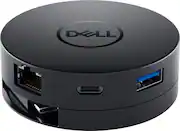
If you’re working from home on your dining room table like I am, this adapter might come in handy. It was perfect for my needs, I plug in all my peripherals and monitor into this hub so I don’t have to plug everything into my laptop. If I need to take my laptop somewhere, I just unplug the USB-C cable. The design of this 6 in 1 adapter is round, it’s a nice looking form factor – it basically resembles a hockey puck. I like that the USB-C cable rewinds back into the adapter and tucks away neatly by simply twisting the bottom half. The adapter includes the following ports: 1. Ethernet 2. HDMI 3. DP (display port) 4. USB-C 5. USB-A 6. VGA After using this for a few days, here are my thoughts on the Dell 6 in 1 adapter. First off, it’s 2021, do we really still need a VGA adapter? That space could’ve been utilized for something else, an extra USB to charge your phone perhaps. With this adapter, it gives my laptop an ethernet port which it doesn’t have. The adapter does everything it promises; I can connect several devices to it and unplug 1 cable to disconnect it all. Here’s where the design doesn’t work so well, with a few devices plugged in, it looks like an octopus with a wire extending in every direction! Comparing this to another USB hub I happen to own, the cables line up better with a straight design. Not a deal breaker, just something to consider. One other feature I wished it had is “power delivery” via USB-C. This feature would charge your laptop if you plug in a USB-C power supply into this adapter and then plug it into your laptop. This adapter won’t do that. Overall, Dell has made a nice little USB-C adapter that will fulfill the needs for many. Easy to stow in your laptop bag, and nice to look at. A bit on the pricy side for what you get though.
Posted by Gizmo
- Rated 5 out of 5 stars
Compact USB-C Dock With a Twist
The Dell 6-in-one USB-C hub is a near perfect mobile docking solution. With the shift to ever slimmer laptops, the number and types of ports available is shrinking, many offering only a couple of USB-C ports. This means connecting a laptop or chromebook to a presentation projector, external monitor, or even a tv requires an external adapter. While wireless is becoming ubiquitous, gigabit wired is still necessary sometimes. The Dell hub has a hidden USB-C cable to connect to the computer and supports up to 10Gb transfers. The cable tucks away for storage with a twist of the bottom. The clever design protects the cable when you throw it in your bag with the other accessories. At first I thought it was gimmicky, but I've lost a couple of hdmi adapters after the cable was yanked loose and have come to appreciate it. You can see the cable in the two pictures, along with a quarter for size reference. There are three types of video output connectors - dp, hdmi, and vga, although only one can be used at a time. There are two usb ports: one USB-C and one USB-A, which can be used simultaneously if your computer supports the usb current requirements. Finally, there is a gig Ethernet port, for which I'm truly grateful as spotty wifi has made presentations difficult. The video output has been excellent with both a UHD (4K) video monitor and a 1080p presentation projector. The support of video up to 4K was important going forward as that seems to be the new standard for desktop monitors and is starting to show up in projectors as well. One very cool thing, the hub was recognized and usable by both my Win10 and Chromebook laptops. Since the Dell hub was designed as a portable expander, it doesn't support a charging port (charger plugs into the hub and charges the connected laptop). It would have been a nice to have, but not really necessary for a portable hub. I don't really miss it, but it's one of those things to consider. Overall, I'm very pleased with the Dell Dock, it's been a high quality and sturdy addition to my laptop bag with very high grade support of 4k video. Working with a Chromebook as well as Windows has been a real plus and I'd highly recommend it to anyone looking for a portable dock.
Posted by rtbestbuy
- Rated 4 out of 5 stars
Not for older laptops
Because I have an older laptop, I, unfortunately, can’t use the USB-C connector as I don’t have a USB-C port. I did, however, use a USB-C to USB-A adapter and was able to connect my external hard drive to a monitor. This enabled me to connect my laptop to it and look at pictures from the external drive or my laptop onto a monitor. The Dell USB-C Adapter did work well with my laptop, but because it was using a USB-A port, I wasn’t able to connect anything else except the monitor and the external hard drive. The Dell USB-C Mobile Adapter is very well made and solid, though it only weighs about 4 ounces. It’s about 2 5/8” in diameter and 1” thick making it portable enough to even put in your pocket. The USB-C cord is about 6” long and winds up inside the Dell Mobile Adapter just by gently twisting the bottom. The USB-C cable extends the same way. The Dell USB-C Mobile Adapter comes with 6 connectors: 4K, FHD, HDMI/4K for monitors, Ethernet port for hard wiring, USB-C and USB-A ports for keyboard, mouse, and USB flash drives. Each of the USB ports are 10gbps. The monitor ports can only support one display at a time. The connectors on the Dell USB-C Mobile Adapter are well spaced allowing plenty of room to access each one. Transfer speeds are slower than direct connection to my laptop. With the Dell USB-C Mobile Adapter I can transfer files from my external drive or USB Flash Drive to my laptop using the Ethernet port without having to switch accessories back and forth. I recommend the Dell 6in1 USB-C Mobile Adapter, but only if you have a laptop/PC that has the USB-C port to access the full capabilities of the Adapter. If you only have USB-A ports you are limited to Ethernet, USB-A, and External ports. If the Dell USB-C Mobile Adapter was Bluetooth enabled, then it would most likely work well on older laptops.
Posted by dstracker
- Rated 5 out of 5 stars
Nifty little accessory
Having an adapter/hub like this is always a nice accessory to have. Unlike the typical 1 or 2 extra USB slots other adapters have, this one has significantly more ports making it far more universal. It's pretty small and compact. It's also lightweight since it's made of plastic. I put this in my work bag and it fits perfectly in smaller pockets. There is a ethernet port, USB-C, HDMI, USB 3.0 and VGA port as well. You can hook up a projector/monitor as well as additional peripherals using this one adapter. Only negative I can say about this is the connector cable It's about 5-6 inches long and I wish it could've been a bit longer (maybe a foot or so). Aside from this, this is a great little adapter to carry with you or to keep at your work desk or something.
Posted by LouRevue