Rating 4.6 out of 5 stars with 535 reviews
4.6- Overall Performance (163)
- Ease of Use (141)
- Stabilization (97)
- Battery Life (20)
- Features (10)
- Controls (6)
- Weight (4)
Customer Images
The vast majority of our reviews come from verified purchases. Reviews from customers may include My Best Buy members, employees, and Tech Insider Network members (as tagged). Select reviewers may receive discounted products, promotional considerations or entries into drawings for honest, helpful reviews.
- Rated 5 out of 5 stars
Turns home movies into home films
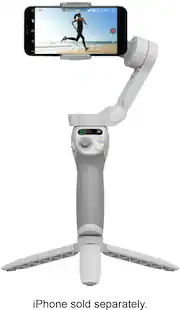
the DJI Osmo Mobile SE Smartphone 3-Axis Gimbal Stabilizer is a fantastic tool for smartphone videographers and content creators. It offers outstanding stabilization, ease of use, and compatibility with a wide range of smartphones, all at an affordable price point. Whether you're an aspiring filmmaker or a casual content creator looking to improve your videos, this gimbal is a smart investment that will undoubtedly elevate the quality of your mobile videography.
Posted by mang0slice
- Rated 5 out of 5 stars
Game-Changer for Mobile Content Creation
DJI nailed it with the Osmo Mobile SE. It’s incredibly easy to set up and use, even for someone new to gimbals. The in-app tutorials are clear and helped me get up and running fast. Thanks to the 3-axis stabilization, my videos are smooth and professional-looking, and my photos are sharper than ever. This device has seriously leveled up my content — highly recommend it for anyone looking to boost their mobile filmmaking or photography game.
Posted by JoeA
- Rated 5 out of 5 stars
DJI Osmo Mobile 3 – Excellent Smartphone Gimbal
I’m very happy with my DJI Osmo Mobile 3. I mainly use it for travel, trips, and recording videos with my smartphone, and it has been a great addition to my setup. The 3-axis stabilization works very well, making my videos look much smoother and more professional, especially when walking or moving around while recording. I really like the compact and lightweight design because it’s easy to take with me when traveling. It doesn’t take up much space and is quick to set up whenever I want to capture a special moment. The controls are easy to use, and the gimbal makes it much easier to get smooth shots without needing complicated camera equipment. It has also helped me get more creative with different angles and movements. The build quality is excellent, and after using it for travel and everyday recording, I’ve been very impressed with its reliability and performance. Overall, this has been an excellent purchase. It’s portable, easy to use, and makes a noticeable difference in the quality of smartphone videos.
Posted by Good
- Rated 5 out of 5 stars
Nice Dji gimbal
I’m a big fan of Dji products, I have 2 drones already and I decided to get one of these and I love it, a lot of features, easy to use from the box but if you want to get the max from this gimbal you need to watch some videos of the features to make better quality videos.
Posted by JohnathanC
- Rated 5 out of 5 stars
Nice unit.
The gimbal works well with my iPhone 11. It is very simple to use and very well-built and pairs easily with the phone. The magnet to hold the phone to the gimbal is crazy-effective. A small instruction manual would be helpful. Buying through Best Buy was super easy.
Posted by BryanP