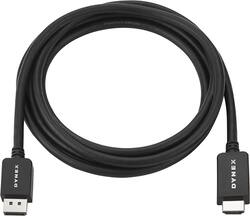
Dynex™ - 6' DisplayPort-to-HDMI Cable - Black
- Key Specs
- Cable Length: 6 feet
- Connector Type (End 1): HDMI Type A
- Gender (End 1): Male
- Connector Type (End 2): DisplayPort
- Gender (End 2): Male
- General
- Brand: Dynex™
- Model Number: DX-PD06502
- Product Name: 6' DisplayPort-to-HDMI Cable
- Color: Black
- Quantity: 1
- Compatibility: Universal
- Connectivity
- Cable Type: HDMI
- Cable Length: 6 feet
- Product Type: Cable
- Connector Type (End 1): HDMI Type A
- Gender (End 1): Male
- Connector Type (End 2): DisplayPort
- Gender (End 2): Male
- Warranty
- Warranty - Parts: 90 days
- Warranty - Labor: 90 days
- Other
- UPC: 600603179808
Easily connect your computer's DisplayPort interface to an HDMI type-A input with this 6' Dynex™ DX-PD06502 cable, which supports up to 1920 x 1200 resolution to create a sharp, vibrant picture.
- Connects your computer's DisplayPort to an HDMI type-A input: So you can enjoy visuals on an external display.
- 360° enclosed metal shell: Combined with PVC overmolding with a matte surface provides durable housing.
- Supports up to 1920 x 1200 resolution: To ensure optimal picture quality.
- HDCP, CEC and HPD support: Accommodates your needs.
Whats Included
- Dynex™ 6' DisplayPort-to-HDMI Cable
Product Manuals
Q: Will this suffice for going from HDMI port on laptop to DisplayPort on monitor?
A: I don't think this will work. I've got a laptop with a USB-C, and a USB-C to HDMI adapter. I can connect from the USB-C >> HDMI adapter >> to an HDMI port in my TV (using a normal HDMI cable). But when I use this cord to go from my USB-C >> HDMI adapter >> DisplayPort monitor (using this cable), the monitor cannot be detected. The description on this product says "Easily connect your computer's DisplayPort interface to an HDMI type-A input." Notice it says *YOUR COMPUTER's DisplayPort." So I think this is DisplayPort output to HDMI input only. I.e. it does NOT support HDMI output to DisplayPort input. Which is too bad. (Note: it's possible that this would work with a direct HDMI output in your computer, and that my problem is the USB-C adapter. But if that were the case, I'd expect the HDMI >> HDMI to fail as well.)
Q: Can I use this to hook my laptop to my standard television monitor
A: If your laptop has a DisplayPort output and your TV has a HDMI input it will work. If the computer has a HDMI output and the monitor has a DisplayPort input it WILL NOT work. I bought mine for this situation and now have to return it.
A: No, this cable won't work for you. This cable is for computer (DisplayPort) to monitor (HDMI).
Q: Will it work if I connect it from my PC's display port to my monitors HDMI?
A: Yes. I hooked it from my DisplayPort of my PC to the HDMI port of my monitor. Worked like a charm.
Q: Would this work to connect a Samsung sound bar to my computer for audio?
A: Yes it will connect to your computer but the computer must have a DisplayPort (looks like a fat USB with a notch on one side). The cable will not work backwards...like from computer HDMI to a DisplayPort monitor port.
A: No, you would need to go from DVI to DVI to support 144hz
Q: Does this cord fit Android phone
A: No, this cable doesn't fit Android phones.
Q: Will this go from laptop display port to a mini projector HDMI?
A: it's a standard full size HDMI, will need adapter if projector has a mini HDMI port, if just standard HDMI you're good to go
People also viewed









Today's top picks
 $299.99The price was $499.99
 $529.99The price was $749.99
 $1,099.99The price was $1,599.99
 $369.99The price was $529.99
 $1,099.99The price was $1,299.99
 $1,199.99The price was $1,299.99
 $999.99The price was $1,599.99
 $649.99The price was $849.99
 $549.99The price was $849.99